Canvas
What is Canvas Creation System
TL;DR
Learn how KrafLayer's Canvas Creation System connects prompts, references, models, edits, style presets, and image-to-video workflows.
Quick answer
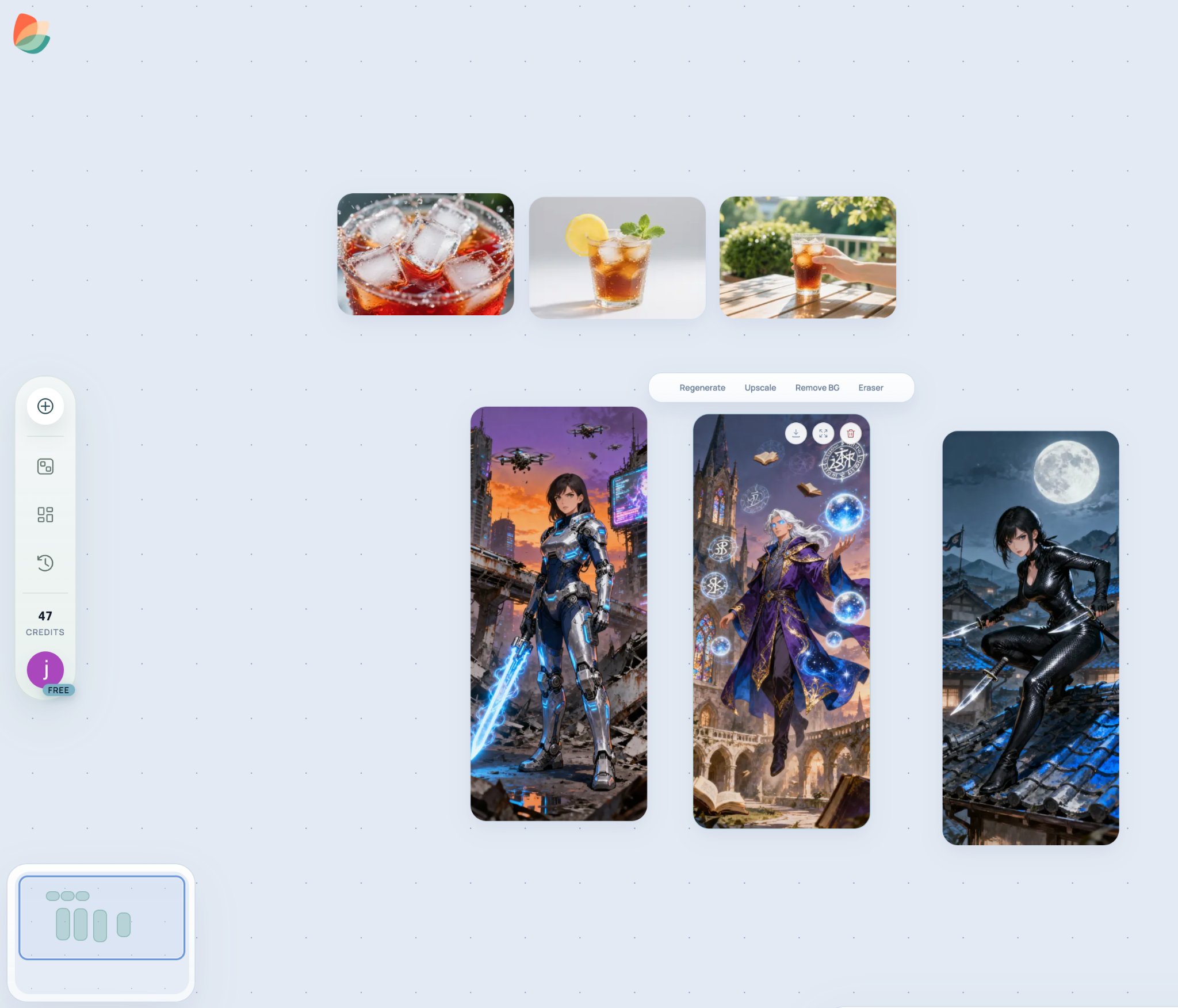
Canvas Creation System is KrafLayer's visual workspace for planning, generating, editing, comparing, and continuing AI image and video ideas in one place. Instead of treating every generation as a one-shot result, Canvas keeps prompts, references, outputs, edits, and variations together so a project can develop over time.
Use this page as the product overview. If you are new to KrafLayer, Canvas is the place where the main creation workflow comes together: prompt writing, style presets, image generation, image editing tools, image-to-video, model selection, and cost awareness.
What Canvas organizes
- Prompts and enhanced prompts that define what you want to create.
- Reference images that preserve product identity, character identity, layout, or visual direction.
- Generated images and video clips that can be compared side by side.
- Editing steps such as background removal, erase, upscale, mask edit, reference edit, and scene compose.
- Model choices for image generation, image editing, and video generation.
- Iterations, so you can return to a visual direction without losing context.
Why it is useful
Most AI generation tools behave like a linear chat or form: write a prompt, get an output, then start again. Canvas is different because it keeps the visual context visible. That matters when you are building a product image set, testing several model families, turning one image into video, or comparing styles before choosing a final direction.
Canvas helps users answer practical questions faster:
- Which output is closest to the intended product, scene, or character?
- Which prompt, style preset, or reference image produced the best result?
- Should the next step be an edit, a new generation, or a video animation?
- Which model is worth using for the final version?
How a typical Canvas workflow works
1. Start with a short idea, product description, or reference image.
2. Use prompt writing basics or prompt enhancement to make the request clearer.
3. Choose a style preset if you want a specific visual lane, such as Product, Cinematic, Anime, Lacquer, or Watercolor.
4. Generate an image with an image model or edit an existing image with an editing tool.
5. Compare results on the canvas and keep the strongest direction.
6. Use image-to-video when a still image should become motion.
7. Check plans and model costs when you need to choose a credit budget or compare model usage.
Where to go next
- Learn the main visual roles in [Types of ecommerce images](/docs/ecommerce-image-types).
- Understand why product visuals need a different workflow in [Ecommerce images vs regular AI images](/docs/ecommerce-images-vs-regular-ai-images).
- Learn the prompt structure in [Prompt writing basics](/docs/prompt-writing-basics).
- Choose a visual direction in [14 style presets](/docs/style-presets-and-when-to-use-them).
- Compare image models in [Image generation models](/docs/image-generation).
- Compare editing tools in [Image editing tools](/docs/editing-tools).
- Animate a still image with [Image to video with AI](/docs/ai-image-to-video-guide).
- Check credit usage in [Costs by model and task](/docs/generation-cost).
Final thought
Canvas Creation System is the connective layer of KrafLayer. The individual docs explain prompts, styles, models, costs, and tools; Canvas explains how those pieces work together as one visual production workspace.
Related KrafLayer tools
- AI product image tools — Browse the full tool list for ecommerce image editing and product visual workflows.
- Listing main and detail images — Generate ecommerce listing main images and detail-page product visuals from product references.
- On-model product photos — Create product-on-model and lifestyle visuals when human context helps the product sell.
- Reference-style product images — Generate ecommerce product images from competitor, brand, or campaign reference styles while preserving your own product identity.
- AI scene compose — Place products into controlled commercial scenes without losing product clarity.
- AI reference image editor — Use extra references to guide product identity, material, style, or composition changes.
- AI mask edit — Edit selected regions while keeping the rest of the product image stable.