Image generation
AI Model Product Photography for Apparel, Accessories, and Lifestyle Shots
TL;DR
Create AI model product photos for apparel, accessories, and lifestyle shots while checking product truth before publishing.
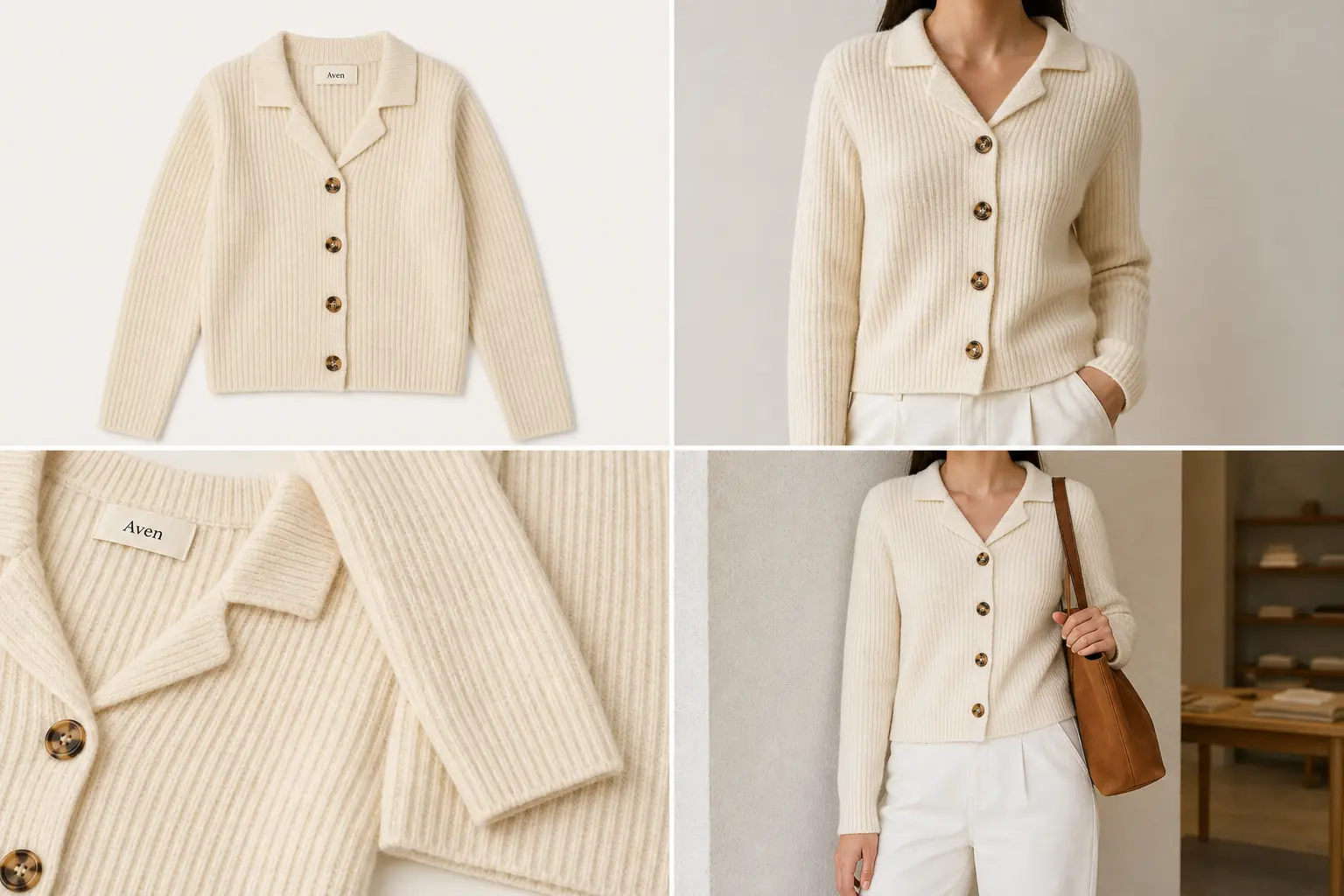
AI model product photography is useful when the model image adds scale, styling, or lifestyle context without changing the product. The safe rule is simple: generate the model view, then compare it against the real SKU for color, shape, fabric, seams, buttons, hardware, label position, and plausible scale before you publish it.
In KrafLayer, start with a clean product reference in the [AI product photography](/ai-product-photography) workflow, create the model-context image with the [AI product image generator](/ai-product-image-generator), and finish only product-safe cleanup in the [product photo editor](/product-photo-editor). That keeps the output useful for [ecommerce product photography](/ecommerce-product-photography) without treating an AI model shot as an unchecked fit guarantee.
The Practical Rule
Use AI model product photos when the image helps a buyer understand how the product looks in use. Do not use them as proof of exact garment fit, body measurement accuracy, marketplace approval, or product claims that the reference image cannot support.
A publishable AI model product photography workflow has three parts:
- A clean product reference that shows the real SKU.
- A model-context image that preserves visible product facts.
- A review step that rejects quiet changes to fit, scale, material, hardware, seams, labels, and color.
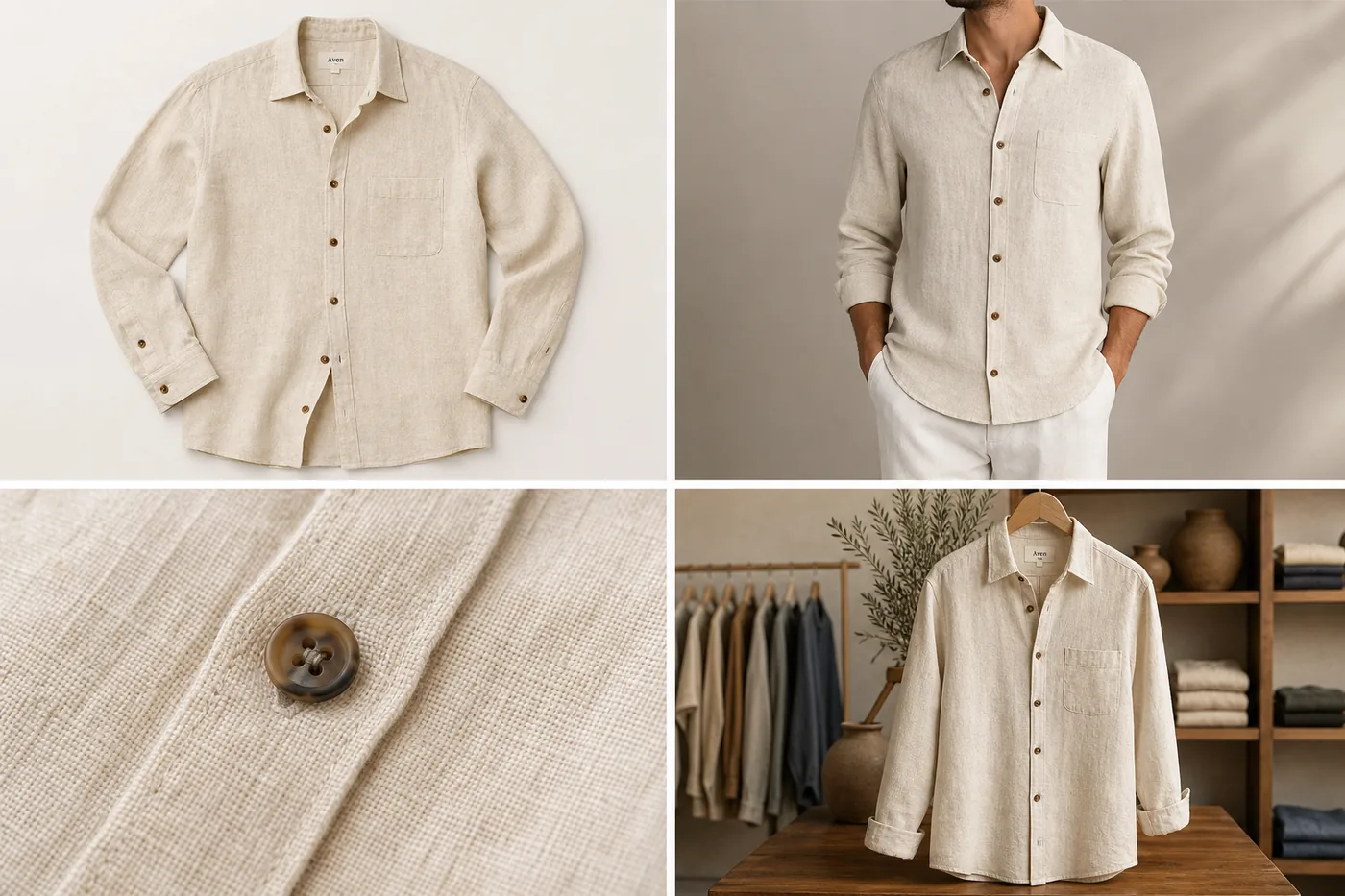
The image above uses one fictional Aven cream ribbed cardigan across a flat-lay reference, a cropped model torso, a knit-and-button detail, and a simple lifestyle store scene. The model view gives styling context, while the detail crop keeps the rib texture, tortoise buttons, collar shape, hem, sleeve length, and woven label inspectable.
When AI Model Product Photos Work Best
AI model product photography works best when the product has visible facts that can be checked in the output. It is strongest for merchandising context, not for replacing fit testing.
Good candidates include:
- cardigans, shirts, jackets, scarves, hats, and other visible apparel
- handbags, sling bags, backpacks, belts, and small accessories
- jewelry or watches where the model crop helps show scale
- lifestyle shots where the buyer needs use context
- collection-page or ad crops that still need product truth
For AI model product photography for apparel, choose model poses that show the garment clearly. For apparel product photography with AI, the model crop should make the product easier to understand, not harder to inspect. A dramatic pose that hides the collar, sleeve, hem, button line, pocket, strap, clasp, or product edge usually creates more review risk than value.
What To Protect Before You Generate
Before creating an AI model product photo, write a short product-truth list. This list tells the model what must stay fixed and gives your team a review checklist afterward.
For apparel, protect:
- true color and fabric texture
- collar, neckline, sleeve, cuff, hem, pocket, button, zipper, seam, and panel placement
- garment length, width family, drape, and shape
- label area, print placement, embroidery, and visible construction details
For accessories, protect:
- silhouette, strap width, strap anchor, handle shape, zipper path, clasp, buckle, rings, and stitching
- metal finish, leather grain, canvas weave, edge paint, and product scale
- logo or label area, if your real product has one
For jewelry and watches, protect:
- stone count, setting, clasp, chain length, hoop diameter, dial layout, bezel shape, band width, and metal color
- realistic size on the body
The product-truth list matters because AI can make a photo look polished while quietly changing a button count, bag strap, neckline, clasp, or material.
Prompt Template For AI Model Product Photography
Use a direct prompt that describes the image role and the facts that cannot change. The same structure also works for on-model product photography when the product is an accessory, watch, or jewelry item instead of a garment.
Create a realistic ecommerce model product photo from this product reference. Keep the same product color, silhouette, fabric texture, seams, buttons, hardware, label area, scale, and construction details. Show the product naturally on a cropped model for a store page, with clean commercial lighting and a simple outfit or setting. Do not add platform UI, badges, claims, new product features, extra logos, unreadable text, or unrelated accessories.
For AI model product photos, the best prompt is usually restrained. The goal is not a fashion campaign first. The goal is a model image that still looks tied to the real product.
How To Review The Result
Review the output against the original product reference before adding it to a PDP, collection page, ad, or email.
Use this checklist:
- Compare color, material, and visible texture against the reference.
- Check that the product is the same shape and size class.
- Inspect collars, sleeves, hems, seams, pockets, buttons, straps, buckles, clasps, labels, and stitching.
- Look for hidden product facts caused by arms, hair, bags, shadows, props, or crop choices.
- Reject images that invent extra pockets, buttons, straps, labels, stones, panels, or decorative trim.
- Keep fit language cautious unless a human has verified fit data separately.
The model image should help the buyer understand scale and styling. It should not become the product specification.
Use A Detail Image When The Model Crop Hides Too Much
Many model shots are not enough by themselves. A cropped torso can show scale and styling, but it may hide fabric texture, closure quality, hardware, stitching, or label placement.
Pair AI model product photography with a detail image when:
- the fabric or material is a selling point
- buttons, zippers, clasps, straps, or stones affect buyer trust
- the model pose hides the real product edge
- the product has construction details buyers need to inspect
- the lifestyle shot is visually strong but not informational enough
This is why the cardigan example includes both a model crop and a knit-detail panel. The model shot answers "how does it look worn?" The detail shot answers "what am I buying?"
Where KrafLayer Fits
Use KrafLayer for the full product-image set, not just the model shot:
- Generate a model-context image from the product reference.
- Create a detail image that proves the material, closure, or construction.
- Edit distractions only after the product identity is correct.
- Build a consistent image set for the product page, collection card, and campaign crop.
If the cardigan color, rib texture, button count, collar shape, or hem changes, regenerate or correct the image. If the product is accurate but the scene is too busy, use editing to clean the background, crop, or lighting. That order keeps the work product-led.
What Not To Claim
Avoid unsupported promises. AI model product photography can create useful ecommerce visuals, but it should not be described as perfect virtual try-on or guaranteed fit simulation.
Safer wording:
- "shows model-context merchandising"
- "helps buyers judge apparent scale"
- "creates a lifestyle product image"
- "requires SKU review before publishing"
Avoid wording like:
- "guaranteed fit"
- "perfect try-on accuracy"
- "approved for every marketplace"
- "exact body measurement simulation"
- "compliance-safe product image"
That language keeps the page honest and avoids turning an AI-generated photo into a claim the image cannot prove.
FAQ
What is AI model product photography?
AI model product photography uses a product reference to create model-context images for ecommerce. It can show scale, styling, and lifestyle use, but the result still needs review for product truth. Color, material, seams, hardware, labels, and plausible scale should match the real SKU.
Can AI model product photos replace a real photoshoot?
They can replace some merchandising images when the product facts are visible and reviewable. They should not replace fit testing, regulated claims, or exact measurement proof. Use AI model product photos for context, then keep real product data and human review in the workflow.
What products work best for AI model product photography?
Visible apparel, accessories, bags, hats, scarves, jewelry, and watches often work well because scale and styling context are easy to inspect. Complex fit-sensitive garments need stricter review because a polished image can still misrepresent drape, length, closure, or body fit.
Should I generate detail images too?
Yes, when the model crop hides important product facts. A detail image can show fabric, stitching, buttons, zippers, clasps, leather grain, metal finish, or label placement. This makes the product page more trustworthy than using a model image alone.
How does KrafLayer help with AI model product photography?
KrafLayer helps create product-led model-context images from references, then supports related product-image work such as detail images, cleanup, background control, and consistent ecommerce crops. Use it to build a complete image set, not just one attractive model shot.
Conclusion
AI model product photography is strongest when it adds model context while protecting the real product. Start with a clear reference, define what cannot change, generate a focused model view, and review the output before publishing. KrafLayer fits this workflow by combining AI product generation with practical editing, so sellers can create model, detail, and lifestyle assets that stay tied to the SKU.
Keep exploring
Continue the story
More practical guidance on product accuracy, composition, and conversion-ready visuals.
Put it into practice
Take the next step in KrafLayer
Choose a generation or editing workflow that matches what you just learned.