Image generation
Best AI Product Image Generators: 5 Options Compared
TL;DR
Compare five AI product image generators by source fidelity, workflow, batch support, API access, and purchasing model.
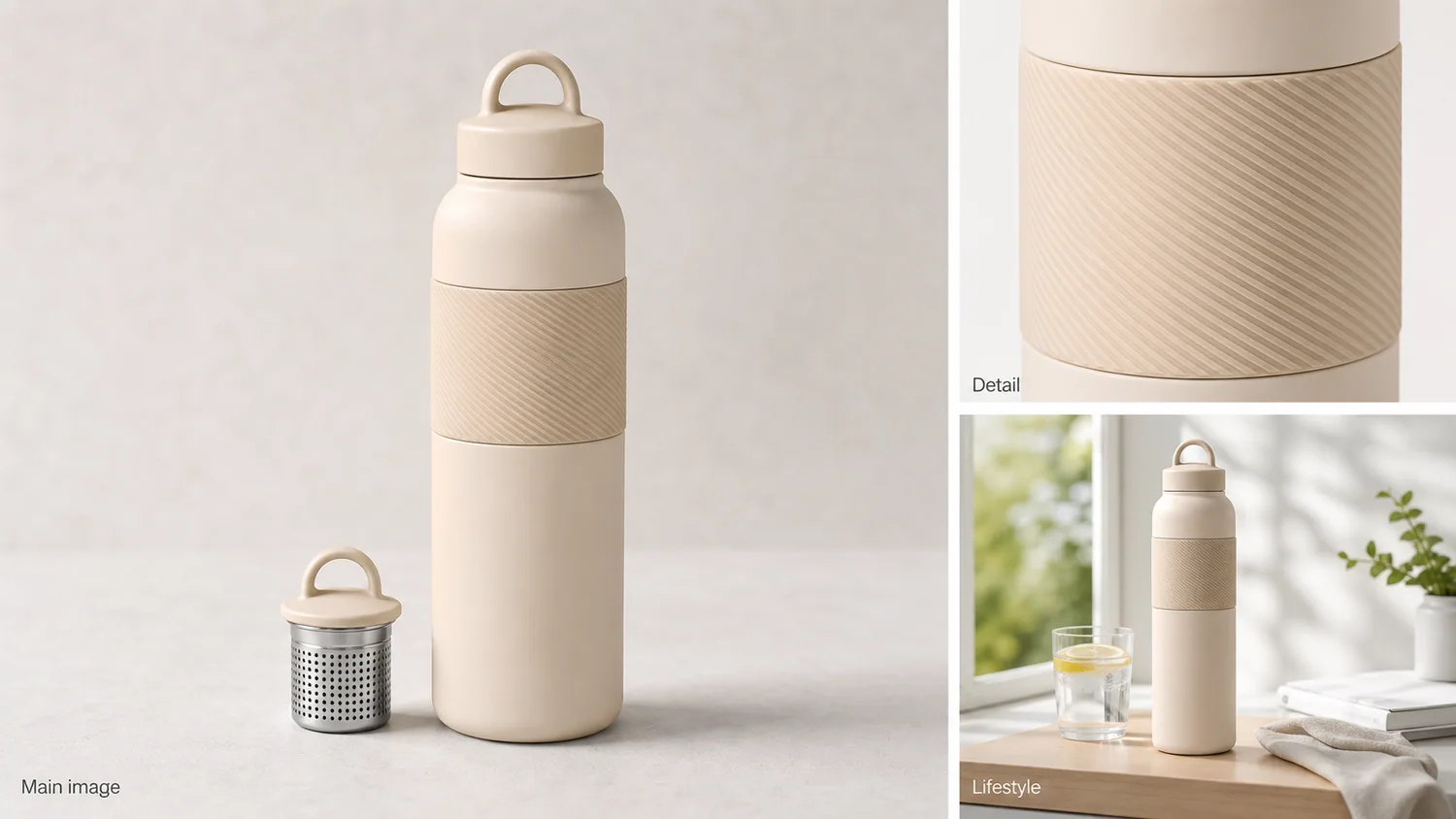
The best AI product image generator is the one that can create a needed ecommerce image role without quietly redesigning the item. A seller generating five lifestyle images needs a different product than a catalog team processing thousands of SKUs through an API. Compare workflow fit, reference control, product fidelity, output limits, and editing depth before comparing headline aesthetics.
We reviewed current public documentation for KrafLayer, Photoroom, Pixelcut, Flair, and Adobe on August 11, 2026. We did not run a controlled paid cross-tool test, so the comparison covers documented capabilities and purchasing fit, not invented image-quality scores.
Quick Summary
KrafLayer is the focused starting point for reference-led ecommerce workflows. Photoroom publishes the clearest catalog and API proposition. Pixelcut emphasizes batches up to 10,000 images. Flair centers custom product models and staging. Adobe Firefly fits teams already using Photoshop and Creative Cloud.
Abstract
Choose a generator by the product asset you need: factual main view, detail, lifestyle, model, ad, or catalog batch. Test hard SKUs before subscribing. Keep the source beside every output, and reject changed labels, geometry, materials, components, or scale.
Key Takeaways
- Generation and editing are different purchasing categories.
- Published batch or API limits matter only after a sample passes fidelity review.
- Photoroom warns that complex shapes, patterns, and text may change during Product Staging.
- Pixelcut publishes batch editing for up to 10,000 images.
- A plain factual image should remain in every product gallery.
Table of Contents
1. [Methodology](#comparison-methodology-and-limits) 2. [What to test](#the-five-tests-that-matter) 3. [Five generators compared](#five-ai-product-image-generators-compared) 4. [Visual evidence](#what-the-demonstration-image-reveals) 5. [Workflow selection](#which-generator-fits-each-workflow) 6. [Buying test](#a-small-test-before-you-subscribe) 7. [Reshoot boundary](#when-no-generator-is-the-right-answer) 8. [Frequently asked questions](#frequently-asked-questions)
Comparison Methodology and Limits
The comparison uses vendor-owned product pages, pricing pages, help centers, and API documentation checked on August 11, 2026. Google Merchant Center guidance supplies the external publishing baseline: correct variant, accurate material and color, no promotional overlays in the main image, and 75%–90% product fill ([Google Merchant Center](https://support.google.com/merchants/answer/6324350?hl=en), 2026).
No authorized paid accounts or competitor API credentials were available for a same-source test. Accordingly, we do not rank output quality. Each vendor row distinguishes a documented capability from a limitation that a buyer should verify with their own hardest products.
The Five Tests That Matter
Photoroom's own Product Staging help page says outputs may differ from the source, especially for complex patterns, shapes, and text. Product fidelity must therefore be a test category, not an assumed feature ([Photoroom Help](https://help.photoroom.com/en/articles/11155705-show-a-product-in-a-realistic-scene-with-product-staging), 2026).
| Test | What to measure | Failure signal |
|---|---|---|
| Identity | Shape, label, color, material, components | Output becomes another SKU |
| Role control | Main, detail, model, lifestyle, ad | One generic scene regardless of brief |
| Repeatability | Same crop, light, scale, and palette | Catalog looks unrelated across outputs |
| Throughput | Batch size, API, review queue, retry behavior | Volume grows faster than QA capacity |
| Export | Resolution, format, background, aspect ratio | Attractive image cannot meet channel needs |
Use transparent, reflective, text-heavy, patterned, and fine-detail products in the test. Easy opaque boxes hide the differences that matter later.
Five AI Product Image Generators Compared
The public products address different operating models. Pixelcut advertises batches up to 10,000 images; Photoroom publishes Product Staging, Virtual Model, batch exports, and APIs; Flair sells custom product models; Adobe supports generated backgrounds and reference-guided work inside its design ecosystem.
| Product | Best fit | Documented strength | Verify before buying |
|---|---|---|---|
| KrafLayer | Sellers building main, detail, model, or style-led ecommerce sets | Separate product-image workflows plus focused editing routes; free credits and low paid entry | Catalog-scale batch and external API requirements |
| Photoroom | Teams needing catalog automation and API access | Product Staging, Virtual Model, Ghost Mannequin, batch export, editing API at $0.10 per Plus call | Credit consumption and fidelity on complex SKU classes |
| Pixelcut | Very large browser batches and fast listing production | Product Showcase and batch editing up to 10,000 images | Consistency review process and plan-specific AI limits |
| Flair | Brand staging built around custom product models | Free plan lists one custom model and five images; Scale adds API early access | Custom-model training quality, image quota, and 4x instant-generation cost |
| Adobe Firefly | Creative teams already using Photoshop and Adobe workflows | Generated backgrounds, reference images, Generative Fill, and handoff to Adobe apps | Ecommerce batch flow, model choice, and product-pixel preservation |
Sources: [Photoroom plans](https://help.photoroom.com/en/articles/6976012-what-are-photoroom-s-plans), [Photoroom API](https://www.photoroom.com/api/pricing), [Pixelcut](https://www.pixelcut.ai/about-us), [Flair pricing](https://flair.ai/pricing), and [Adobe Firefly](https://www.adobe.com/products/firefly/features/background-generator.html).
Start with one product and one image role
Open the [KrafLayer AI Product Image Generator](/ai-product-image-generator), upload the clearest product references, and generate a single factual role before expanding into a full image set.
What the Demonstration Image Reveals
Google recommends showing a clear main product plus additional views that explain distinguishing details. The demonstration below separates a main image, a detail crop, and a lifestyle view, which is more useful than judging one isolated beauty image ([Google Merchant Center](https://support.google.com/merchants/answer/6324350?hl=en), 2026).
*KrafLayer demonstration composite. Compare the cap loop, steel infuser, body proportion, textured grip, color, and contact before judging the scene.*
The detail panel should prove a real texture. The lifestyle panel should preserve product size and all visible components. A generator that makes a convincing room but loses the infuser or changes the grip has not completed the ecommerce job.
Which Generator Fits Each Workflow?
Photoroom positions Ultra for high-volume catalogs, while Pixelcut publishes a 10,000-image batch ceiling. Those scale claims matter for production, but only after the team's representative sample survives review ([Photoroom pricing](https://www.photoroom.com/pricing); [Pixelcut](https://www.pixelcut.ai/about-us), 2026).
| Workflow | Shortlist | Why |
|---|---|---|
| A few reference-led ecommerce sets | KrafLayer, Flair | Product-centered generation and accessible entry plans |
| API-driven catalog production | Photoroom, Flair Scale | Published API positioning and automation paths |
| Very large browser batch | Pixelcut | Public claim of up to 10,000 batch images |
| Virtual model and ghost mannequin | Photoroom, KrafLayer | Dedicated fashion or on-model routes |
| Creative campaign compositing | Adobe Firefly, KrafLayer | Reference-guided scene work plus editing paths |
Do not buy a broad creative suite solely for background removal, and do not buy a simple one-click tool when the real requirement is API retry logic and catalog review.
A Small Test Before You Subscribe
Google will require at least 500 × 500 pixels for product images from January 31, 2027 and recommends around 1500 × 1500 or larger. Include resolution and export behavior in the test rather than relying on editor previews ([Google Merchant Center](https://support.google.com/merchants/answer/6324350?hl=en), 2026).
Choose five SKUs: one easy opaque item, one reflective item, one transparent item, one patterned item, and one package with small text. Generate the same two roles for each. Record hard failures, time spent reviewing, usable exports, credits consumed, and whether a failed result can be corrected locally.
A generator with a lower sticker price can be expensive if most outputs require manual repair. Conversely, a large batch limit has little value when the review queue cannot keep pace.
When No Generator Is the Right Answer
Reshoot when the source lacks the product fact the output must show: hidden geometry, unreadable regulated copy, an unknown material, an important rear view, or reliable variant color. Use manual compositing when the exact product pixels must remain unchanged.
Generation can arrange evidence. It cannot authenticate evidence that never existed.
Verdict
There is no universal winner. KrafLayer is the direct reference-led ecommerce starting point; Photoroom has the clearest automation story; Pixelcut publishes the largest batch claim; Flair centers custom product models; Adobe fits an established creative stack. Run the five-SKU test before choosing.
Frequently Asked Questions
What is the best AI product image generator for a small store?
Start with KrafLayer, Photoroom, Pixelcut, or Flair's accessible plans and test the hardest SKU, not the easiest. The right choice depends on whether you need reference-led sets, virtual models, large batches, or general design tools.
Is an AI product generator different from a photo editor?
Yes. A generator creates a new composition or scene, while an editor changes a narrower part of an existing image. Editing usually exposes fewer product pixels to change. Use generation when a new image role is genuinely needed.
Which product generator has an API?
Photoroom publishes a production image-editing API and $0.10 Plus calls. Flair lists product-photography API early access on its Scale plan and unlimited API calls for Enterprise. Verify endpoint behavior, storage, retries, and current pricing before integration.
Can AI generators create marketplace main images?
They can prepare a clean product view, but the merchant remains responsible for accuracy and channel policy. Google requires the correct product and variant, forbids promotional overlays, and recommends white or transparent backgrounds with 75%–90% fill.
How do I compare output quality honestly?
Use the same source set and image roles, then score identity failures before aesthetics. Include transparent, reflective, patterned, text-heavy, and fine-detail products. Disclose the sample, settings, plan, date, and review method if publishing a ranking.
References
1. [Google Merchant Center: Image link requirements](https://support.google.com/merchants/answer/6324350?hl=en), accessed August 11, 2026. 2. [Photoroom: Plans](https://help.photoroom.com/en/articles/6976012-what-are-photoroom-s-plans), accessed August 11, 2026. 3. [Photoroom API pricing](https://www.photoroom.com/api/pricing), accessed August 11, 2026. 4. [Pixelcut: Product and batch capabilities](https://www.pixelcut.ai/about-us), accessed August 11, 2026. 5. [Flair: Pricing](https://flair.ai/pricing), accessed August 11, 2026. 6. [Adobe Firefly: Background generator](https://www.adobe.com/products/firefly/features/background-generator.html), accessed August 11, 2026.
Keep exploring
Continue the story
More practical guidance on product accuracy, composition, and conversion-ready visuals.

Put it into practice
Take the next step in KrafLayer
Choose a generation or editing workflow that matches what you just learned.