Image generation
AI Clothing Model Images: 7 Fit Checks That Matter
TL;DR
Preserve garment fit in AI model images by reviewing construction, anchor points, tension, drape, length, scale, and source identity.
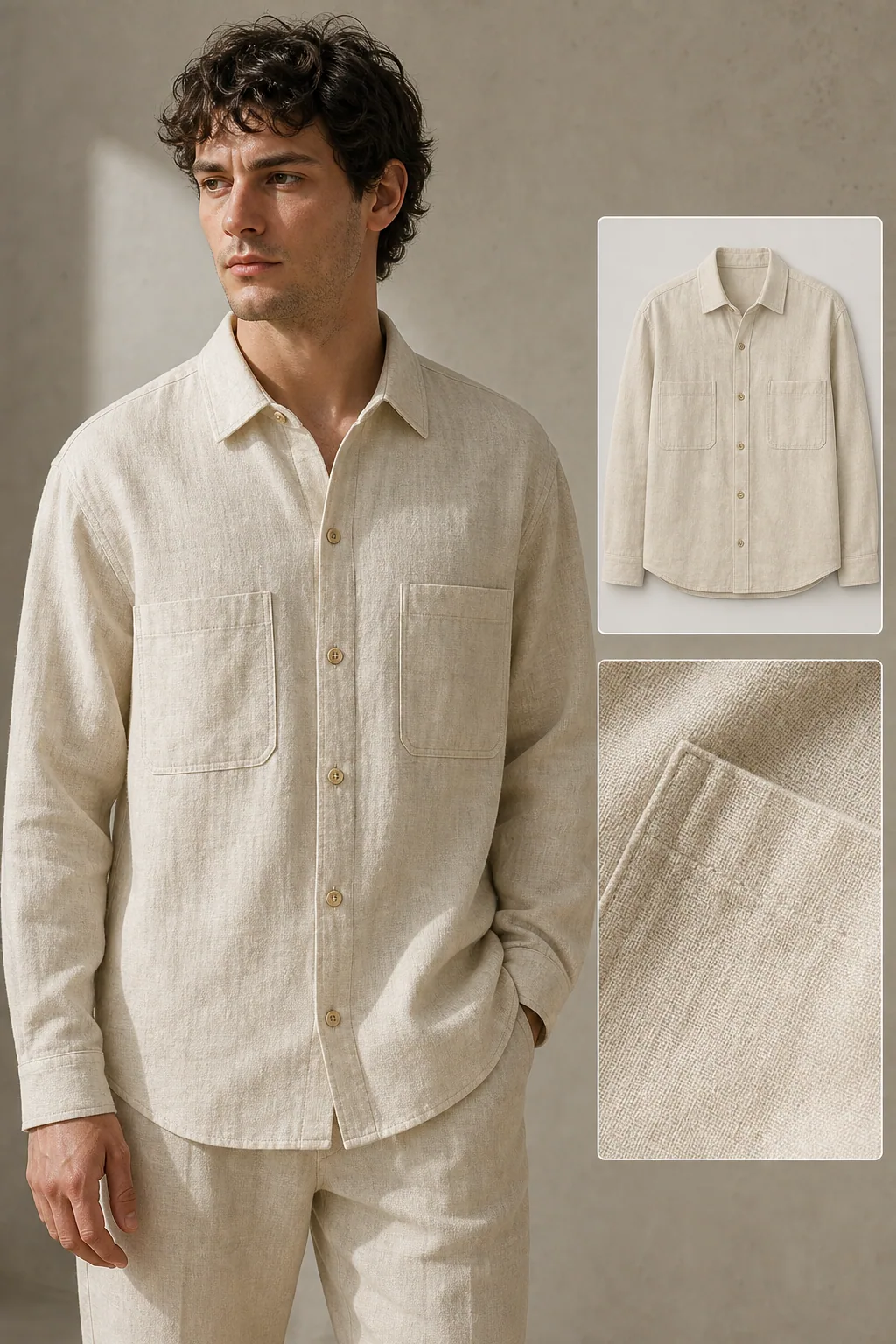
An AI model image can preserve a shirt's print while still changing its fit. Sleeve length, shoulder position, body ease, hem curve, pocket placement, seam path, and fabric drape all affect what a buyer thinks they will receive. Lock those construction facts before choosing the model, pose, or background.
The workflow uses Google apparel-image guidance and recent virtual try-on research checked on August 11, 2026. The linen-shirt image is a KrafLayer demonstration, not a sizing guarantee, fit test, or customer result.
Quick Summary
Google recommends showing apparel worn by people and keeping the product as the focus. Recent fit-aware virtual try-on research notes that many systems prioritize 2D texture preservation over physical fit. Use front, back, side, measurement, and fabric references, then review construction before portrait realism.
Abstract
Preserving clothing fit requires more than copying color and print. Build a garment identity sheet, choose a neutral pose, generate one view at a time, and compare seam landmarks with the source. Never use an AI model image as the only source of sizing evidence.
Key Takeaways
- Texture preservation does not prove physical fit.
- Shoulder, sleeve, waist, hem, and pocket landmarks need separate checks.
- Flat-lay, mannequin, and model images should complement one another.
- A new body or pose can change drape without changing garment construction.
- Published measurements remain the factual sizing reference.
Table of Contents
1. [Evidence and limits](#why-fit-preservation-is-difficult) 2. [Reference set](#the-garment-reference-set) 3. [Fit map](#a-seven-zone-fit-map) 4. [Generation workflow](#a-controlled-model-image-workflow) 5. [Review table](#construction-and-drape-review) 6. [Claims boundary](#what-an-ai-model-image-cannot-prove) 7. [Frequently asked questions](#frequently-asked-questions)
Why fit preservation is difficult
Google recommends showing apparel worn by people and avoiding full-body crops that remove the model's head or feet. Yet FitVTON, a 2026 research paper, observes that many virtual try-on methods treat the task as 2D inpainting and prioritize texture over physical plausibility ([Google Merchant Center](https://support.google.com/merchants/answer/6324350?hl=en); [FitVTON](https://arxiv.org/abs/2606.12012), 2026).
That gap matters commercially. A print can look perfect while the shoulder broadens, sleeve shortens, or waist becomes tailored. We did not measure fit accuracy across models; the workflow below is a human review system for visible construction.
*KrafLayer demonstration composite. Compare collar spread, shoulder seam, sleeve end, twin pockets, button count, hem, body ease, and fabric texture.*
The garment reference set
Google requires the correct color, pattern, and material for each variant. Clothing also needs construction coverage that a single front flat-lay cannot provide ([Google Merchant Center](https://support.google.com/merchants/answer/6324350?hl=en), 2026).
| Reference | Locks | Missing without it |
|---|---|---|
| Front flat-lay or mannequin | Placket, pockets, collar, front hem | Back and depth |
| Back view | Yoke, vents, rear seams, back length | Front details |
| Side view | Body depth, sleeve shape, side seam | Symmetry |
| Measurement sheet | Chest, shoulder, sleeve, body length | Visual material behavior |
| Fabric macro | Weave, knit, sheen, thickness | Whole-garment proportion |
| Label and trim detail | Button, zipper, logo, care mark | Fit silhouette |
Use the exact size and variant photographed. Do not combine a medium front with a large side view and call the result a factual fit reference.
A Seven-Zone Fit Map
Visual-correspondence research for virtual try-on focuses on garment detail preservation and 3D-aware matching, which reinforces the need to compare stable garment landmarks rather than only the overall portrait ([Visual Correspondence VTON](https://arxiv.org/abs/2505.16977), 2025).
| Zone | Compare | Reject when |
|---|---|---|
| Collar | Shape, stand, opening | Collar becomes another style |
| Shoulder | Seam position and slope | Seam shifts far inside or outside shoulder |
| Sleeve | Length, cuff, volume | Long sleeve becomes cropped or tapered |
| Chest | Ease, darts, pocket position | Relaxed body becomes fitted |
| Waist | Side seam and suppression | Straight cut gains false shaping |
| Hem | Length, curve, vents | Hem changes construction |
| Fabric | Weave, weight, drape, transparency | Linen becomes satin or heavy canvas |
Build the on-model view from the product, not from the pose
Use [AI Product Photography](/ai-product-photography) with the garment references first. Choose a neutral standing pose until all seven fit zones remain stable.
A Controlled Model Image Workflow
Google says the apparel product should remain the focus. Begin with a front standing pose, arms slightly separated from the torso, no jacket, bag, or hair covering construction. Complex poses come later, after the garment survives the basic view ([Google Merchant Center](https://support.google.com/merchants/answer/6324350?hl=en), 2026).
Record the photographed size and factual measurements first. Upload front, back, side, and detail sources, then write a construction lock using the seven zones. Generate one neutral front view. Compare seam landmarks and component count at full resolution before adding side or motion views, and keep product-only plus measurement images in the gallery.
Avoid asking for a more flattering fit. That instruction authorizes a redesign. Describe the real cut: relaxed, straight, fitted, cropped, dropped shoulder, or oversized, backed by the photographed SKU.
Construction and Drape Review
Fit and drape are related but not identical. The garment's construction should remain fixed, while gravity, pose, and body shape create limited, plausible drape variation. A fold can move. A seam cannot migrate freely.
Review the source and output side by side. Count buttons and pockets. Trace shoulder, armhole, side seam, cuff, and hem. Check whether fabric thickness and transparency match. Then review skin, hands, and portrait artifacts.
What an AI Model Image Cannot Prove
An AI model image cannot authenticate size, comfort, stretch, opacity, or fit across body types. Keep the published size chart and real measurements authoritative. Do not turn a generated body into an implicit promise about how the garment fits every buyer.
Reshoot when construction is hidden, measurements are unavailable, or the source uses the wrong size or variant. Manual compositing or real on-model photography is safer when exact drape and fit claims drive the purchase.
Verdict
Preserve construction first, texture second, and portrait style last. A convincing model wearing the wrong sleeve length or waist shape is not a successful product image.
Frequently Asked Questions
Can AI preserve the exact clothing fit?
It can preserve visible construction more reliably when given multiple views and measurements, but it cannot guarantee physical fit. Compare seven garment zones and keep real sizing information as the factual reference.
What source image is best for AI model photography?
Use sharp front, back, and side product views plus a fabric macro and measurement sheet. A flat-lay is useful for construction; a mannequin can clarify volume. Keep every source tied to the same size and variant.
Why does AI make relaxed clothing look fitted?
Generators often optimize for a familiar fashion silhouette. Counter that tendency with explicit construction language and landmark checks: straight side seams, stated chest ease, dropped shoulder, actual hem width, and no waist suppression.
Should the model pose with hands in pockets?
Not in the first fidelity test. Hands can hide pocket shape, hem, and waist ease. Start with a neutral pose, approve construction, then generate a secondary pose if it adds useful context.
Can I use generated model photos as sizing evidence?
No. They can show styling and approximate appearance, but sizing claims should come from verified garment measurements, a size chart, and real fit information. Do not infer exact body measurements from a generated model.
References
1. [Google Merchant Center: Image link requirements](https://support.google.com/merchants/answer/6324350?hl=en), accessed August 11, 2026. 2. [FitVTON: Fit-aware virtual try-on](https://arxiv.org/abs/2606.12012), accessed August 11, 2026. 3. [Visual correspondence for virtual try-on](https://arxiv.org/abs/2505.16977), accessed August 11, 2026.
Keep exploring
Continue the story
More practical guidance on product accuracy, composition, and conversion-ready visuals.
Put it into practice
Take the next step in KrafLayer
Choose a generation or editing workflow that matches what you just learned.