Image generation
AI Product Photo Generator From References: 7 Checks
TL;DR
Use product and style references with a clear source hierarchy, multi-view coverage, identity locks, role-specific prompts, and seven checks for SKU consistency.
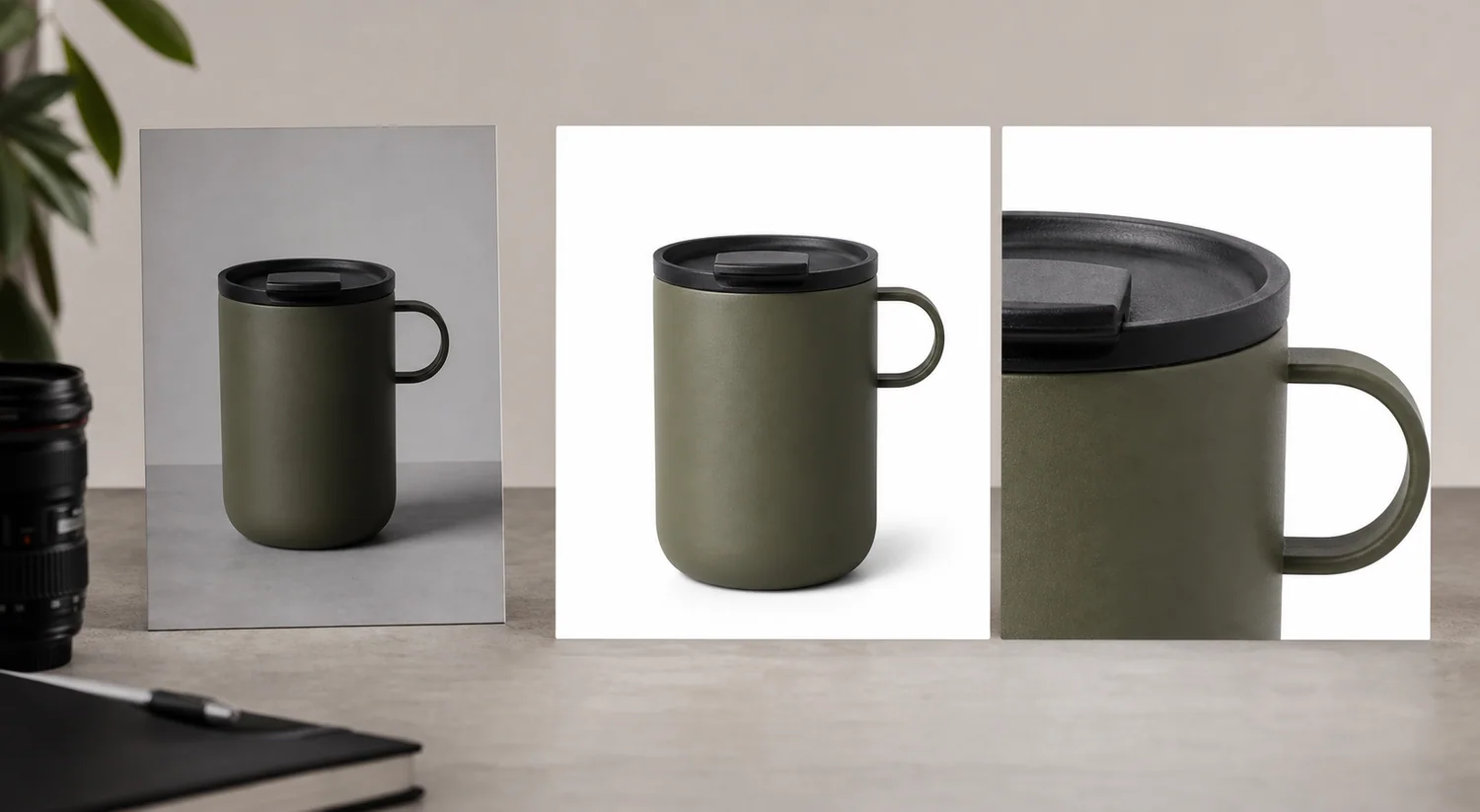
An AI product photo generator from reference images can preserve only what those source images actually show. One clean front view may anchor color, label placement, and silhouette, but it cannot reliably reveal the back, underside, hidden connector, internal mechanism, or exact depth. Treat reference generation as controlled composition around product evidence, not as a way to manufacture missing evidence.
The workflow combines current marketplace guidance with 2025 ecommerce image-generation research. The desk-set composite is a KrafLayer demonstration, not a controlled model benchmark or customer result.
Quick Summary
Start with the highest-quality product view, add more angles for hidden geometry, write an identity lock, and generate one image role at a time. Google requires the correct variant, color, pattern, and material. Reject any output that invents parts or mutates text, even when the scene looks convincing.
Abstract
Reference-image generation works best when the source hierarchy is explicit: product photos define identity; optional style references define lighting and composition; the prompt defines the job. More references are useful only when each adds factual coverage or a clear visual constraint.
Key Takeaways
- A reference image is evidence, not a complete 3D model.
- Product references and style references must have different roles.
- Multiple views reduce hidden-geometry guessing.
- Generate main, detail, and lifestyle roles separately.
- Review text, components, material, and proportions at full resolution.
Table of Contents
1. [Evidence and limitations](#what-can-a-reference-image-generator-reliably-do) 2. [Reference hierarchy](#which-reference-images-should-you-upload) 3. [One image versus multiple views](#when-is-one-reference-image-not-enough) 4. [Identity lock](#how-do-you-write-a-product-identity-lock) 5. [Role-by-role prompts](#how-should-you-generate-each-image-role) 6. [Fidelity review](#how-do-you-check-product-consistency) 7. [When not to generate](#when-should-you-edit-or-reshoot-instead) 8. [Frequently asked questions](#frequently-asked-questions)
What Can a Reference Image Generator Reliably Do?
The 2025 DreamPainter paper describes ecommerce generation as a balance between product consistency, spatial arrangement, shadows, reflections, text prompts, and visual references. It also says text-only control is limited for precise background inpainting ([DreamPainter](https://arxiv.org/abs/2508.02155), 2025).
The distinction drives the method below: the product reference supplies visible facts, while the prompt and optional style reference control presentation. We did not compare commercial models with a fixed test set. The published image demonstrates a review method, not a measured fidelity score.
*KrafLayer demonstration composite. Compare the mug's body, handle, color, graphic placement, rim, and proportions across source, output, and detail crop.*
Which Reference Images Should You Upload?
Google requires each image to show the correct variant and match its color, pattern, and material. That makes product references the identity authority. A mood board may influence lighting or layout, but it must not replace the factual SKU ([Google Merchant Center](https://support.google.com/merchants/answer/6324350?hl=en), 2026).
| Reference type | Controls | Should not control |
|---|---|---|
| Primary product front | Silhouette, color, front label, main proportions | Hidden back or underside details |
| Product side/back/top | Depth, closures, ports, handle geometry, rear copy | Unrelated scene style |
| Product detail | Texture, seam, finish, mechanism, small mark | Whole-product scale by itself |
| Style reference | Camera, lighting, palette, composition, prop restraint | Product identity, logo, packaging, exact text |
| Brand guide | Approved colors, typography, layout rules | Physical product facts absent from photography |
Upload only references you can explain. Ten near-identical front views add less information than a front, side, back, and one necessary detail view.
When Is One Reference Image Not Enough?
Google advises using additional images for other product views, and Amazon lists front, back, side, overhead, close-up, and 45-degree shots among standard angles. Multiple views are not merely decorative; they constrain different parts of the product ([Google Merchant Center](https://support.google.com/merchants/answer/6324350?hl=en); [Amazon](https://sell.amazon.com/blog/product-photos), 2026).
| Product | One view may preserve | Add another view for |
|---|---|---|
| Bottle or box | Front silhouette, color, front label | Back copy, cap mechanism, side depth |
| Bag or shoe | Main shape and color | Closure, sole, strap anchors, interior |
| Appliance | Front controls and body | Ports, cable, lid, rear vents |
| Furniture | Front finish and style | Depth, back construction, joinery |
| Jewelry | General form | Clasp, setting, engraving, scale |
One image is acceptable when the output stays close to that visible angle. It becomes risky when the prompt asks for a rotation or close-up of something the source never shows.
How Do You Write a Product Identity Lock?
An AAAI 2025 study treats product inconsistency as a separate failure from an inappropriate background and evaluates it by comparing segmented product regions before and after generation. The practical lesson is simple: review product identity independently from scene quality ([AAAI paper](https://ojs.aaai.org/index.php/AAAI/article/download/32027/34182), 2025).
Write the identity lock before the creative prompt. Record the exact SKU and variant color, followed by silhouette, proportions, and orientation. Then document material behavior; every visible label, logo, graphic, and line of text; required components; what is included; and facts absent from the references that the model must not invent.
Then add the output job. Example: "Create a square secondary lifestyle image on a pale stone desk, eye-level three-quarter camera, soft window light from left. Preserve the uploaded mug's cream ceramic body, handle geometry, rim thickness, green graphic, and exact proportions. Do not add text or change the printed mark."
Give every output one job
Use the [AI Product Image Generator](/ai-product-image-generator) with your clearest product views. Generate a main, detail, or lifestyle role separately so each result has a specific review checklist.
How Should You Generate Each Image Role?
Amazon's photography guide recommends at least six product images and identifies individual, lifestyle, scale, detail, packaging, and group shots as distinct types. Separating roles keeps one generated image from trying to answer every buying question at once ([Amazon](https://sell.amazon.com/blog/product-photos), 2026).
| Role | Prompt emphasis | Source requirement | Reject when |
|---|---|---|---|
| Plain main view | Complete product, neutral light, clean field | Sharp full-product reference | New props, text, missing parts, changed variant |
| Alternate angle | Requested orientation and visible construction | Actual source from that side | Hidden geometry is guessed |
| Detail | One material or mechanism | Sharp detail reference | Texture or component is invented |
| Scale | Known setting and verified dimensions | Dimensions plus suitable product view | Perspective implies false size |
| Lifestyle | Real use context and restrained props | Strong identity reference | Scene hides product or changes use |
| Campaign | Brand palette and composition | Identity references plus style guide | Style reference overwrites the SKU |
Generate two to four candidates for one role, reject obvious drift, and refine only the strongest. Fifty unrelated variants make review worse because the identity errors are no longer comparable.
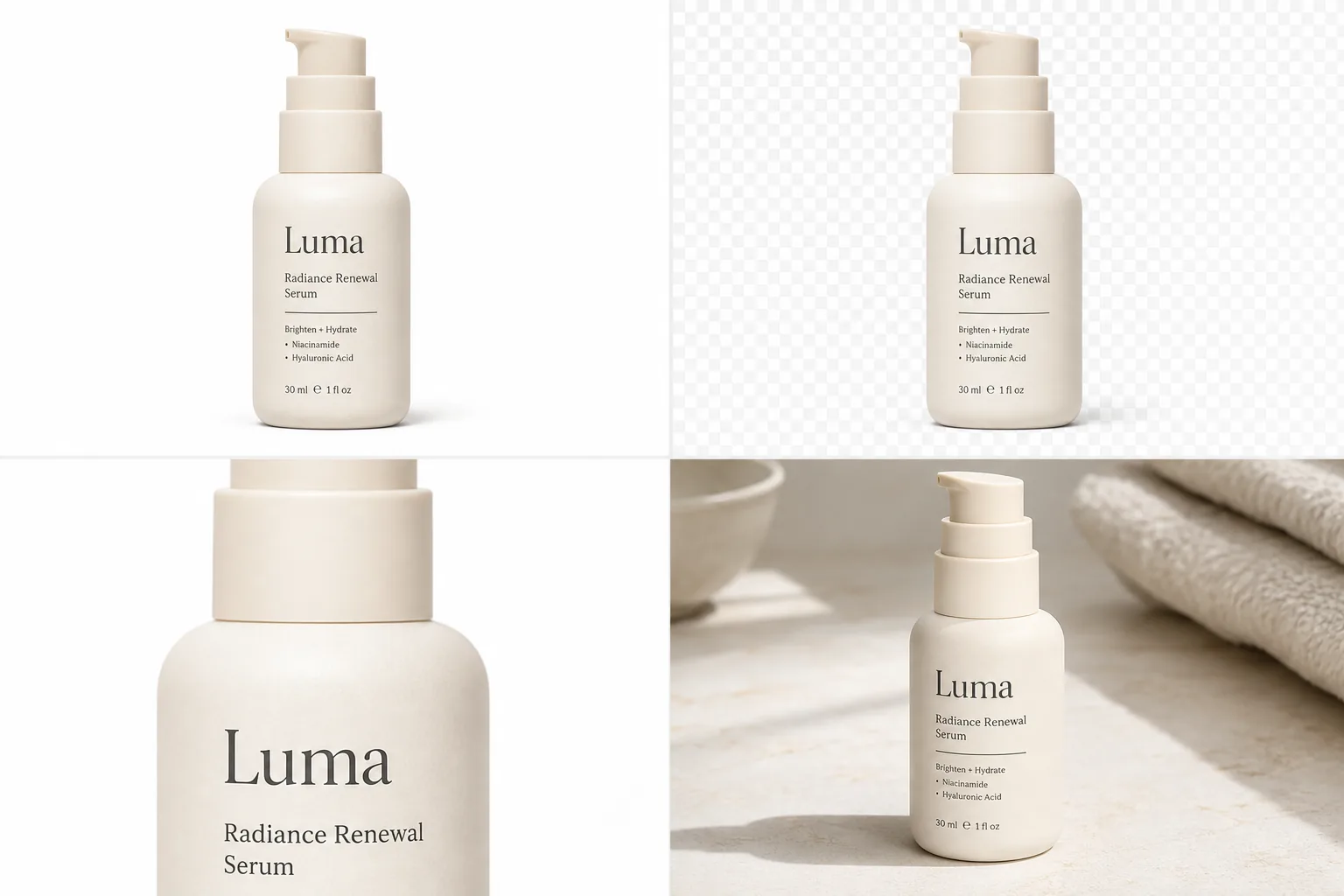
*Published demonstration. A role set is coherent only if pump geometry, bottle proportions, label placement, and cream color remain stable in all four panels.*
How Do You Check Product Consistency?
Google recommends product images at 75%–90% frame fill and requires the right variant. Amazon prefers images above 1,000 pixels per side for zoom. Use that resolution to compare facts, not merely sharpness ([Google Merchant Center](https://support.google.com/merchants/answer/6324350?hl=en); [Amazon](https://sell.amazon.com/blog/product-photos), 2026).
Score each candidate pass or fail on seven checks:
1. Silhouette: outline, proportions, openings, handles, and thickness. 2. Color: correct variant and neutral material color. 3. Text: every visible letter, number, mark, and logo. 4. Material: gloss, weave, grain, glass, metal, and transparency. 5. Components: caps, ports, seams, fasteners, stones, and included parts. 6. Scale: product size relative to props and camera perspective. 7. Light and contact: shadow, reflection, and surface contact in the new scene.
Do not average the checks into a flattering score. A wrong label or missing safety component is a hard rejection even when the other six pass.
When Should You Edit or Reshoot Instead?
Use editing rather than generation when the original product is already correct and only the background, dust, glare, or one local area needs work. A smaller edit exposes fewer product pixels to change.
Reshoot when the required fact is missing: unreadable regulated copy, hidden connector, cropped edge, unknown material texture, wrong variant, or a new angle. Generated pixels can be visually plausible without being true. For a factual listing asset, missing evidence is a photography problem.
Verdict
Reference generation is strongest when the source hierarchy is boringly clear. Product photos own identity; style references shape presentation; the prompt names one image job. Missing geometry still needs another product view, and missing evidence still needs a camera.
Frequently Asked Questions
Can AI generate product photos from one reference image?
Yes, especially when the output stays close to the visible angle and the product has a simple, clear silhouette. One image cannot establish hidden geometry. Add side, back, top, and detail views when the output must show those facts.
What makes a good product reference image?
Use a sharp, high-resolution image with the whole product visible, accurate color, readable marks, controlled glare, and clean separation from the background. The best reference is factual rather than dramatic. Keep the largest original instead of a compressed marketplace download.
Does a reference image prevent product drift?
No. It constrains visible identity but does not guarantee it. Review silhouette, color, text, material, components, scale, and light against the source. Reject changed labels, invented parts, or guessed geometry even if the surrounding scene looks realistic.
Should style references contain another brand's product?
They can demonstrate lighting or composition, but they must not control product identity, packaging, logos, exact text, or a one-to-one layout. State that your product images define the SKU while style references supply only visual method.
When is photo editing safer than generation?
Editing is safer when the product pixels are already correct and the defect is narrow, such as a messy background, dust spot, cable, or local glare. Full generation introduces more opportunities to change product facts and requires a broader review.
References
1. [DreamPainter: Image background inpainting for ecommerce](https://arxiv.org/abs/2508.02155), accessed August 11, 2026. 2. [AAAI 2025: Evaluation framework for product-image background inpainting](https://ojs.aaai.org/index.php/AAAI/article/download/32027/34182), accessed August 11, 2026. 3. [Google Merchant Center: Image link requirements](https://support.google.com/merchants/answer/6324350?hl=en), accessed August 11, 2026. 4. [Amazon: Six tips for product photos](https://sell.amazon.com/blog/product-photos), accessed August 11, 2026.
Keep exploring
Continue the story
More practical guidance on product accuracy, composition, and conversion-ready visuals.
Put it into practice
Take the next step in KrafLayer
Choose a generation or editing workflow that matches what you just learned.