Image generation
Furniture Product Photography With AI: Room Scenes Without Changing Color or Scale
TL;DR
A practical workflow for creating furniture main images, room scenes, and detail photos while preserving color, material, scale, and silhouette.
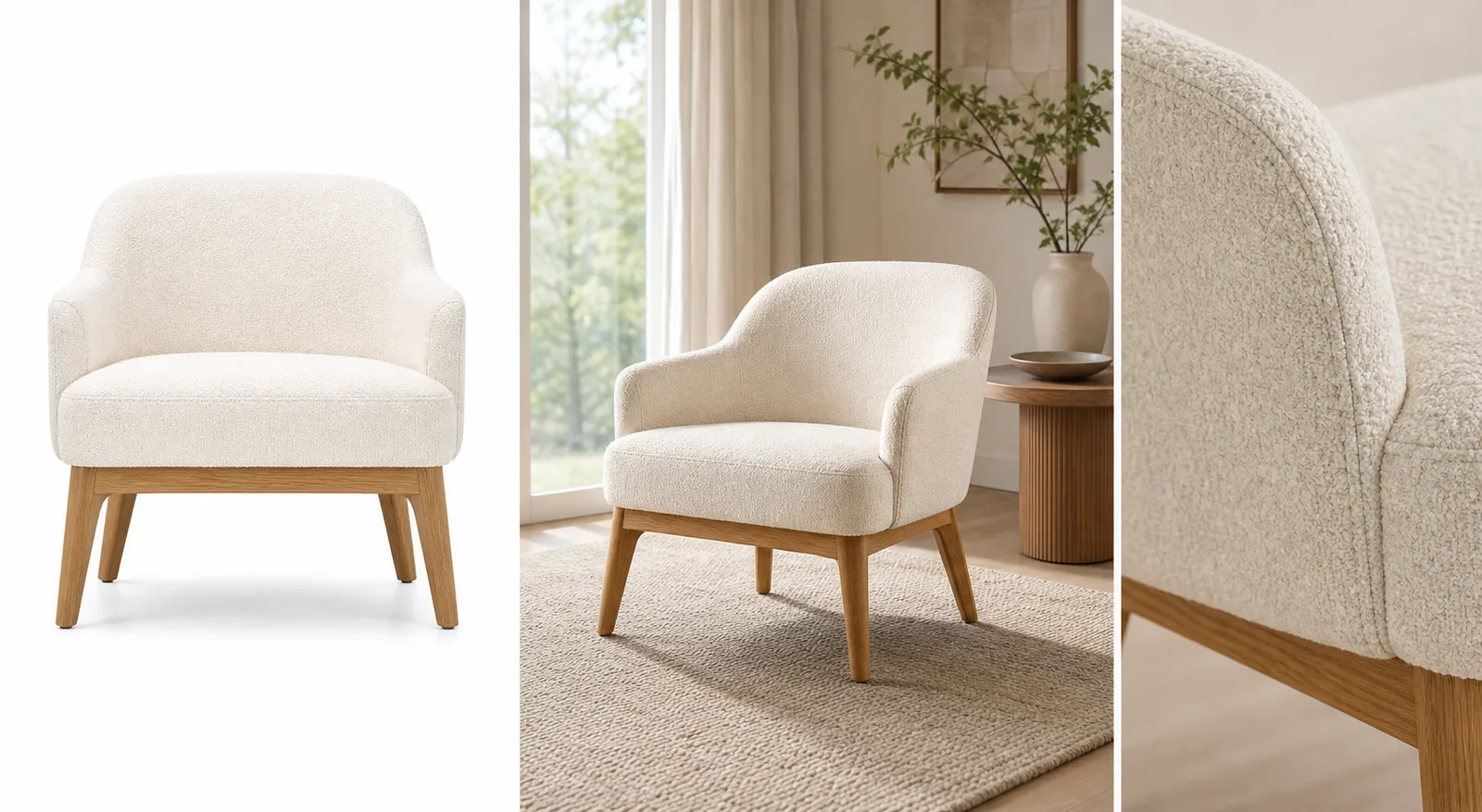
Furniture product photography with AI works when the furniture stays accurate and the room adds useful context. The clean product image should show the SKU clearly; the room scene should help buyers judge scale, material, color, and use; the detail image should prove texture and construction.
The practical rule is simple: lock the furniture facts before generating style. In KrafLayer, use [AI product photography](/ai-product-photography) to turn one furniture reference into main images, room scenes, and detail images, then compare every result against the original product before publishing.
AI furniture photography is useful when it creates more selling context without inventing a different SKU.
Start With Product Truth, Not Decor
For furniture product photography with AI, the room should never become more important than the product. A beautiful living room image is not publishable if it changes the chair arm curve, sofa depth, table leg angle, cabinet handle placement, upholstery color, wood grain, or floor contact.
A furniture lifestyle image is ready only when a shopper can identify the same SKU from the clean product photo and the room scene.
Before generating, write a short product-truth list:
- product type, silhouette, camera angle, and visible face
- height, width, depth, leg length, cushion thickness, and seat proportion
- true color under realistic daylight or warm room light
- material details such as boucle, linen, leather, rattan, oak, walnut, metal, stone, or painted finish
- construction details such as seams, buttons, handles, drawers, brackets, arms, legs, shelves, and feet
- natural floor contact, believable shadow, and plausible scale beside rugs, windows, tables, or lamps
This list is the review standard. If the AI image looks polished but sells a different chair, table, sofa, cabinet, or shelf, reject it.
Build A Three-Image Furniture Set
A strong furniture page usually needs more than one visual role. Use AI to create a set, not one overly decorative scene.
Clean Main Image
The main image should identify the product quickly. Use a simple background, clear crop, natural shadow, and enough resolution to inspect shape and material. This is the buyer's anchor image, so keep props and room styling out of the way.
Realistic Room Scene
The room scene explains scale and style fit. It can show how a chair sits near a window, how a coffee table relates to a sofa, or how a cabinet works against a wall. Keep the room believable and restrained. The furniture should still be the dominant subject.
Material Or Construction Detail
The detail image should answer a buyer question: upholstery texture, wood grain, leg joinery, handle finish, cushion seam, rattan weave, leather surface, drawer gap, or edge profile. A detail image is useful only if it matches the same product in the main image.
Prompt Pattern For Furniture Product Photography
Use one furniture SKU and one image role at a time:
~~~text Create one ecommerce furniture product photo from this exact reference. Product facts to preserve: [product type], [silhouette], [camera angle], [true color], [material], [wood grain or fabric texture], [leg angle], [arm/handle/drawer/seam details], [proportions], [scale], [natural floor contact shadow]. Image role: [clean main image / realistic room scene / material detail image / ad crop]. Room direction: realistic, restrained, product-led, natural light, believable scale, simple props. Keep the same product shape, color, material, construction details, scale, and shadow. Avoid real brand names, marketplace UI, fake badges, price tags, QR codes, barcodes, text overlays, extra products, impossible scale, and unsupported claims. ~~~
If the product drifts, narrow the instruction. For example: "keep the same rounded chair arms, cream boucle texture, oak leg angle, cushion thickness, and front-facing scale."
What To Check Before Publishing
Furniture product photos need a stricter review than ordinary lifestyle images because scale and material affect buyer trust.
- Color: did cream turn beige, walnut turn orange, or black metal turn gray?
- Material: does the fabric weave, leather sheen, rattan texture, stone grain, or wood grain still match?
- Proportion: did the cushion get thicker, the legs get longer, or the cabinet depth change?
- Silhouette: are arms, backrests, table edges, shelves, drawers, and handles in the same places?
- Scale: does the product feel plausible beside the room, rug, lamp, window, or side table?
- Shadow: does it sit naturally on the floor, or does it float?
- Visibility: are props hiding buyer-relevant details?
- Product set consistency: do the clean main image, room scene, and detail image still show the same SKU?
Use the [product photo editor](/product-photo-editor) when the source image is close but needs cleanup, crop adjustment, or minor retouching. Use the [AI product image generator](/ai-product-image-generator) when you need new room scenes, detail views, or campaign-ready variations from a clean furniture reference.
Where KrafLayer Fits
The broader [ecommerce product photography](/ecommerce-product-photography) workflow still applies: clear subject first, then selling context. Furniture just raises the stakes because small changes to color, scale, and material can mislead a buyer.
In KrafLayer, start with one clear furniture reference. Create the main image, room scene, and detail image as separate roles. Review each result against the product-truth list before using it on Shopify, Amazon, Etsy, a landing page, or an ad campaign. This keeps AI product photography useful without letting the room redesign the SKU.
Common Furniture AI Mistakes
- Making the product too large or too small for the room.
- Changing upholstery color, wood tone, rattan weave, leather finish, or metal surface.
- Adding extra legs, handles, seams, buttons, drawers, shelves, or decorative parts.
- Hiding important product details behind pillows, blankets, plants, or side tables.
- Creating a dramatic interior where the furniture becomes background decor.
- Using fake labels, certification marks, review stars, discount tags, or marketplace UI.
- Publishing a room scene without a clean product image and material detail nearby.
Good room scene product photography should make the product easier to understand, not harder to inspect.
FAQ
Can AI create furniture product photography from one reference image?
Yes, AI can help create furniture product photography from one clear reference image when you work by image role. Start with a clean product view, then create a room scene and a material detail image. Review color, material, silhouette, scale, legs, seams, handles, and floor contact before publishing.
How do I stop AI from changing furniture color or scale?
Write the exact color, material, proportions, and scale cues into the prompt, then compare the result against the source. Mention details such as cream boucle, oak legs, cushion thickness, drawer gaps, arm shape, or natural floor contact. Reject outputs where the product looks like a different SKU.
What images should a furniture product page include?
A practical furniture image set includes a clean main image, a realistic room scene, a material or construction detail, and sometimes a scale or dimension-supporting view. The main image identifies the product, the room scene explains context, and the detail image proves material quality.
Should furniture lifestyle images replace clean product images?
No. Furniture lifestyle images help shoppers understand room fit, but clean product images are still needed for inspection. Use room scenes as supporting images beside clear main views and detail images, especially when color, material, or scale are important.
Can KrafLayer make furniture lifestyle images?
KrafLayer can help create furniture lifestyle images from a product reference, then support cleanup and editing around the final asset. The seller should still review the output for color, material, silhouette, scale, construction details, and believable floor contact.
Conclusion
Furniture product photography with AI is strongest when it treats the real SKU as the source of truth. KrafLayer helps sellers create clean main images, realistic room scenes, detail images, and campaign-ready furniture visuals from one reference, while keeping color, material, scale, silhouette, and selling intent under review. For furniture teams, the advantage is faster visual production without giving up the product accuracy buyers need before they trust a room scene online.
Keep exploring
Continue the story
More practical guidance on product accuracy, composition, and conversion-ready visuals.
Put it into practice
Take the next step in KrafLayer
Choose a generation or editing workflow that matches what you just learned.