Image generation
Skincare Product Photography With AI: Texture, Label Accuracy, and Clean Scenes
TL;DR
A practical workflow for creating skincare main images, texture details, and clean scenes while preserving labels, packaging, color, and claims.
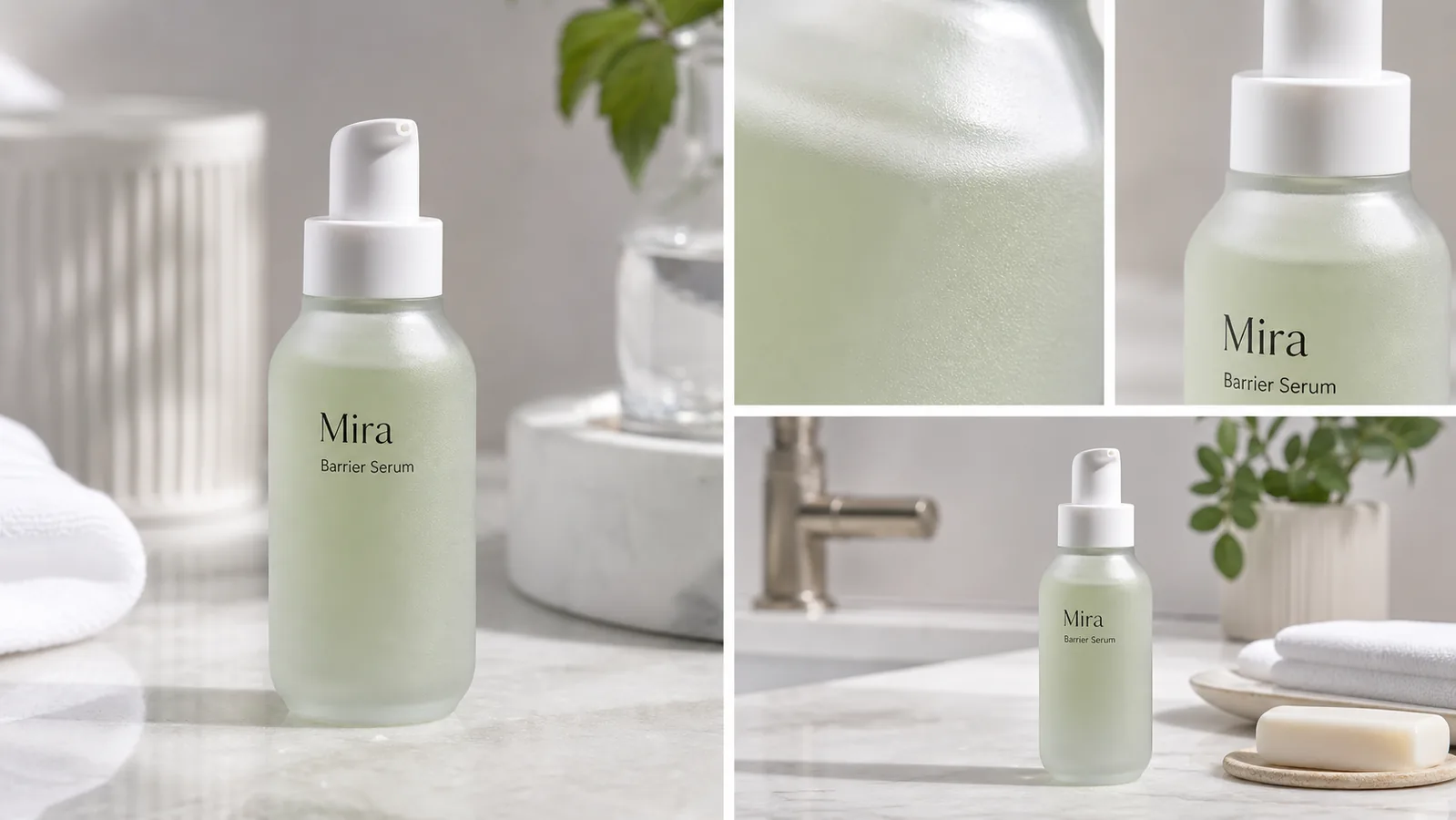
Skincare product photography with AI works when the package facts stay unchanged and the scene makes the product easier to trust. A clean main image should show the bottle, jar, tube, pump, cap, label, color, and shadow clearly. Detail images should prove texture, finish, dispenser shape, label accuracy, and material quality without inventing claims.
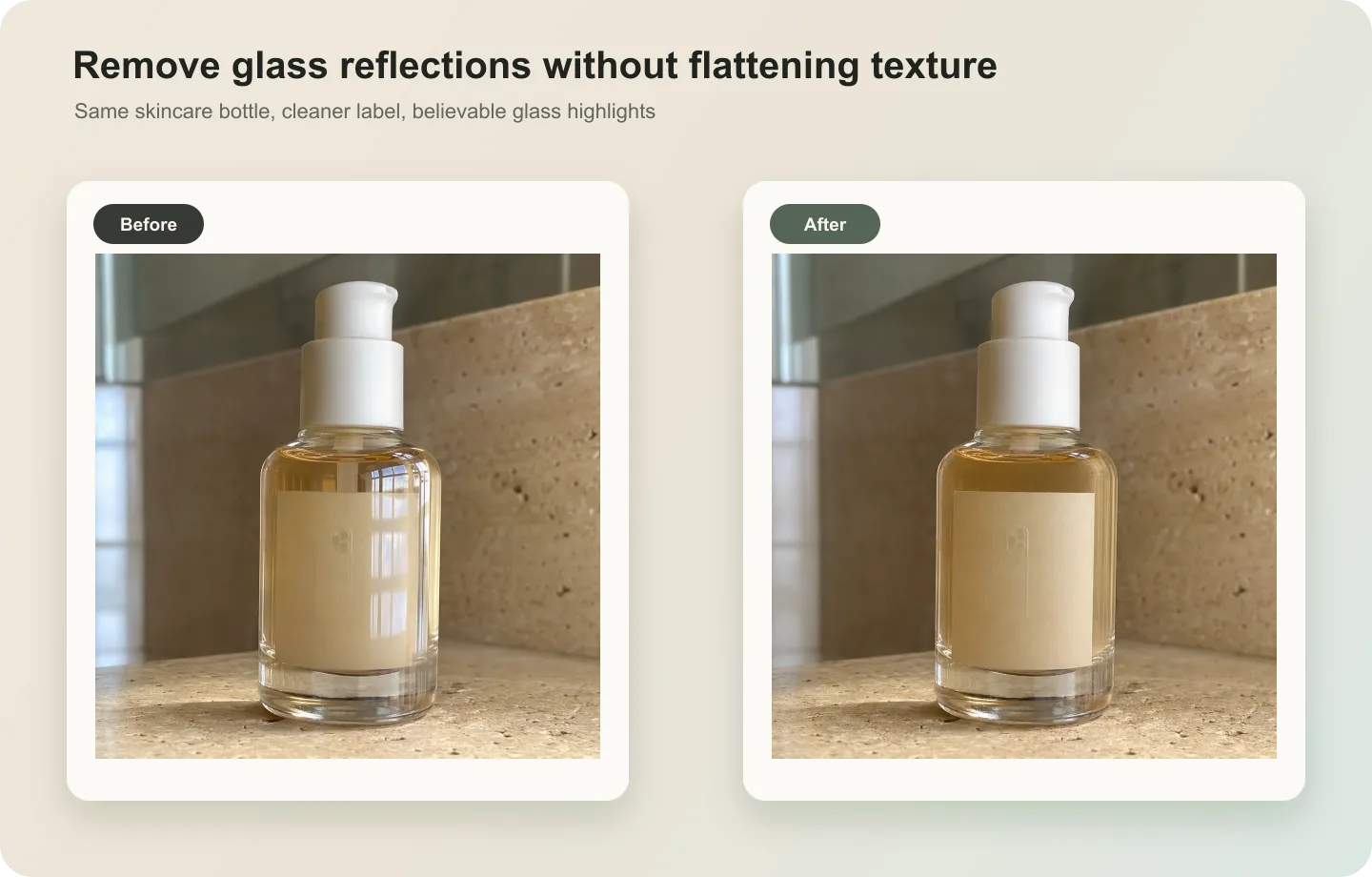
The practical rule is simple: protect the skincare packaging before styling the scene. In KrafLayer, use [AI product photography](/ai-product-photography) to create clean product shots, skincare texture detail images, and bathroom or vanity scenes from one reference, then compare every output against the original package before publishing. This is cosmetic product photography only when the package, formula presentation, and claim language remain believable.
AI skincare photography is useful when it creates more selling context without rewriting the label, changing the bottle, or implying a product claim the brand cannot support.
Start With The Package Facts
Skincare and cosmetic product photography has a higher truth bar than many lifestyle categories. A small change to label text, dispenser shape, bottle color, fill level, texture, or claim language can turn a useful image into a misleading asset.
Before generating images, write a short package-truth list:
- product type: serum, cream jar, toner, cleanser, sunscreen, oil, balm, mask, or set
- package shape, shoulder curve, cap height, pump/dropper/nozzle, and visible closure
- label position, brand mark, product name, line breaks, and readable front copy
- bottle or jar material: frosted glass, clear PET, aluminum tube, acrylic jar, paper carton, or airless pump
- product color, translucency, fill level, finish, and surface texture
- claims to avoid changing, including SPF, dermatologist, clinical, natural, organic, medical, anti-acne, whitening, or certification language
- natural contact shadow, clean reflection, and realistic bathroom or vanity scale
A skincare image is ready only when the buyer can recognize the same SKU from the main image, detail crop, and scene image.
Build A Skincare Image Set By Role
Do not ask AI for one generic "beautiful skincare photo." Build separate image roles so each asset answers one buyer question.
Clean Main Image
The main image identifies the product. Keep the package upright, label readable, cap visible, and shadow natural. Use a simple surface or clean studio setup so the product, not the props, carries the frame.
Texture Detail Image
The detail image should prove material or formula presentation: frosted glass texture, pump opening, cream surface, gel translucency, serum color, tube crimp, carton embossing, label ink, cap finish, or dispenser quality. Detail images work best when they match the same product from the main image.
Clean Lifestyle Scene
The scene gives context: bathroom counter, vanity tray, towel, sink edge, soft daylight, or a restrained ingredient cue. Keep props secondary. Avoid making the skincare product small, overdecorated, or hidden behind plants, towels, soap, mirrors, or hands.
Prompt Pattern For Skincare Product Photography
Use one product reference and one image role at a time:
~~~text Create one ecommerce skincare product photo from this exact reference. Product facts to preserve: [product type], [bottle/jar/tube shape], [cap or pump shape], [label position], [product name], [front label text], [material], [color], [fill level], [texture], [scale], [natural contact shadow]. Image role: [clean main image / texture detail image / clean vanity scene / ad crop]. Scene direction: premium but practical, clean bathroom or vanity surface, natural light, restrained props, product-led composition. Keep the same package shape, label layout, cap, dispenser, color, material, scale, and shadow. Avoid real brand names, marketplace UI, fake badges, QR codes, barcodes, certification marks, medical claims, SPF claims, dermatology claims, before-after skin claims, price tags, and extra products. ~~~
If the output changes the label, narrow the instruction. For example: "keep the front text exactly as a fictional label, keep the same Mira Barrier Serum layout, do not add claims, badges, ingredients, QR codes, or extra typography."
What To Check Before Publishing
Skincare product photos should be reviewed like packaging assets, not just lifestyle images.
- Label: did any text change, duplicate, blur, or turn into fake claims?
- Bottle shape: did the shoulder, base, cap, pump, nozzle, or dropper change?
- Material: does frosted glass, clear plastic, matte tube, glossy jar, or carton paper still look right?
- Color: did the formula, bottle tint, cap color, or label color drift?
- Texture: does the detail crop show the same product material rather than a random macro surface?
- Scene hygiene: is the surface clean, with no stains, clutter, unsafe bathroom cues, or distracting props?
- Claim safety: did the image add SPF, clinical, medical, organic, cruelty-free, dermatologist, acne, whitening, or certification language?
- Product set consistency: do the main image, detail image, and lifestyle scene still show one SKU?
Use the [product photo editor](/product-photo-editor) when the source image only needs cleanup, background adjustment, or local retouching. Use the [AI product image generator](/ai-product-image-generator) when you need new main images, texture detail views, clean scenes, or campaign variations from a verified skincare reference.
Where KrafLayer Fits
The broader [ecommerce product photography](/ecommerce-product-photography) workflow still applies: clear subject first, then selling context. Skincare adds another layer: labels and claims must stay conservative because packaging copy can affect buyer trust and regulatory review.
In KrafLayer, start with one clean product reference. Generate the main image, detail crop, and lifestyle scene as separate roles. Review the output for package shape, label accuracy, material texture, color, scale, and claim safety before using it on Shopify, Amazon, Etsy, landing pages, emails, or ads.
Common Skincare AI Mistakes
- Adding fake claims such as clinical, medical, SPF, organic, cruelty-free, dermatologist approved, anti-acne, or whitening.
- Changing a serum bottle into a lotion pump, jar, tube, or different dispenser.
- Redesigning the label with new typography, marks, badges, or ingredient panels.
- Making the formula color look richer, greener, clearer, or more luxurious than the real product.
- Hiding the package behind towels, plants, soap, mirrors, or hands.
- Creating extra SKUs that look like a product line when the listing sells one item.
- Using fake marketplace UI, review stars, discount tags, barcodes, QR codes, or certification seals.
Good skincare product photography with AI should make the package easier to inspect and the texture easier to understand. It should not create a new product story the brand cannot defend.
FAQ
Can AI create skincare product photography from one reference image?
Yes, AI can help create skincare product photography from one clear reference image when you separate the image roles. Generate a clean main image, a texture or packaging detail image, and a clean lifestyle scene, then review label accuracy, package shape, cap, dispenser, material, color, and claims.
How do I keep skincare labels accurate in AI product photos?
Write the exact label facts into the prompt and compare the result against the source image. Keep brand name, product name, line breaks, label position, and package shape unchanged. Reject outputs that add ingredients, badges, SPF, clinical, dermatologist, organic, medical, or certification claims.
What images should a skincare product page include?
A practical skincare product page should include a clean main image, a label or package detail, a texture or dispenser close-up, and a restrained lifestyle scene. The main image identifies the SKU, the detail image builds trust, and the lifestyle scene gives context without hiding the product.
Should skincare lifestyle images replace clean product images?
No. Lifestyle images can help shoppers understand the setting and brand feel, but clean product images are still needed for package inspection. Use lifestyle scenes as supporting images beside main product photos and label or texture details.
Can KrafLayer make skincare product photos for ecommerce?
KrafLayer can help create skincare product photos from a product reference, including clean main images, detail images, and lifestyle scenes. The seller should still review the final images for package shape, label accuracy, material texture, color, scale, and cautious claim language before publishing.
Conclusion
Skincare product photography with AI is strongest when it keeps the real package as the source of truth. KrafLayer helps sellers create clean main images, texture detail images, lifestyle scenes, and campaign-ready skincare visuals from one reference while keeping labels, bottle shape, material, color, scale, and claims under review. For beauty teams, the advantage is faster visual production without losing the product accuracy buyers need before they trust a skincare listing online.
Keep exploring
Continue the story
More practical guidance on product accuracy, composition, and conversion-ready visuals.
Put it into practice
Take the next step in KrafLayer
Choose a generation or editing workflow that matches what you just learned.