Image generation
AI Product Photography Examples: What to Inspect Before You Use Them
TL;DR
A practical way to inspect AI product photography examples before using them: main images, lifestyle scenes, detail crops, ad crops, and product-truth checks.
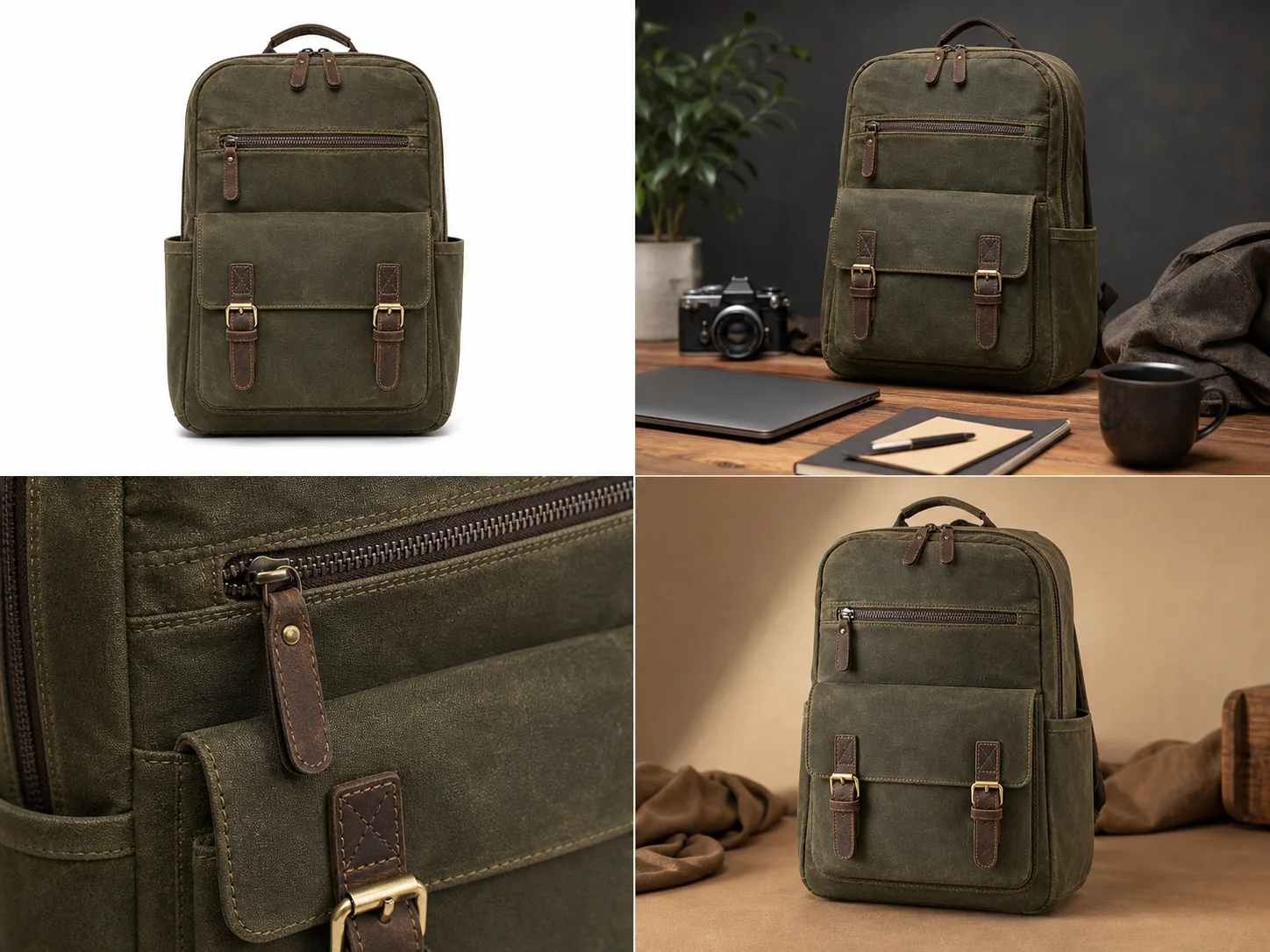
AI product photography examples are useful only when they show what the product is, why the image role matters, and which product details stayed accurate. A strong example is not just a beautiful scene; it is an image a seller could review against the real SKU before publishing. In KrafLayer, the best way to judge examples is to compare main images, lifestyle scenes, detail crops, and ad crops against one product-truth checklist.
Use this rule first: if an AI product photo example changes the product shape, color, material, hardware, scale, or included parts, it is not ready for ecommerce use. The image can look premium and still be wrong.
Start With The Image Role
The fastest way to inspect AI product photography examples is to ask what job each image is doing. A main image, a lifestyle image, a detail image, and an ad crop should not be judged by the same standard.
For the backpack example above, each view has a different job:
- The white-background main image should make the product shape, front pocket, buckles, handle, zipper pulls, and side pockets easy to inspect.
- The lifestyle scene should show scale and use context without hiding the backpack behind props.
- The detail crop should prove material, stitching, zipper teeth, leather pull, and brass hardware quality.
- The ad-style crop should create a warmer campaign look while still showing the same product.
This is why example galleries can be misleading. A dramatic scene may be useful for an ad, but weak for a product page. A clean main image may be excellent for inspection but too plain for a campaign.
What Good AI Product Photography Examples Have In Common
Good AI product photography examples protect the product before they improve the image. They make the product easier to understand, not harder to verify.
For ecommerce teams, the useful pattern is simple: AI product photography examples for ecommerce should show a main image, a lifestyle image, and a detail image that all look like the same SKU. Treat AI product photo examples as working assets, not inspiration screenshots.
Look for these signals:
- The product has one clear subject and enough size in the frame.
- Key product details match across examples.
- Materials look believable: canvas should not become plastic, leather should not become rubber, and metal should not become flat yellow paint.
- The contact shadow and lighting make sense for the surface.
- Props support the product instead of becoming the reason the image exists.
- The image avoids fake platform UI, badges, review stars, discount marks, QR codes, barcodes, and unsupported claims.
For ecommerce product photography examples, consistency matters more than novelty. If four AI outputs look like four different SKUs, the set is not useful for a product page. The same rule applies to AI product image examples in a tool gallery: the image should prove a real ecommerce job, not only a visual style.
Inspect Main Image Examples
The main image is the clearest test of product truth. It should answer the buyer's first question: what exactly is being sold?
Check these details before using a main image:
- silhouette and proportions
- front, side, top, and bottom structure when visible
- handles, straps, buckles, clasps, buttons, ports, lids, pumps, seams, or zippers
- product color under neutral light
- edge quality and contact shadow
- whether props, labels, or decorative objects imply extra included items
In the backpack example, the main image works because the product is centered, the front pocket and two buckles are visible, and the olive canvas material is readable. It would fail if the image invented a new zipper layout or changed the buckles between views.
Inspect Lifestyle Scene Examples
Lifestyle examples are useful when they show scale, use case, or buying context. They are risky when the scene becomes more important than the product.
Use lifestyle AI product photo examples when you need to show:
- where the product fits in daily use
- how large or compact the item feels
- what materials look like under realistic light
- how the product pairs with a room, desk, model, surface, or occasion
The lifestyle view above places the same backpack in a work-and-travel desk scene. That kind of example can help sell the product, but the seller still needs to review the front pocket, leather pulls, buckles, stitching, side shape, and color against the reference product.
Do not use a lifestyle output if the scene hides the product, changes the SKU, adds accessories that look included, or creates a use claim the product cannot support.
Inspect Detail Crop Examples
Detail examples should prove one thing at a time. They are strongest when they show a buyer-relevant feature: texture, stitching, hardware, closure, label area, edge finish, glass thickness, fabric weave, leather grain, or product construction.
A good detail crop should feel tied to the same SKU. For the backpack, the close crop should match the same olive canvas, zipper teeth, leather pull, brass hardware, stitching color, and pocket construction from the main image.
Use this practical test:
- Can a buyer understand what material or construction detail is being shown?
- Does the detail crop match the main image?
- Is the crop sharp enough for mobile inspection?
- Did the AI invent a new logo, label, seam, buckle, or texture?
- Would the detail image make the buyer more confident without exaggerating the product?
Detail images are often where AI drift is easiest to miss. Review them slowly before publishing.
Inspect Ad And Social Crop Examples
Ad-style examples can be more atmospheric, but they still need product accuracy. A campaign crop can use warmer lighting, tighter framing, or stronger composition; it should not redesign the product.
For ad and social examples, check:
- the product is still large enough to recognize quickly
- the crop does not cut off key buying details
- the product color does not shift into a different variant
- the scene does not add fake offers, badges, or review cues
- the image can be adapted into a channel crop without making the product tiny
KrafLayer's [AI product photography](/ai-product-photography) workflow is useful here because the seller can generate several roles from the same product idea, then use the [product photo editor](/product-photo-editor) to fix weak details before placing the image in a wider [ecommerce product photography](/ecommerce-product-photography) set.
Example Review Checklist
Before publishing AI product image examples, use a short review pass instead of relying on first impressions.
Review the set in this order:
- Product identity: same SKU, color, shape, material, scale, and key parts.
- Image role: main, lifestyle, detail, ad, marketplace, or store PDP.
- Buyer clarity: the product is easy to understand in the first two seconds.
- Detail accuracy: texture, stitching, hardware, labels, and edges are stable.
- Scene honesty: no fake included accessories, claims, platform UI, badges, or review stars.
- Channel fit: the crop and background make sense for the page or campaign.
- Editability: weak details can be fixed without regenerating the entire product.
The best AI product photography examples are examples you can audit. If you cannot explain what the image proves, it probably belongs in an inspiration board, not a product listing.
Prompt Direction For Better Examples
When using an [AI product image generator](/ai-product-image-generator), write the prompt around product truth and image role instead of broad style words.
Example direction:
Create four ecommerce product photography examples for the same olive waxed-canvas commuter backpack: a white-background main image, a realistic desk lifestyle scene, a close detail crop of stitching, zipper, leather pull, and brass buckle, and a warm ad-style crop. Keep the same backpack silhouette, front pocket, side pockets, handle, zipper pulls, buckle placement, stitching, material texture, color, and proportions in every view. Do not add real logos, marketplace UI, review stars, badges, prices, QR codes, barcodes, or unsupported claims.
That kind of prompt gives the model a job. It also gives the human reviewer a checklist.
FAQ
What makes a good AI product photography example?
A good AI product photography example shows a clear product role and preserves product facts. It should keep the same shape, color, material, scale, parts, and details while improving the selling image. If the example looks impressive but changes the SKU, it is not ready for ecommerce.
Can AI product photography examples be used directly on a store?
Sometimes, but they need review first. Compare every output against the real product or approved reference image. Check material, hardware, labels, included parts, crop, and any on-image text before using AI product photography examples on Shopify, Amazon, TikTok Shop, ads, or a product page.
What examples should an ecommerce product page include?
Most ecommerce product pages benefit from a clear main image, one or two angle or lifestyle images, at least one product detail image, and channel-specific crops for ads or social. The exact set depends on the product, but every image should explain the product better.
How do I avoid fake-looking AI product photos?
Keep one product as the subject, protect product facts in the prompt, avoid over-styled scenes, and review the output for changed details. Use editing only where needed. A believable AI product photo usually has clear scale, natural shadow, realistic material, and stable SKU details.
How does KrafLayer help create AI product photography examples?
KrafLayer helps sellers generate product-led image roles from a reference, then refine weak outputs with product photo editing workflows. That lets a team create AI product photography examples for main images, lifestyle scenes, detail crops, and ad creatives while still reviewing product accuracy before publishing.
Conclusion
AI product photography examples should be judged by usefulness, not by visual drama alone. The strongest examples show a clear image role, protect product details, and help buyers understand the product faster. KrafLayer helps ecommerce teams create main images, lifestyle scenes, detail images, and ad-ready product visuals from a product-focused workflow, then review and edit the outputs before they become live ecommerce assets.
Keep exploring
Continue the story
More practical guidance on product accuracy, composition, and conversion-ready visuals.
Put it into practice
Take the next step in KrafLayer
Choose a generation or editing workflow that matches what you just learned.