Image generation
Jewelry Product Photography With AI: Shine, Scale, and Wearing Shots
TL;DR
A practical workflow for using AI to create jewelry main images, detail photos, and wearing shots while protecting product truth.
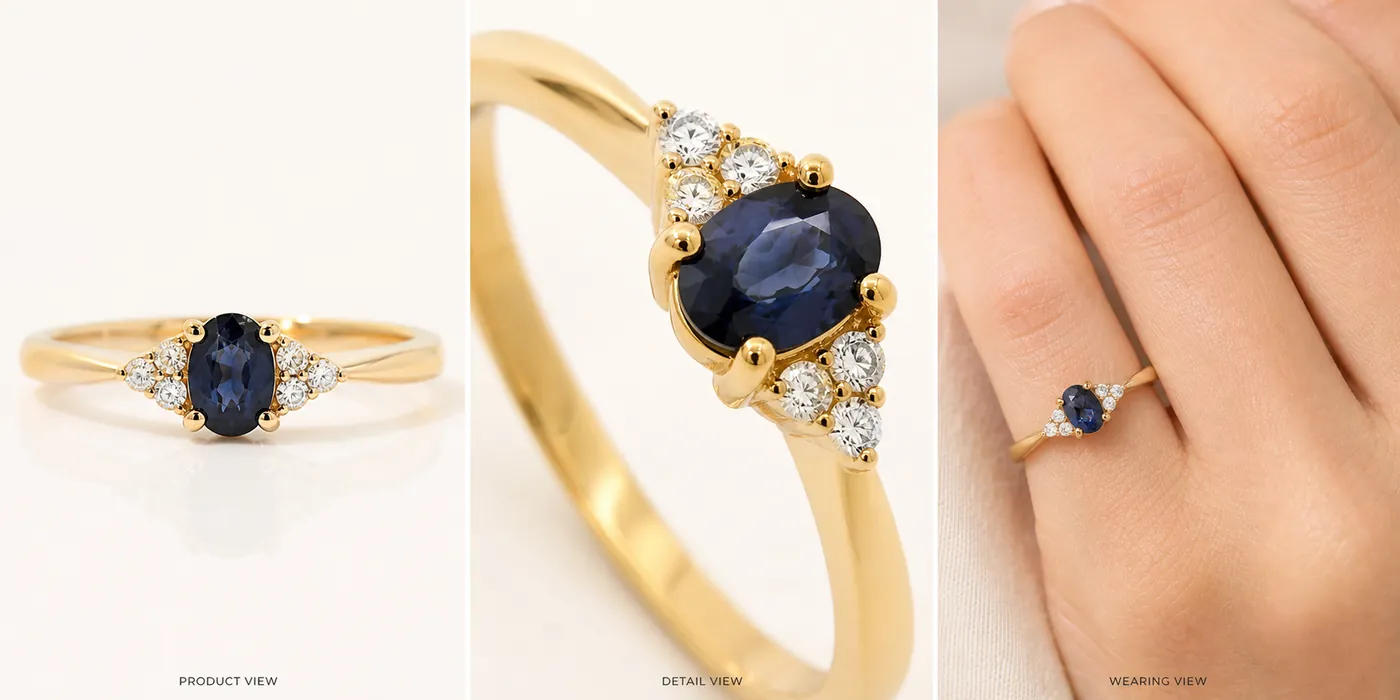
Jewelry product photography with AI works best when each image has a narrow job: the main photo identifies the piece, the detail image proves the setting and finish, and the wearing shot explains scale. AI can make jewelry images cleaner and more flexible, but it should not invent extra stones, change prongs, exaggerate sparkle, or make the item look larger than it is.
The practical rule is simple: protect the jewelry facts first, then improve the presentation. In KrafLayer, use [AI product photography](/ai-product-photography) to create main images, jewelry detail images, and wearing shots from a reference, then compare every result against the real piece before publishing.
Build A Jewelry Truth List First
Before generating AI jewelry photography, write the details that must stay unchanged:
- jewelry type, silhouette, and orientation
- stone shape, stone count, stone size relationship, and setting style
- prong count, bezel edge, claw position, clasp, chain, hinge, or earring back
- metal color, finish, band width, engraving position, and texture
- true scale on a hand, ear, neck, wrist, tray, or product surface
- visible marks that are part of the product, not dust or glare
This list prevents a common failure: the generated image looks expensive, but it no longer shows the same ring, necklace, bracelet, or earrings. A jewelry image is only useful if the buyer can trust the product facts.
Choose The Right Image Roles
For most jewelry product photos, create three image roles before adding campaign variations.
Main Product Image
The main image should make the jewelry easy to recognize at thumbnail size. Use clean light, a controlled shadow, and enough contrast to separate metal and stones from the background. Avoid busy props, fake luxury badges, heavy reflections, or dramatic crops that hide the actual piece.
For a ring, show the face, band width, setting height, and stone shape. For earrings, show the pair, closure, and drop length. For necklaces and bracelets, show the chain or clasp instead of cropping it away.
Detail Image
The detail image should prove craftsmanship. This is where jewelry product photography with AI can help create a sharper macro-style view, but the review must be strict. Check prongs, stone edges, chain links, clasps, pearl shape, engraved details, and metal texture.
The quotable rule: a jewelry detail photo should clarify the product, not upgrade it into a different SKU.
Wearing Or Scale Shot
Jewelry wearing shots answer the buyer's scale question. A ring on a hand, earrings near an ear, a pendant on a neckline, or a bracelet on a wrist can make the item easier to imagine.
Keep the crop tasteful and product-led. The model, hand, or styling should explain scale; it should not become the subject. Do not make a small stone look oversized, a delicate chain look heavy, or a narrow band look wider than the real item.
Prompt Pattern For Jewelry Product Photography
Use one image role at a time. This keeps review easier and reduces product drift.
~~~text Create one ecommerce jewelry product photo from this exact reference. Product facts to preserve: [jewelry type], [metal color], [stone shape], [stone count], [setting/prong/clasp details], [band/chain width], [finish], [true scale]. Image role: [clean main image / macro detail image / wearing scale shot / lifestyle campaign image]. Lighting: polished but realistic, clear highlights, controlled reflection, natural shadow. Keep the same product shape, stone layout, prong count, metal color, scale, and construction. Avoid real brand names, marketplace UI, review stars, badges, certificates, price tags, QR codes, barcodes, medical claims, and exaggerated gemstone sparkle. ~~~
If the first output changes the jewelry design, do not continue building the set from it. Regenerate or revise until the product truth list holds.
What To Check Before Publishing
Review jewelry product photos more carefully than ordinary catalog images because small changes can misrepresent value.
- Stone shape: oval, round, pear, emerald, marquise, cushion, or square should not drift.
- Stone count: side stones, pavé rows, and accent stones should stay consistent.
- Prongs and settings: missing or extra prongs can change the product.
- Metal color: yellow gold, rose gold, white gold, silver, and platinum should not blend together.
- Scale: wearing shots should not make the piece look larger, heavier, or thicker than it is.
- Surface truth: remove distracting dust or harsh glare, but keep real texture and finish.
- Product set: every image should still show the same ring, necklace, bracelet, or earrings.
Use the [product photo editor](/product-photo-editor) for cleanup when a real jewelry image is close but has lint, dust, glare, or a weak crop. Use the [AI product image generator](/ai-product-image-generator) when you need new main, detail, and campaign-ready views from a clean product reference.
How KrafLayer Fits The Jewelry Workflow
The broader [ecommerce product photography](/ecommerce-product-photography) workflow applies to jewelry, but the tolerances are tighter. A handbag can survive a slightly different fold; a ring cannot survive a changed stone setting.
In KrafLayer, start with one clear jewelry reference. Generate or edit one image role, compare it to the truth list, then move to the next role. This incremental workflow is slower than accepting the first beautiful output, but it produces safer jewelry product photos for stores, marketplaces, product detail pages, and ad creatives.
Common Jewelry AI Mistakes
- Adding extra stones, prongs, chain links, charms, pearls, or clasps.
- Turning warm gold into brass, silver, or rose gold.
- Making small stones look larger than the real item.
- Over-polishing metal until engraving, texture, or handmade marks disappear.
- Using lifestyle props that hide the jewelry.
- Creating wearing shots where the hand, model, or scene is clearer than the product.
- Publishing a shiny image without checking it against the real piece.
Good jewelry product photography with AI is not about maximum sparkle. It is about accurate product evidence, controlled shine, and enough scale context for a buyer to understand what they are considering.
FAQ
Can AI create jewelry product photos from one reference image?
Yes, AI can help create jewelry product photos from one reference image when you work one role at a time. Start with a clean main image, then generate a detail image and a wearing or scale shot. Review every output for stone shape, prongs, metal color, chain or band width, and true scale.
How do I keep jewelry details accurate with AI?
Write a jewelry truth list before generating: stone count, stone shape, prong count, setting style, metal finish, clasp, chain width, band width, and scale. Compare each output against that list. If the image changes construction, it may look attractive, but it is not accurate enough for a product listing.
What images should a jewelry listing include?
A practical jewelry listing set includes a main product image, a macro detail image, a wearing or scale shot, and one lifestyle or packaging image when useful. The main image identifies the piece, the detail image proves craftsmanship, and the wearing shot helps buyers judge size.
Should AI jewelry photography exaggerate sparkle?
No. Jewelry photography can use controlled highlights, but exaggerated gemstone sparkle can mislead buyers and hide product details. Keep the shine realistic enough to show metal finish, stone clarity, prongs, setting height, and texture without making the item look like a different product.
Can KrafLayer make jewelry wearing shots?
KrafLayer can help create wearing or scale-focused product visuals from a jewelry reference, but the seller should review scale carefully. For rings, earrings, necklaces, and bracelets, the hand, ear, neck, or wrist should explain size while the jewelry remains the clear subject.
Conclusion
Jewelry product photography with AI is strongest when it balances shine with product truth. KrafLayer helps sellers create main jewelry product photos, detail images, wearing shots, and campaign-ready variations from a product reference, but the final review should protect stone shape, prongs, metal color, finish, and scale. For jewelry teams, the advantage is faster image production without giving up the accuracy buyers need before they trust a small, high-detail product online.
Keep exploring
Continue the story
More practical guidance on product accuracy, composition, and conversion-ready visuals.
Put it into practice
Take the next step in KrafLayer
Choose a generation or editing workflow that matches what you just learned.