Image generation
Product-on-Model Photography With AI: When It Works and What to Check
TL;DR
Use product-on-model photography with AI for scale and styling context, then check fit, material, hardware, seams, and product truth before publishing.
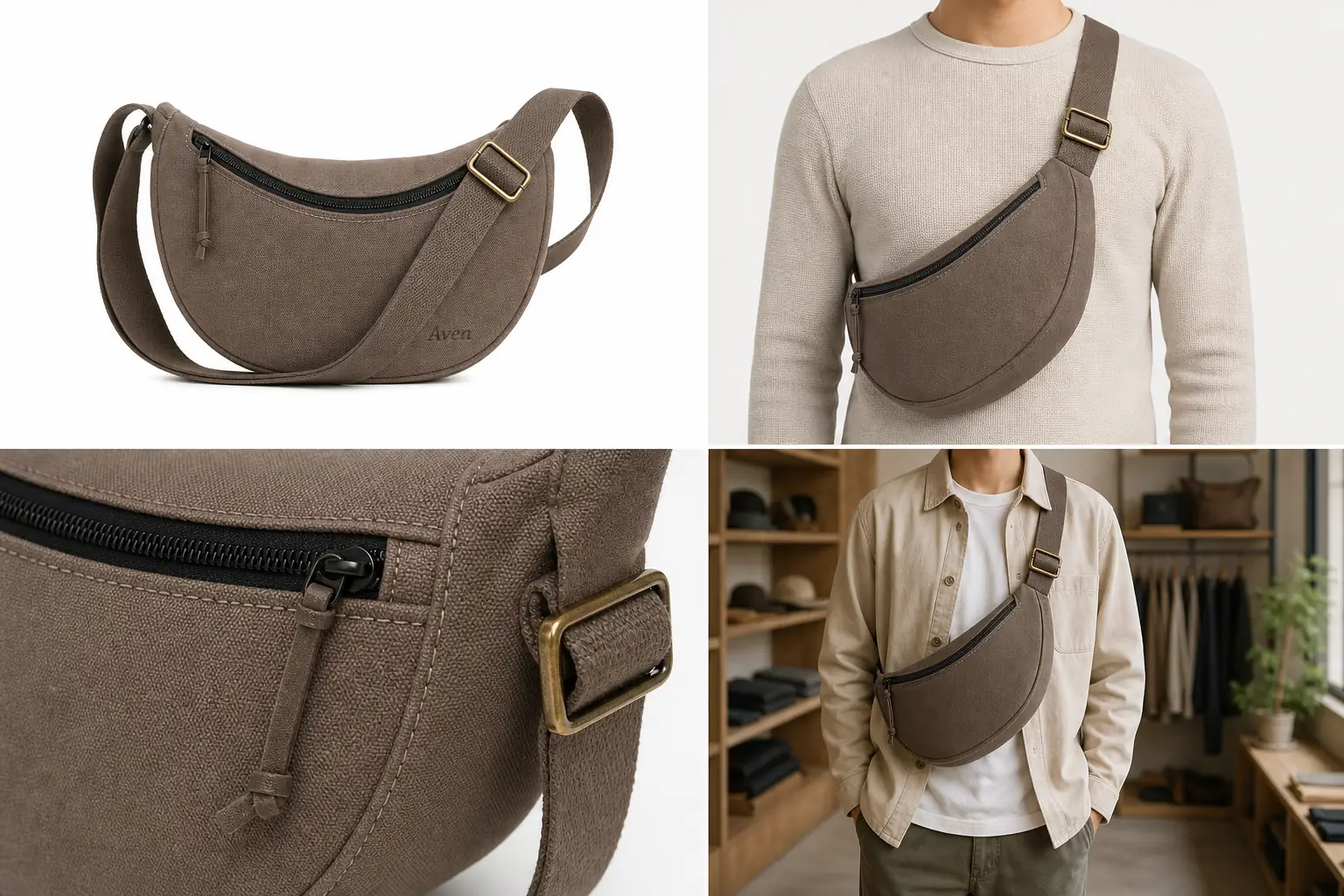
Product on model photography AI works best when the product has visible, checkable facts: silhouette, scale, material, hardware, seams, closure, and how it sits on the body. Use AI model images for merchandising context, not as an unchecked promise of perfect fit.
In KrafLayer, a practical workflow is to start with a clean product reference in the [AI product photography](/ai-product-photography) flow, generate an on-model view with the [AI product image generator](/ai-product-image-generator), then review the result against your real SKU before finishing any cleanup in the [product photo editor](/product-photo-editor). The goal is a believable [ecommerce product photography](/ecommerce-product-photography) asset that helps buyers judge scale and styling without changing the product.
The Practical Rule
Use product on model photography AI when the model view can prove scale, styling, or wear context. Do not use it when the image would need to guarantee exact fit, body measurement accuracy, regulated claims, or hidden construction details the reference image does not show. Make the product fit and scale check explicit before the image reaches a product page.
A safe on-model workflow has four checks. Treat this as an AI product photography for accessories and apparel review step, not as a replacement for product QA.
- The product remains the same SKU.
- The model pose does not hide important product facts.
- The scale looks plausible for the category.
- Any fit or comfort claims stay cautious and seller-reviewed.
That is why the example above uses one Aven taupe canvas sling bag across a clean reference, an on-model crop, a close hardware detail, and a store-context image. The model view adds scale and styling context, while the detail crop keeps the black zipper, strap anchor, brass buckle, stitching, and canvas texture inspectable.
When Product-on-Model AI Works Well
Product-on-model photography with AI is strongest for visual context jobs where the buyer needs to understand how the item sits, drapes, hangs, or scales.
Good use cases include:
- sling bags, handbags, backpacks, and small accessories
- jewelry where scale is more important than exact body fit
- scarves, hats, belts, and other styling-led items
- outerwear and tops when the real garment reference is clear
- lifestyle crops for store pages, ads, and collection pages
For these categories, the model view can answer a real buyer question: how big does this look on a person, and does the material feel casual, premium, sporty, formal, or everyday?
What To Protect Before You Generate
Before using AI for on-model product photos, write a product-truth list. This is not busywork. It is the checklist you will use to accept or reject the output.
For a bag, protect:
- silhouette and opening shape
- true color and fabric texture
- strap width, length family, and attachment points
- zipper color, zipper path, pull tab, buckle, rings, and stitching
- logo or label area, if present
- realistic body scale
For apparel, protect:
- neckline, collar, sleeve, hem, pocket, button, zipper, seam, and panel placement
- fabric weight, weave, print, color, and drape
- true garment length and shape family
- visible construction details that affect buyer expectations
For jewelry, protect:
- stone count, stone shape, setting, clasp, hoop diameter, chain length, metal color, and scale
- whether the product is a stud, hoop, drop, ring, bracelet, pendant, or set
AI can make a model image look polished while quietly changing one of these facts. The checklist keeps the review grounded.
A Prompt Template For On-Model Product Photos
Use a prompt that names the product facts and the image role:
Create a realistic ecommerce on-model product photo from this product reference. Keep the same product silhouette, color, material, scale, hardware, stitching, strap placement, and logo area. Show the product worn naturally on a neutral model crop for a store page. Use clean commercial lighting and a simple outfit that does not distract. Do not add badges, platform UI, claims, extra accessories, new product features, or unreadable text.
For product on model photography AI, the strongest prompt is not the most dramatic one. It is the one that makes product preservation easy to inspect.
How To Review The Output
Review the generated image before publishing it. For on-model product photos, the most common failures are scale drift, fit fantasy, and product redesign.
Use this checklist:
- Compare the on-model image against the original product reference.
- Check whether the product is the same size class.
- Look at seams, buckles, zippers, straps, stones, buttons, and closures.
- Confirm that the material did not change from canvas to leather, cotton to satin, or metal to plastic.
- Check that hands, hair, jackets, shadows, or poses are not hiding critical product facts.
- Reject images that invent extra pockets, clasps, straps, jewels, labels, or decorative panels.
- Avoid language that says the image proves exact fit unless a human has verified fit data.
A good AI model product photography result should help a buyer imagine the product in use. It should not become the product specification.
Where KrafLayer Fits In The Workflow
Use KrafLayer for three linked jobs:
- Generate the first on-model product image from a clear reference.
- Create a supporting detail image when the model crop hides important construction.
- Edit minor distractions after the product identity is already correct.
For example, if the sling bag is accurate but the background is too busy, edit the background or crop. If the buckle shape changed, regenerate or correct the product area instead of publishing. If the on-model crop looks good but the zipper detail is too soft, create a separate detail image rather than pretending the model view proves everything.
What Not To Claim
Do not claim that AI-generated on-model images guarantee exact fit, body measurement accuracy, marketplace approval, or buyer satisfaction. AI can create useful merchandising context, but apparel and accessory presentation still needs SKU review.
Safer wording:
- "shows styling context"
- "helps review apparent scale"
- "creates an on-model visual for merchandising"
- "requires a product-truth check before publishing"
Avoid wording like:
- "perfect try-on accuracy"
- "guaranteed fit"
- "compliance-safe"
- "approved for every marketplace"
- "exact body measurement simulation"
This keeps the article useful without turning an AI image into an unsupported guarantee.
FAQ
Can AI create product photos on a model?
Yes, AI can create on-model product photos when you provide a clear product reference and review the output carefully. It works best for scale, styling, and merchandising context. The final image still needs SKU checks for shape, color, material, hardware, seams, and plausible fit.
Is product on model photography AI accurate enough for ecommerce?
It can be useful for ecommerce, but it should not be treated as automatically accurate. Use it when the product facts are visible and reviewable. Reject outputs that change fit, size, fabric, hardware, closures, labels, or other details that affect buyer expectations.
What products work best for AI model product photography?
Accessories, bags, jewelry, scarves, hats, and clearly photographed apparel are usually stronger candidates because scale and styling context are visible. Complex fit-sensitive clothing can still work, but it needs stricter review and cautious copy.
Should I include a detail image with an on-model photo?
Yes, when the model crop hides material, closure, stitching, hardware, or texture. A detail image gives buyers product proof that the on-model image cannot show clearly. This is especially useful for bags, jewelry, footwear, and outerwear.
How does KrafLayer help with on-model product photos?
KrafLayer helps create product-led AI model images from references, then supports cleanup and related product image work. Use it to generate the on-model view, create detail support images, and edit distractions while preserving product truth.
Conclusion
Product on model photography AI is useful when it adds scale, styling, and merchandising context without rewriting the SKU. Start from a clear reference, protect product facts, generate one model view at a time, and review the result before publishing. KrafLayer fits this workflow by connecting AI product generation with practical editing, so sellers can build on-model and detail assets that still feel tied to the real product.
Keep exploring
Continue the story
More practical guidance on product accuracy, composition, and conversion-ready visuals.
Put it into practice
Take the next step in KrafLayer
Choose a generation or editing workflow that matches what you just learned.