Image generation
AI Product Photography for Ecommerce: What It Can Replace and What Still Needs Review
TL;DR
A practical guide to what AI product photography can replace for ecommerce teams, what still needs review, and how to protect product truth.
AI product photography for ecommerce can replace many repeatable image-production jobs: clean main images, lifestyle scenes, detail crops, background variations, and ad-ready compositions. It should not replace product review. Before an AI image goes live, check the product shape, color, material, scale, labels, parts, and selling claim against the real item.
The practical rule is simple: use AI to produce more ecommerce image options, then use human review to protect buyer trust. In KrafLayer, that means starting from a product reference in [AI product photography](/ai-product-photography), generating a product-led image, and using the [product photo editor](/product-photo-editor) only where the output needs cleanup.
What AI Product Photography Can Replace
AI product photography for ecommerce works best when the job is visual production, not product decision-making. A seller can use it to create a broader image set from one strong reference instead of reshooting every role from scratch.
It can usually help with:
- main product image concepts for a clean product page
- lifestyle scenes that show use context
- detail images for texture, lid shape, stitching, hardware, glass, fabric, or finish
- background variations for store pages, ads, and seasonal campaigns
- crop variations for product pages, paid social, and marketplace thumbnails
- cleanup drafts when a source photo has a distracting surface or weak lighting
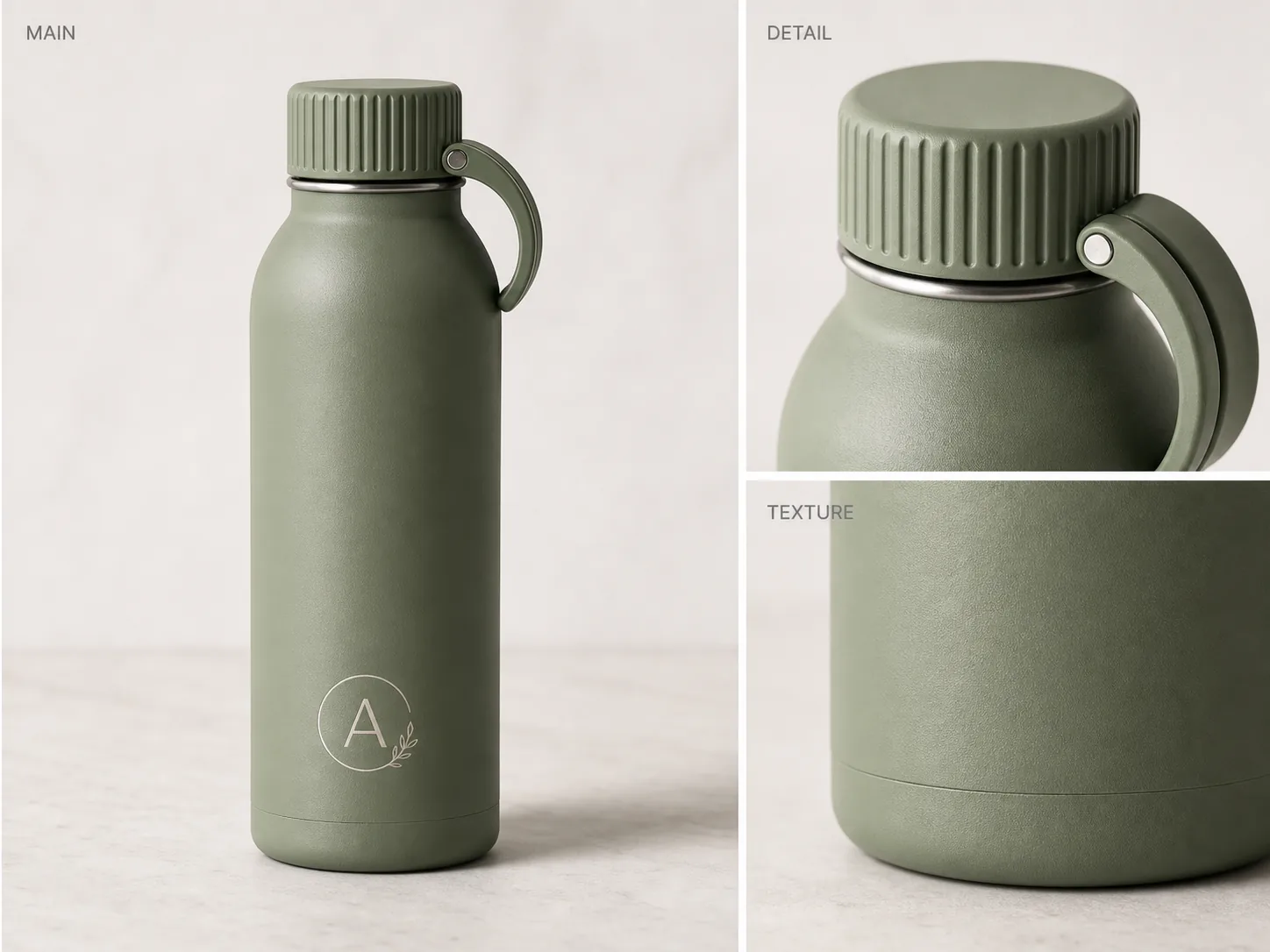
The generated bottle image above is a useful ecommerce example because it keeps one product visible across the main, detail, and texture panels. The buyer can understand the product first, then inspect the ribbed lid, carry loop, matte finish, and bottom edge.
What Still Needs Review
AI product images for ecommerce still need product-truth review before publishing. A polished image can quietly change the SKU, and that is more dangerous than a rough photo.
Review these facts every time:
- silhouette: the product shape should match the real item
- color: the generated color should not become more premium or different from the shipped SKU
- material: metal, glass, fabric, leather, ceramic, and plastic should stay believable
- details: lids, handles, seams, ports, clasps, labels, zippers, buttons, and stitching should stay in the right place
- scale: the product should not look larger, thinner, taller, softer, or more expensive than it is
- text: labels and package copy should be approved artwork, not invented AI lettering
- claims: no fake badges, ratings, certifications, sustainability marks, medical claims, or performance promises
A good ecommerce review rejects images that make the product look more capable than it really is. Do not publish an image that changes what the buyer can inspect or what the buyer will receive.
A Safe AI Product Photography Workflow for Ecommerce
Treat AI product photography as a production workflow with checkpoints. Do not ask for a final image in one vague prompt and publish the first attractive result.
Use this workflow:
- Start with the clearest product reference you have.
- Write down the product facts that cannot change.
- Choose one image role: main image, detail image, lifestyle scene, ad crop, or background cleanup.
- Generate one controlled version with the [AI product image generator](/ai-product-image-generator).
- Compare the output to the product fact list.
- Use editing only for specific fixes such as background cleanup, shadow control, crop, or texture clarity.
- Place the result inside your broader [ecommerce product photography](/ecommerce-product-photography) set so the listing feels consistent.
This keeps the AI image tied to a commercial job. The goal is not to create the most dramatic image; the goal is to create a product image a buyer can trust.
Prompt Template for Ecommerce AI Product Photography
Use a prompt that defines the product, the image role, and the facts that must stay unchanged.
Create an ecommerce product photo of this exact product for a [main image/detail image/lifestyle scene/ad crop]. Keep the product shape, proportions, color, material, label area, lid or hardware, scale, and camera angle consistent with the reference. Improve the lighting and selling context without adding fake logos, badges, review stars, marketplace UI, certification marks, claims, barcode, QR code, or accessories that are not included with the product.
For a product like the sage insulated bottle, the prompt should protect the ribbed lid, carry loop, matte texture, bottom seam, logo area, cylinder shape, and natural contact shadow. Those details matter more than background drama.
Where KrafLayer Fits
KrafLayer is most useful when the ecommerce team needs a controlled image set, not a single one-off render. Start with the owner workflow at [AI product photography](/ai-product-photography), generate main or detail images with the AI product image generator, then use product editing to clean one problem area instead of regenerating the entire SKU.
That workflow is especially useful for catalogs where the same product must appear in several roles: main image, texture closeup, scale cue, lifestyle scene, and ad crop. Each output should look like the same product, not five different interpretations.
FAQ
Is AI product photography good enough for ecommerce?
AI product photography can be good enough for ecommerce when the product facts are reviewed before publishing. It is useful for creating main images, detail crops, lifestyle scenes, and campaign variations, but the seller still needs to check accuracy, labels, scale, materials, and claims.
What should I check before publishing AI product images?
Check product shape, color, material, scale, logo or label placement, small parts, edge quality, contact shadow, and any visible text. Also reject fake badges, platform UI, review stars, certification marks, medical claims, or accessories the buyer will not receive.
Can AI product photography replace a full studio shoot?
It can replace some repeatable image-production work, especially background variations, detail concepts, and campaign drafts. It should not replace all photography when the product needs exact legal, technical, packaging, color, or material documentation.
What is the best first image to create with AI?
For most sellers, the best first AI product image is a clean main image or a detail image that proves one selling point. These roles are easier to review than a complex lifestyle scene and help establish whether the product identity is stable.
How is AI product photography different from ecommerce product photography?
Ecommerce product photography is the broader selling system: main images, details, lifestyle views, crops, and review standards. AI product photography is one production method inside that system. It helps create images faster, but the ecommerce checklist still decides whether an image is publishable.
Conclusion
AI product photography for ecommerce is strongest when it replaces repetitive production work while keeping product review in the workflow. Use it to create main images, detail images, backgrounds, and campaign variations, then inspect the output against the real SKU before publishing. KrafLayer helps ecommerce teams move from a product reference to AI product photography and final product photo editing, so the image set can improve without losing the product details that buyers rely on.
Keep exploring
Continue the story
More practical guidance on product accuracy, composition, and conversion-ready visuals.
Put it into practice
Take the next step in KrafLayer
Choose a generation or editing workflow that matches what you just learned.