Image generation
AI Product Photography Tools for Ecommerce Product Images
TL;DR
A practical guide to choosing AI product photography tools by ecommerce job: generation, background cleanup, editing, upscaling, and scene composition.
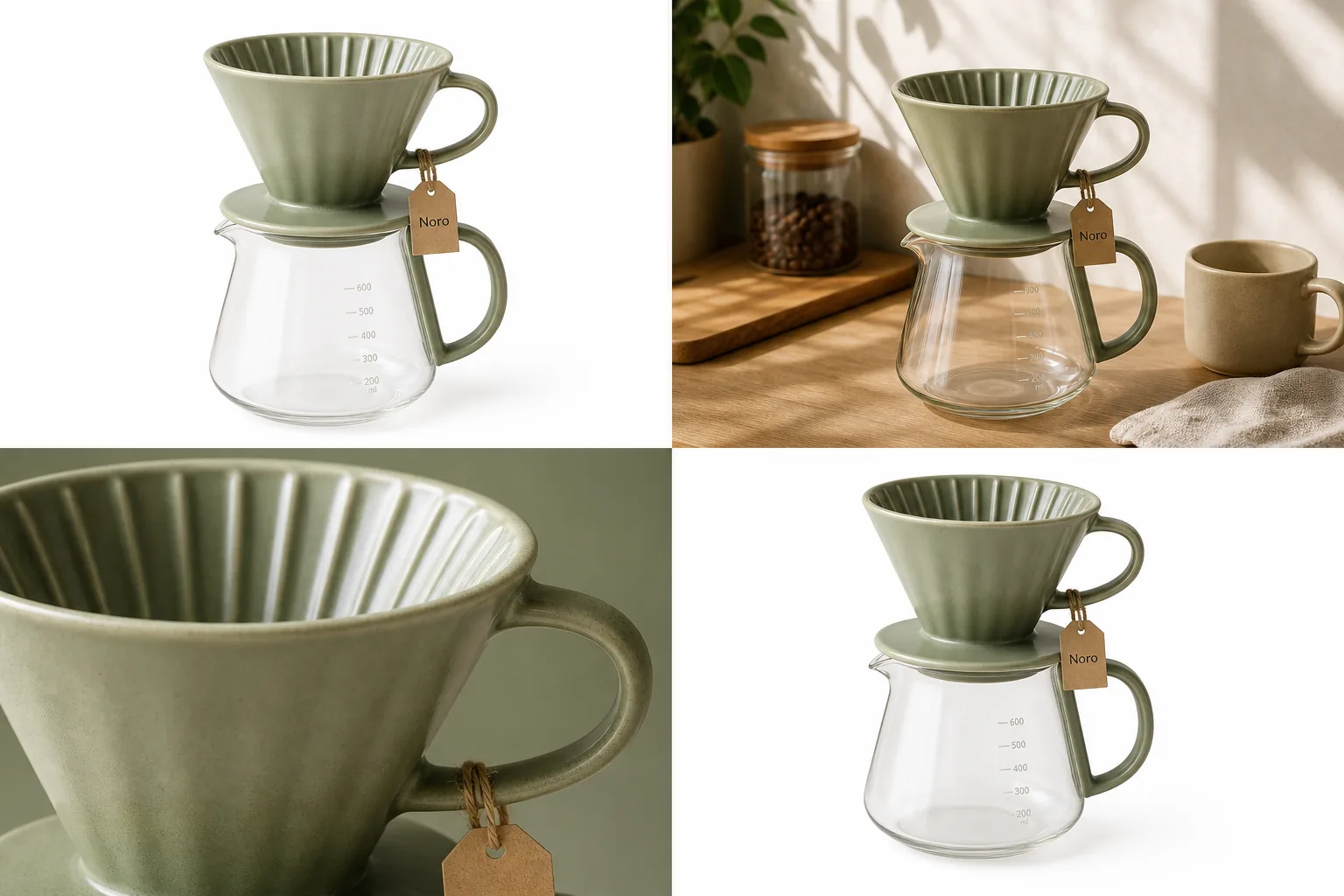
AI product photography tools are easiest to choose by job, not by feature list. Use a generator when you need a new product-led image, a background tool when the setting is the problem, an AI product photo editor when one area needs repair, and an upscaler when the image is right but too small or soft. The best AI product photography tools for ecommerce protect the SKU while making the image easier to sell.
The practical rule: every AI product photography tool should protect product truth before it improves the scene. In KrafLayer, a seller can start with [AI product photography](/ai-product-photography), create an image with the [AI product image generator](/ai-product-image-generator), then use editing tools to clean the result before it reaches a product page.
Match The Tool To The Product Image Job
A good AI product photography tools workflow starts with the image role. A white-background main image, a lifestyle scene, a close detail crop, and an ad crop are different jobs. They should not be forced through the same prompt.
Use this selection rule:
- Use an AI product image generator when you need a new product-led image from a reference.
- Use a product background remover when the product is good but the setting is distracting.
- Use a background replacer when the product is good but needs a cleaner selling context.
- Use a product photo editor when one local area needs repair, cleanup, or polish.
- Use an upscaler when the composition is right but edges, texture, or resolution are weak.
- Use scene composition when the product must sit naturally inside a specific room, surface, or campaign layout.
This keeps the workflow concrete. You are not choosing software in the abstract; you are choosing the next edit that makes the image more useful for ecommerce.
Tool 1: AI Product Image Generator
An AI product image generator is the right starting point when you have a reference product and need a new ecommerce image role: main image, lifestyle image, detail image, campaign visual, or channel-specific crop.
The output should still look like the same product. Before you ask for a richer scene, write down the product facts that cannot change:
- shape, silhouette, and proportions
- material, finish, and true color
- label placement, logo area, package panels, or tag position
- hardware, seams, ridges, ports, buttons, handles, laces, clasps, or closures
- scale cues such as hand size, room size, cup size, furniture height, or product thickness
For the Noro coffee dripper visual in this article, the tool job is not "make a pretty coffee image." The job is to keep the same sage ceramic dripper, glass carafe, ridged cone, handle, tag position, and scale while creating usable product-image roles.
Tool 2: Background Remover Or Background Replacer
Use a [product background remover](/tools/ai-background-remover) when the source product is already accurate but the environment is hurting the listing. This is common with supplier photos, warehouse shots, old campaign images, or phone photos taken on a busy desk.
Use a [background replacer](/tools/ai-background-replacer) when the product is accurate but the selling context is wrong. A skincare bottle may need a clean bathroom counter, a handbag may need a street-style surface, and a coffee dripper may need a warm kitchen scene.
The rule is simple: remove the background when you need inspection. Replace the background when you need context.
Check these after either tool:
- the product edge should not look cut out, fuzzy, or melted
- transparent glass, glossy metal, and soft fabric should keep believable edges
- the contact shadow should match the surface
- product color should not shift with the new background
- no fake badges, marketplace UI, QR codes, barcodes, price stickers, or unsupported claims should appear
Background tools are not just cosmetic. They decide whether the product feels inspectable and trustworthy.
Tool 3: AI Product Photo Editor
A product photo editor is the right tool when the image is mostly correct but one part blocks publishing. Examples include a small glare spot, a crease behind the product, a dust mark, a crooked label, an over-dark shadow, a distracting prop, or a crop that needs extension.
Use the [product photo editor](/product-photo-editor) after generation when the product is close but not final. This is often better than regenerating the entire image, because a full regeneration can quietly change the SKU.
Good local-edit instructions are specific:
Clean the shadow under the same sage ceramic coffee dripper and glass carafe. Keep the dripper color, ridged cone shape, handle, tag, glass measurement marks, carafe shape, scale, and camera angle unchanged. Do not add text, badges, props, logos, or new accessories.
Local editing should reduce risk, not create a new version of the product.
Tool 4: AI Upscaler
Use an upscaler when the product image is already compositionally correct but too small, soft, or compressed for a product page. Upscaling is useful for old catalog photos, supplier images, cropped details, and images that need sharper mobile inspection.
Do not treat upscaling as proof that an image is accurate. Review:
- texture: ceramic glaze, fabric weave, leather grain, wood pores, metal brushing, or glass thickness
- text and label areas: no invented wording or warped characters
- edges: no halos, jagged cutouts, or plastic-looking outlines
- small parts: screws, ports, clasps, buttons, zippers, stones, laces, stitching, or handles
- product scale: the item should not become unnaturally smooth, premium, larger, or redesigned
Upscaling improves the file. It does not replace ecommerce product photography judgment.
A Practical KrafLayer Workflow
For most ecommerce teams, the strongest workflow is not one tool. It is a short tool chain.
Use this KrafLayer sequence:
- Start from the clearest product reference available.
- Define the image role: main image, lifestyle image, detail image, ad crop, or marketplace cleanup.
- Generate one image with the AI product image generator.
- Compare the output to your product truth list.
- Use background removal, background replacement, local editing, or upscaling only where the image needs it.
- Place the final output inside your broader [ecommerce product photography](/ecommerce-product-photography) set so the listing feels consistent.
This workflow is useful because each tool has a clear reason to exist. The generator creates the new image. The editor protects the SKU. The background tools manage selling context. The upscaler improves inspectability.
How To Compare AI Product Photography Tools
Do not compare AI product photography tools by sample-gallery drama alone. Compare them by how well they handle product facts under ecommerce pressure.
Use this checklist:
- Can the tool start from a real product reference?
- Does it support main, lifestyle, detail, background, and ad image roles?
- Can it keep the same SKU across multiple outputs?
- Does it offer cleanup tools after generation?
- Can it handle transparent, reflective, soft, textured, and small-detail products?
- Does it avoid fake platform marks, claims, badges, review stars, and misleading accessories?
- Can the final image be reviewed and edited before publishing?
The best AI product photography tools make product review easier. They do not ask you to publish every generated output blindly.
FAQ
What are AI product photography tools?
AI product photography tools help create, clean, edit, or improve ecommerce product images from references. The useful categories are product image generators, background removers, background replacers, local photo editors, upscalers, and scene composition tools.
Which AI product photography tool should I use first?
Use an AI product image generator first when you need a new product-led image. Use a background remover or editor first when the existing product photo is accurate but messy. The right starting point depends on whether you need creation or cleanup.
Are AI product photography tools safe for ecommerce listings?
They can be useful, but every output needs review. Check product shape, color, material, label placement, scale, included parts, small details, and any on-image text. Do not publish an image that changes what the buyer will receive.
What is the difference between an AI product image generator and a product photo editor?
An AI product image generator creates a new product-image role from a reference or prompt. A product photo editor fixes a specific image problem, such as background clutter, glare, crop, softness, dust, or a local detail that needs cleanup.
How does KrafLayer combine these tools?
KrafLayer connects generation and editing in one product-image workflow. You can plan the image with AI product photography, create it with the AI product image generator, then use background removal, background replacement, upscaling, or product photo editing before publishing.
Conclusion
AI product photography tools work best when each tool has a narrow job. Start with the image role, protect the product facts, then choose generation, background cleanup, local editing, or upscaling based on the problem in front of you. KrafLayer is useful for this workflow because it lets ecommerce teams move from product reference to generated image to final cleanup without treating every product image as a generic creative prompt.
Keep exploring
Continue the story
More practical guidance on product accuracy, composition, and conversion-ready visuals.
Put it into practice
Take the next step in KrafLayer
Choose a generation or editing workflow that matches what you just learned.