Platforms
Amazon Listing Image Optimization: A 6-Point Audit
TL;DR
Audit Amazon listing images by role, sequence, mobile readability, product fidelity, compliance, and controlled testing.
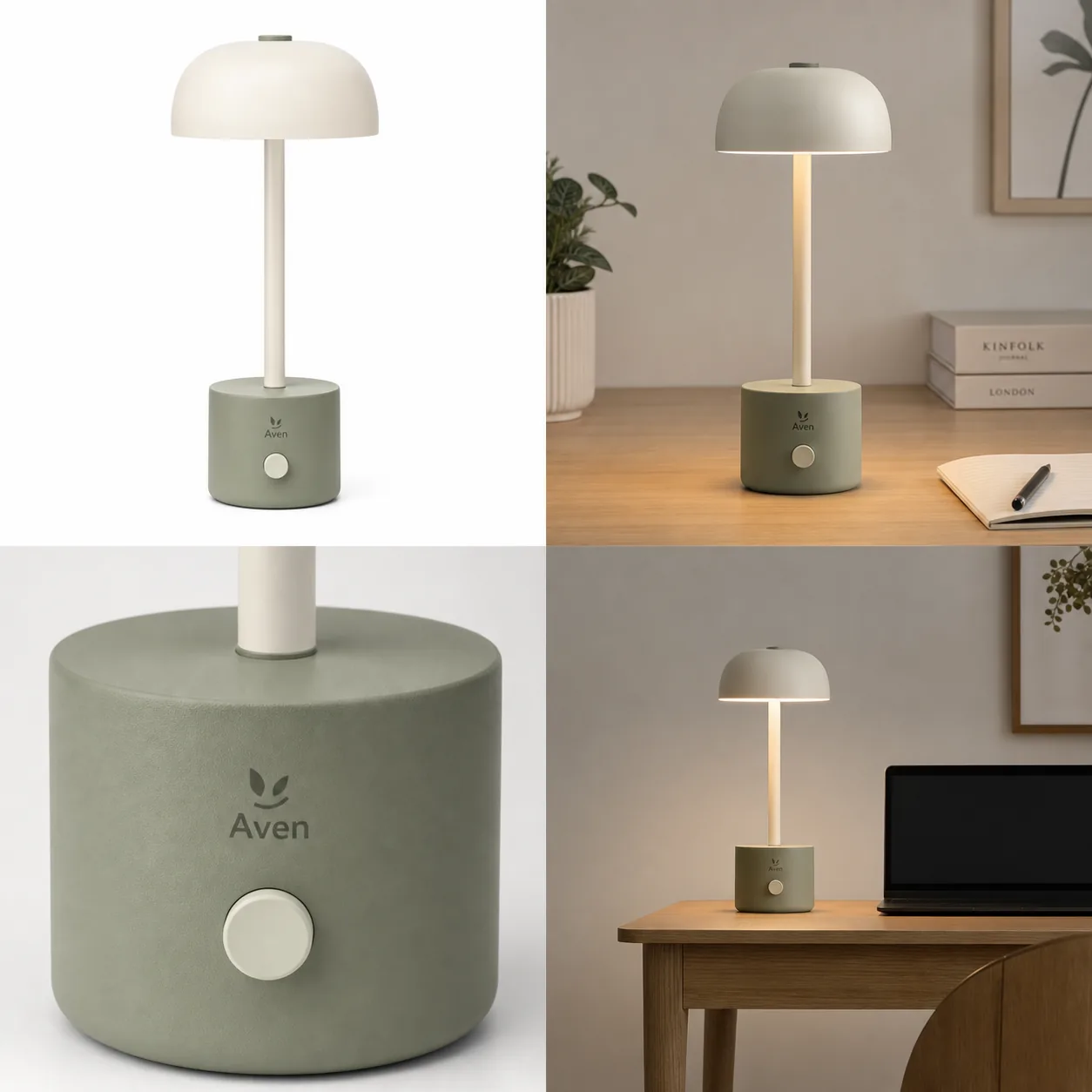
Amazon listing image optimization is the work of finding the next unanswered buying question, assigning it to one gallery slot, and testing the order. It is not the same as brainstorming image types. The companion guide to Amazon secondary images explains how to create detail, lifestyle, scale, and callout assets; the optimization guide focuses on auditing and sequencing the completed set.
The method uses Amazon's current listing, photography, A+ Content, and Manage Your Experiments documentation checked on August 11, 2026. The lamp image is a KrafLayer demonstration, not an ASIN experiment or sales result.
Quick Summary
Amazon allows up to nine product photos and recommends at least six in its photography guidance. Optimize the set by removing repeated roles, moving the biggest buyer objection earlier, keeping the main image factual, and testing one image change at a time with Manage Your Experiments when eligible.
Abstract
Audit image coverage before redesigning assets. Map each slot to identification, construction, scale, use, included items, or objection handling. Then score clarity, fidelity, mobile readability, and duplication. Image creation belongs in the secondary-image guide; sequencing and testing belong here.
Key Takeaways
- Up to nine slots do not require nine images.
- Repetition is a sequencing problem, not more evidence.
- The first secondary image should resolve the largest remaining uncertainty.
- Amazon prefers images above 1,000 pixels per side for zoom.
- Eligible brands can test images with randomized experiments.
Table of Contents
1. [Scope](#optimization-versus-image-creation) 2. [Audit matrix](#audit-every-gallery-slot) 3. [Sequence](#order-images-by-buyer-uncertainty) 4. [Mobile review](#review-the-gallery-on-mobile) 5. [Experiment design](#test-one-image-hypothesis) 6. [A+ boundary](#what-belongs-in-a-content) 7. [Frequently asked questions](#frequently-asked-questions)
Optimization versus image creation
Amazon says sellers can upload up to nine photos and recommends at least six product images. Its photography guide identifies individual, lifestyle, scale, detail, packaging, and group shots as distinct types ([Amazon listings](https://sell.amazon.com/blog/amazon-product-listings); [Amazon product photos](https://sell.amazon.com/blog/product-photos), 2026).
If you still need to create those roles, use the [Amazon secondary image guide](/blog/amazon-secondary-images-detail-lifestyle-scale-callouts). Once the assets exist, optimization asks a different question: which images deserve a slot, and in what order?
*KrafLayer demonstration set. The four panels identify the lamp, prove the control detail, show illumination, and communicate desk scale. They are roles, not measured winners.*
Audit every gallery slot
Amazon prefers images larger than 1,000 pixels on each side for zoom and says accurate, realistic product photos help customer understanding. Audit both technical readiness and information value ([Amazon](https://sell.amazon.com/blog/product-photos), 2026).
| Slot audit | Question | Remove or replace when |
|---|---|---|
| Role | What new buying question does it answer? | Same answer already appears earlier |
| Fidelity | Does SKU, color, text, material, and included parts match? | Product fact drifts |
| Clarity | Is the proof visible without reading tiny copy? | Claim depends on microscopic text |
| Scale | Is size supported by dimensions or believable context? | Perspective misleads |
| Mobile | Does the thumbnail remain distinguishable? | Image becomes visual noise |
| Compliance | Is the main image factual and category-appropriate? | Overlay, prop, or background violates rules |
Score each row pass, repair, replace, or remove. A gallery with seven distinct answers is stronger than nine repetitions.
Order Images by Buyer Uncertainty
The main image identifies the item. After that, order depends on the product's biggest uncertainty. For a compact lamp, size and brightness may come early. For jewelry, scale and clasp matter. For clothing, material and fit coverage outrank a decorative room.
| Buyer uncertainty | Move earlier | Move later |
|---|---|---|
| Will it fit? | Dimensions, scale, on-body or in-room reference | Second decorative angle |
| How is it made? | Detail crop, side/back construction | Generic lifestyle scene |
| What is included? | Complete contents layout | Packaging beauty shot |
| How is it used? | Clear lifestyle or operation view | Repeated white angle |
| Can I trust the claim? | Visible proof or verified specification | Unsupported callout |
Create only the missing role
If the audit reveals a real gap, use the [AI Product Image Generator](/ai-product-image-generator) for that one detail, scale, or lifestyle job, then rerun the gallery audit before publishing.
Review the Gallery on Mobile
Amazon says images above 1,000 pixels per side support zoom, but gallery discovery often begins with small thumbnails. Review the sequence on a phone, not only in an editor ([Amazon](https://sell.amazon.com/blog/product-photos), 2026).
At thumbnail size, check whether adjacent images look meaningfully different. A detail shot should visibly read as detail; a scale image should retain its reference; callout text should not become gray dust. Then open every asset and inspect fidelity at full resolution.
Keep typography restrained. If an image needs a paragraph to explain the feature, the claim may belong in A+ Content or product copy.
Test one image hypothesis
Amazon Manage Your Experiments randomly splits customers between Version A and Version B and can test product images, titles, bullet points, descriptions, and A+ Content. Amazon states that optimized content can increase sales by up to 20%, which is a platform claim rather than a guaranteed ASIN outcome ([Amazon Manage Your Experiments](https://sell.amazon.com/tools/manage-your-experiments), 2026).
Write one hypothesis: moving the scale image from slot five to slot two will resolve the most common size objection earlier. Keep price, title, bullets, and other content stable where possible. Record the ASIN, variants, dates, traffic sufficiency, and result. Do not test a new image and a new order simultaneously if you want to know which change mattered.
What Belongs in A+ Content
Amazon A+ Content supports enhanced images, technical specifications, and comparison charts. Move dense explanations, brand story, cross-product comparison, and long feature proof out of the gallery when the thumbnail becomes unreadable ([Amazon A+ guide](https://sell.amazon.com/blog/a-plus-content-design-guide), 2026).
The gallery should remain product-led. A+ can carry the deeper argument after the image set has established identity, construction, scale, use, and contents.
Verdict
Optimization is subtraction and order. Remove duplicate roles, move the largest uncertainty forward, and test one hypothesis. Do not create another lifestyle image when the gallery is missing a back view or verified dimension.
Frequently Asked Questions
How many Amazon listing images should I use?
Amazon allows up to nine photos and recommends at least six. Use enough to answer distinct questions without repetition. The product may need fewer than nine when main, detail, scale, use, and included items already cover the purchase decision.
What should the second Amazon image show?
It should resolve the biggest uncertainty left by the main image. That may be size, rear construction, material detail, included items, or use. There is no universal second-slot template for every category.
How is optimization different from planning Amazon secondary images?
Yes. Secondary-image planning defines and creates image roles. Listing optimization audits the completed assets, removes duplication, sequences them by buyer uncertainty, checks mobile readability, and runs controlled tests.
Can AI optimize an Amazon gallery automatically?
AI can classify roles and help create a missing asset, but it cannot verify every product fact or know the buyer's primary objection without real data. Use reviews, support questions, specifications, and experiments to guide order.
Should feature callouts go in the gallery or A+ Content?
Keep concise, verified, product-led callouts in secondary images when readable. Move dense explanations, comparison charts, specifications, and brand storytelling into A+ Content modules where there is room to understand them.
References
1. [Amazon: How to create product listings](https://sell.amazon.com/blog/amazon-product-listings), accessed August 11, 2026. 2. [Amazon: Six tips for product photos](https://sell.amazon.com/blog/product-photos), accessed August 11, 2026. 3. [Amazon: Manage Your Experiments](https://sell.amazon.com/tools/manage-your-experiments), accessed August 11, 2026. 4. [Amazon: A+ Content design guide](https://sell.amazon.com/blog/a-plus-content-design-guide), accessed August 11, 2026.
Keep exploring
Continue the story
More practical guidance on product accuracy, composition, and conversion-ready visuals.
Put it into practice
Take the next step in KrafLayer
Choose a generation or editing workflow that matches what you just learned.