Platforms
Amazon Secondary Images: 7 Roles That Answer Buyers
TL;DR
Plan Amazon secondary images for alternate views, detail, scale, lifestyle context, included items, callouts, and buyer objections.
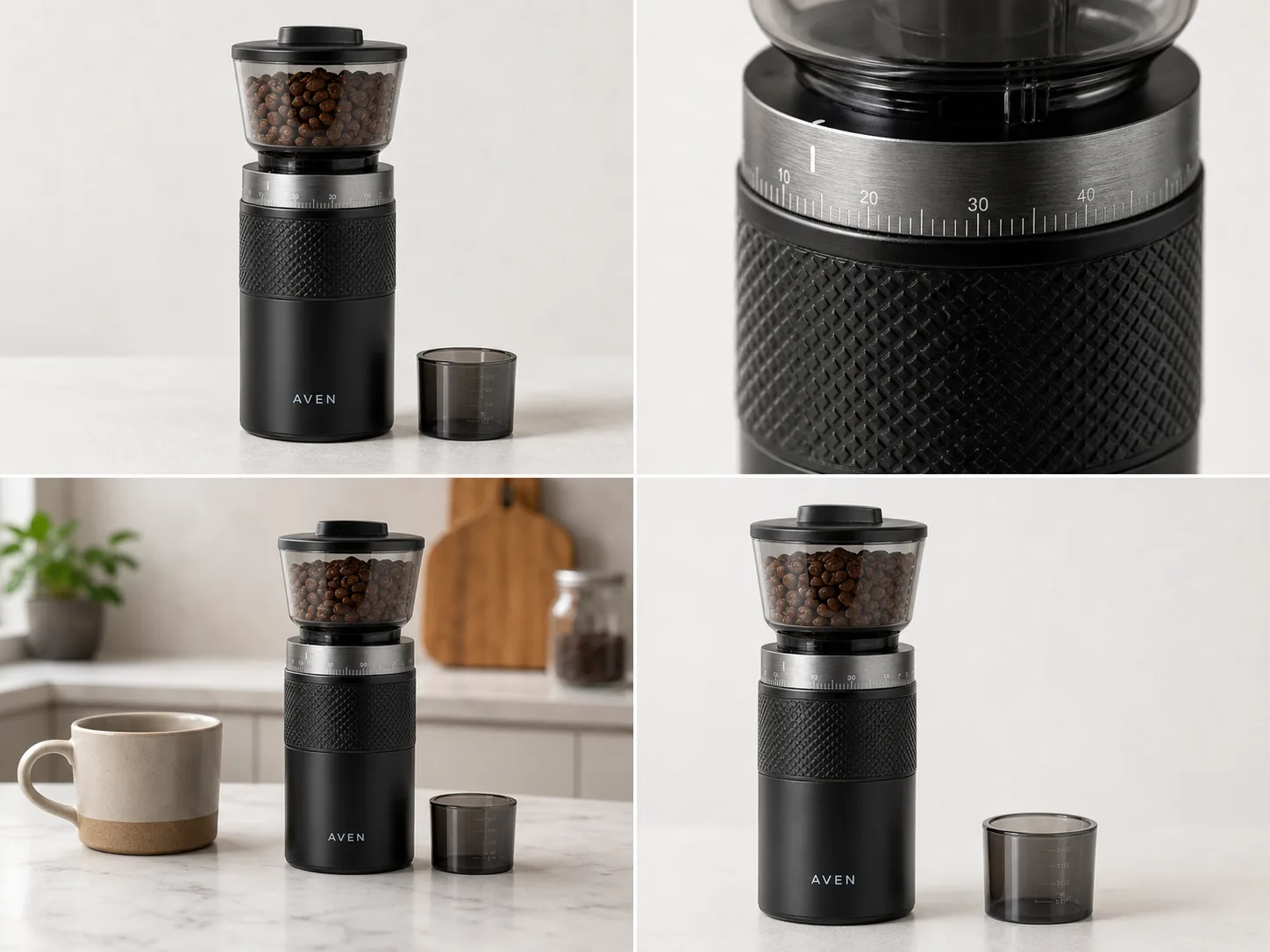
Amazon secondary images should answer buying questions that the main image cannot: What does the material look like up close? How large is it in a hand or room? What is included? How is it used? A useful image set assigns one clear job to each slot instead of repeating the same three-quarter product angle.
The analysis uses Amazon's public listing and product-photography guidance checked on August 11, 2026. The coffee-grinder composite is a KrafLayer demonstration, not a real listing experiment or sales result.
Quick Summary
Amazon says sellers can upload up to nine photos and recommends at least six in its product-photo guidance. Use the secondary set to cover alternate views, detail, use, scale, included items, and one restrained feature callout while keeping every claim and visible part accurate.
Abstract
Begin with the buyer's unresolved questions, then map each to an image role. Keep the main image factual and white; use secondary images for evidence, context, scale, and explanation. Generated lifestyle scenes need the same SKU-fidelity review as any other product image.
Key Takeaways
- Amazon listing guidance allows up to nine photos.
- Amazon recommends images above 1,000 pixels per side for zoom.
- Detail images should prove a visible fact, not decorate a claim.
- Scale images need a known reference and believable perspective.
- Brand owners can test image variants with Manage Your Experiments.
Table of Contents
1. [Method and official guidance](#what-does-amazon-publish-about-product-images) 2. [A practical image sequence](#what-should-an-amazon-secondary-image-set-contain) 3. [Detail images](#how-should-detail-images-prove-a-feature) 4. [Lifestyle and scale](#how-do-lifestyle-and-scale-images-avoid-misleading-buyers) 5. [Callouts and included items](#when-should-you-use-feature-callouts-or-accessory-views) 6. [AI workflow and checks](#how-can-you-build-secondary-images-with-ai) 7. [Testing](#how-should-you-test-the-image-order) 8. [Frequently asked questions](#frequently-asked-questions)
What Does Amazon Publish About Product Images?
Amazon's listing guide says sellers can upload up to nine photos. Its product-photo guide recommends at least six, prefers files larger than 1,000 pixels on each side for zoom, and treats pure white RGB 255, 255, 255 as the default for main product shots ([Amazon listings](https://sell.amazon.com/blog/amazon-product-listings); [Amazon product photos](https://sell.amazon.com/blog/product-photos), 2026).
Those numbers define capacity, not the ideal story for every SKU. We used Amazon's published image types and accuracy guidance to create the sequence below. We did not test a live ASIN, and we make no conversion claim for the demonstration asset.
*KrafLayer demonstration composite. Each panel has a different job: identify the product, show construction, place it in use, and clarify what accompanies it.*
What Should an Amazon Secondary Image Set Contain?
Amazon lists individual, group, lifestyle, scale, detailed, packaging, and 360-degree shots as useful product-photo types. A six-to-nine-image plan can turn those categories into a deliberate answer sequence rather than a pile of variants ([Amazon](https://sell.amazon.com/blog/product-photos), 2026).
| Slot | Image role | Buyer question | Evidence to include |
|---|---|---|---|
| 1 | Main image | What exactly is sold? | Complete product on compliant white background |
| 2 | Alternate angle | What is on the side or back? | Ports, closures, controls, construction |
| 3 | Detail | Is the material or mechanism credible? | Sharp close-up tied to one factual feature |
| 4 | Scale | How large is it in real use? | Hand, body, room, or known object with honest perspective |
| 5 | Lifestyle | Where and how is it used? | Product-led scene with no unsupported accessories |
| 6 | Included items | What arrives in the box? | Only components actually included |
| 7 | Feature callout | Which specification needs explanation? | Short verified text beside visible evidence |
| 8 | Packaging or care | How does it arrive or need care? | Real packaging, dimensions, or instructions |
| 9 | Remaining objection | What still blocks purchase? | Category-specific proof, not a repeated hero |
Do not force nine images when six complete the story. Repetition wastes attention and can introduce inconsistent product details.
How Should Detail Images Prove a Feature?
Amazon says detailed shots help show small features and that accurate photography can help control returns. A detail image earns its slot when the crop visibly supports a specific product fact, such as stitching, a removable tray, a locking mechanism, or a material finish ([Amazon](https://sell.amazon.com/blog/product-photos), 2026).
| Weak detail image | Stronger replacement |
|---|---|
| Random close crop with an unsupported quality slogan | Macro view of the actual seam, weave, hinge, or finish |
| Invented diagram over a beauty image | Real product view with a verified dimension or part label |
| Sharpened unreadable text | New source photo where the label is genuinely legible |
| Three features in tiny boxes | One visible feature with enough scale to inspect |
If the image cannot show the claim, the claim belongs in copy or needs a new photograph. Generative fill must not invent a gasket, port, fastener, texture, or certification mark.
Build one image role at a time
Open the [AI Product Image Generator](/ai-product-image-generator), choose a detail, scale, or lifestyle job, and keep the original product reference beside every output during review.
How Do Lifestyle and Scale Images Avoid Misleading Buyers?
Amazon defines lifestyle images as products in action and scale images as a way to help buyers gauge size through a familiar reference. The two roles can overlap, but scale needs stricter geometry: a hand, countertop, doorway, or common object must relate to the product believably ([Amazon](https://sell.amazon.com/blog/product-photos), 2026).
For lifestyle images, keep the use context ordinary enough to understand. A coffee grinder beside beans and a brewer is clear. A crowded designer kitchen with unrelated appliances may look expensive but makes the SKU harder to identify.
For scale images, begin with the real dimensions. Match camera height and perspective, avoid extreme wide-angle distortion, and do not use a prop whose size varies wildly. If exact size matters, add verified dimension callouts instead of relying on visual inference alone.
| Check | Lifestyle image | Scale image |
|---|---|---|
| Product visibility | Product remains the focal point | Entire relevant dimension remains readable |
| Props | Support the real use case | Provide a known or intuitive size reference |
| Perspective | Feels physically coherent | Does not enlarge foreground or shrink background deceptively |
| Claim risk | No unsupported use or performance | No implied size that conflicts with specification |
When Should You Use Feature Callouts or Accessory Views?
Amazon's main-image standards exclude promotional text and unrelated accessories, while A+ Content offers modules for enhanced images, technical specifications, and comparison charts. Secondary assets and A+ modules have more explanatory room, but every visible claim still needs to match the product ([Amazon A+ guide](https://sell.amazon.com/blog/a-plus-content-design-guide), 2026).
Use a callout when a buyer may miss an important verified detail in a plain photo. Keep text short, high-contrast, and subordinate to the product. Do not add unsupported superlatives or percentages over a generated image.
An included-items view should be literal. Lay out the product, cable, case, adapter, replacement part, or tool only when it ships with that exact variation. If a styled prop is not included, the composition must not imply otherwise.
How Can You Build Secondary Images With AI?
Amazon prefers images larger than 1,000 pixels per side for zoom, so start with source files that can survive close inspection. AI can help change the background or compose context, but it cannot establish hidden product facts from a single front view ([Amazon](https://sell.amazon.com/blog/product-photos), 2026).
1. List the five most important pre-purchase questions from reviews, support tickets, and specifications. 2. Match each question to an image role. 3. Gather source views that show every required product fact. 4. Generate one role at a time with a specific scene and identity constraints. 5. Compare silhouette, color, text, material, components, scale, and shadow with the sources. 6. Add only verified callout copy. 7. Export a consistent square set and check the mobile thumbnail sequence.
Reject an output if a generated scene adds a second unit, changes a control, rewrites label text, hides an included component, or makes the product materially larger or smaller than its specification.
How Should You Test the Image Order?
Amazon's Manage Your Experiments lets eligible brand owners test product images, titles, descriptions, and A+ Content. Amazon says optimized content from these experiments can increase sales by up to 25%, but that is Amazon's platform-level claim, not a guaranteed result for an individual ASIN ([Manage Your Experiments](https://sell.amazon.com/blog/manage-your-experiments), 2026).
Test one meaningful hypothesis at a time. For example: place the scale image third instead of fifth for a compact product where size is a frequent objection. Keep the title, price, and all other image assets stable where the experiment setup allows. Record the date, ASIN, tested variant, hypothesis, and measured outcome. Otherwise, normal sales noise can masquerade as an image insight.
Verdict
The strongest Amazon gallery is a short visual argument. The main image identifies the item; later slots resolve construction, scale, use, included parts, and the biggest remaining objection. Build only the roles the SKU needs, verify every claim, then test one meaningful order change instead of copying a generic nine-image template.
Frequently Asked Questions
What are Amazon secondary images?
They are the images after the primary product image in the listing gallery. Their job is to show additional angles, detail, use, scale, included components, packaging, or verified features. Amazon says listings can include up to nine photos, though the useful count depends on the product.
How many Amazon secondary images should I use?
Amazon recommends at least six product images in its photography guidance and allows up to nine photos in its listing guide. Use enough to answer distinct buyer questions. Six informative images are better than nine near-duplicate hero angles.
Can Amazon secondary images contain text?
The main image has stricter rules against overlays and promotional elements. Secondary and A+ assets can explain features, but text must remain accurate, readable, and category-compliant. Use verified dimensions and product facts, not invented superlatives or claims.
Can AI generate Amazon lifestyle images?
AI can create or replace the environment, but the seller must review the actual SKU. Compare shape, color, label, material, components, scale, light, and shadow with source photos. Keep at least one plain factual view and check current category rules.
What should the first secondary image show?
Use the image that resolves the biggest remaining purchase question after the main view. That may be a back angle, a construction detail, a scale reference, or included components. There is no universal second-slot winner, which is why eligible brands should test meaningful order changes.
References
1. [Amazon: How to create product listings](https://sell.amazon.com/blog/amazon-product-listings), accessed August 11, 2026. 2. [Amazon: Six tips for product photos](https://sell.amazon.com/blog/product-photos), accessed August 11, 2026. 3. [Amazon: Manage Your Experiments](https://sell.amazon.com/blog/manage-your-experiments), accessed August 11, 2026. 4. [Amazon: A+ Content design guide](https://sell.amazon.com/blog/a-plus-content-design-guide), accessed August 11, 2026.
Keep exploring
Continue the story
More practical guidance on product accuracy, composition, and conversion-ready visuals.
Put it into practice
Take the next step in KrafLayer
Choose a generation or editing workflow that matches what you just learned.