Ecommerce
Best Background Colors for Product Photography: 7 Options
TL;DR
Choose among seven ecommerce product-photography backgrounds by image role, edge contrast, product color, channel rules, and catalog consistency.
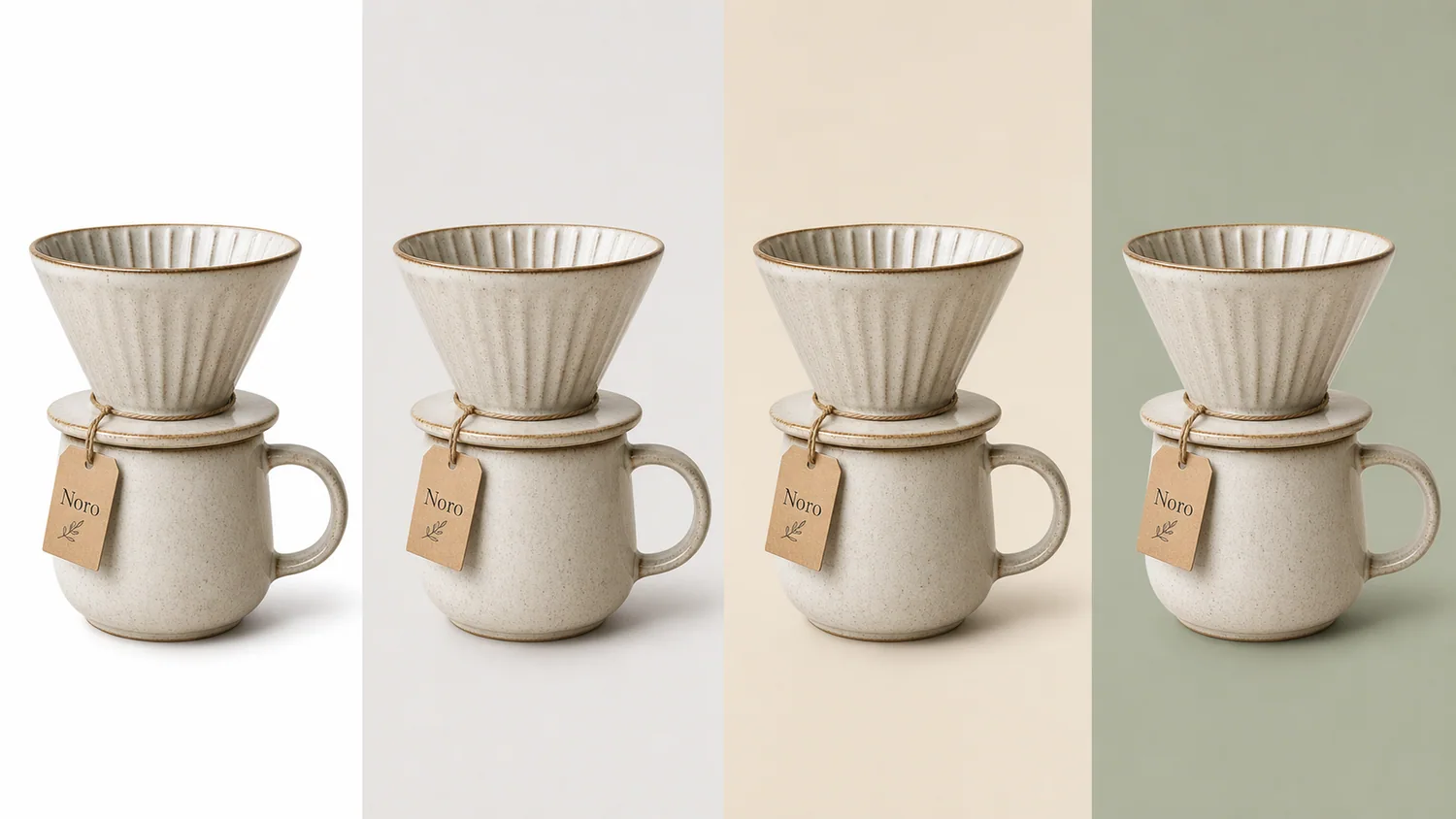
The best background color for product photography is the one that separates the product from the frame, preserves its real color and material, and fits the image's job. It is not automatically the prettiest color. White remains the default for marketplace-style main images. Light gray rescues pale edges. Warm neutrals and muted brand colors belong mainly in secondary, store, and campaign images.
The analysis uses current Google, Amazon, Shopify, and Etsy image guidance checked on August 11, 2026. The four-background ceramic image is a KrafLayer demonstration composite, not a conversion test or customer case study.
Quick Summary
Google recommends a white or transparent background and 75%–90% product fill. Amazon calls pure white, RGB 255, 255, 255, the default for main product shots. Choose color only after deciding the image role, checking edge contrast, and locking the product's true color.
Abstract
Use white for factual main images, light gray when a white product loses its outline, warm beige for natural secondary imagery, muted brand colors for owned-store consistency, and dark tones only when reflective edges remain readable. One SKU can use several backgrounds, but each gallery role should have a reason.
Key Takeaways
- White is the safest starting point for marketplace main images.
- A pale product needs tonal separation, not automatically a darker scene.
- Etsy converts transparent pixels to black, so transparency is not channel-neutral.
- Consistent crop, scale, and light matter as much as a consistent color.
- Test backgrounds on the actual product, not on a palette swatch.
Table of Contents
1. [How the guide was evaluated](#how-was-the-background-color-guide-evaluated) 2. [Background color decision table](#which-background-color-fits-each-image-role) 3. [White and light products](#when-should-you-use-white-or-light-gray) 4. [Warm, brand, and dark colors](#where-do-warm-brand-and-dark-backgrounds-belong) 5. [A five-step selection method](#how-do-you-choose-a-background-color-in-five-steps) 6. [Channel requirements](#what-do-marketplaces-do-with-backgrounds) 7. [Pre-publish checks](#what-should-you-check-before-publishing) 8. [Frequently asked questions](#frequently-asked-questions)
How Was the Background Color Guide Evaluated?
Google recommends solid white or transparent product-image backgrounds and says the product should occupy 75%–90% of the frame. Amazon's current photography guide calls white RGB 255, 255, 255 the default for product shots, while allowing more color and texture for creative or lifestyle views ([Google Merchant Center](https://support.google.com/merchants/answer/6324350?hl=en); [Amazon](https://sell.amazon.com/blog/product-photos), 2026).
We compared those rules with the visual job of five common background families: white, light gray, warm neutral, muted brand color, and dark. We did not run a conversion experiment, and the recommendations are not universal performance claims. They are a decision framework built from channel rules, contrast, and product-fidelity risks.
*KrafLayer demonstration composite. Because the product stays similar across four panels, compare rim visibility, handle separation, ceramic color, shadow, and overall gallery mood. It is not evidence that one color converts better.*
Which Background Color Fits Each Image Role?
Google permits staged or lifestyle images when the product remains clear, but its main-image guidance still favors a solid white or transparent field. That distinction is useful: choose a background for the image's role before choosing it for mood ([Google Merchant Center](https://support.google.com/merchants/answer/6324350?hl=en), 2026).
| Background | Best role | Works well for | Main risk |
|---|---|---|---|
| Pure white | Marketplace main image, catalog grid | Most opaque products and clean comparisons | Pale or translucent edges can disappear |
| Light gray | Main or secondary image where white lacks separation | White packaging, chrome, glass outlines | Gray can create a dirty cast if too warm |
| Warm beige | Secondary, collection, editorial image | Ceramics, food, skincare, natural materials | Can shift cream and skin-adjacent product colors |
| Muted brand color | Store detail image, landing page, ad | Strong brand systems and simple silhouettes | Competes with packaging or creates false color contrast |
| Dark charcoal | Secondary luxury or detail view | Metal, jewelry, glass, luminous products | Lost edges, crushed black materials, dramatic reflections |
| Transparent | Reusable master asset | Layout systems and later compositing | Some channels render transparency unpredictably |
The table is a starting point. A white ceramic mug and a black velvet bag should not receive the same contrast treatment merely because they sit in the same catalog.
When Should You Use White or Light Gray?
Amazon recommends always having white-background images and says product shots should usually use RGB 255, 255, 255. Google also favors white or transparent backgrounds. White therefore carries the least policy ambiguity for a factual main view ([Amazon](https://sell.amazon.com/blog/product-photos); [Google Merchant Center](https://support.google.com/merchants/answer/6324350?hl=en), 2026).
White fails when the product's boundary is also white, translucent, highly reflective, or softly feathered. Do not solve that by dropping the product into a dramatic dark room. First try a very light neutral gray, a slightly stronger contact shadow, or restrained edge lighting. The goal is separation without changing the perceived product color.
| Product issue | Safer first adjustment | Reject when |
|---|---|---|
| White package disappears | Move to neutral light gray | The package looks gray or dirty |
| Glass edge disappears | Add controlled side contrast and retain transparency | Reflections imply a different shape |
| Chrome reflects the white sweep | Add neutral flags or a subtle gradient in a secondary image | Metal becomes flat gray plastic |
| Fine pale fibers vanish | Keep higher-resolution source and review the mask at 100% | The cutout trims real fibers |
See the contrast on your own SKU
Use the [KrafLayer Product Photo Editor](/product-photo-editor) to make a white and light-gray version from the same source. Compare edges, material, label color, and shadow before choosing a catalog standard.
Where Do Warm, Brand, and Dark Backgrounds Belong?
Amazon explicitly treats lifestyle, scale, detail, and packaging shots as useful image types, while Google accepts staged imagery as long as the product is clear. Colored backgrounds have a legitimate role, but usually after the plain product view has answered “what am I buying?” ([Amazon](https://sell.amazon.com/blog/product-photos), 2026).
Warm beige works when the product story is tactile and domestic: ceramics, linen, wood, food, or understated skincare. Watch for warm color contamination. A cool-white bottle photographed on beige can appear cream, which may misrepresent the SKU.
Muted brand colors are most useful across owned-store collection cards or secondary images. Keep saturation below the product's strongest packaging color unless contrast is the specific design idea. If the background becomes the first thing you notice at thumbnail size, it is too loud.
Dark backgrounds suit polished metal, transparent glass, jewelry, and some luxury goods, but only when every outer edge remains visible. Black products on charcoal need rim light and tonal separation. Otherwise the expensive mood removes the evidence a buyer needs.
How Do You Choose a Background Color in Five Steps?
Shopify says consistent aspect ratios create better-looking collection pages and recommends 2048 × 2048 pixels for square product images. The same logic applies to backgrounds: consistency is a system of crop, scale, light, and color, not a hex code alone ([Shopify Help Center](https://help.shopify.com/en/manual/products/product-media/product-media-types), 2026).
1. Name the image role. Main, detail, lifestyle, collection card, ad, and reusable cutout have different constraints. 2. Sample the product's lightest and darkest edges. Check whether both remain visible against the candidate color. 3. Protect color truth. Compare packaging, fabric, glaze, and metal with the source under neutral viewing conditions. 4. Standardize crop and shadow. Lock the canvas ratio, product fill, baseline, and shadow family for the catalog. 5. Export two finalists and inspect thumbnails. A background that works at 100% may swallow the product in a small search card.
Use a compact test set before rolling out a palette. Include your palest product, darkest product, most reflective product, transparent product, and most complex silhouette. Those five files expose more risk than testing five easy boxes.
What Do Marketplaces Do With Backgrounds?
Etsy states that transparent parts of an uploaded image appear black. Google warns that transparent backgrounds behind light-colored products may also appear black. A transparent PNG is a useful master asset, not proof that every destination will display it as intended ([Etsy Help](https://help.etsy.com/hc/en-us/articles/115015663347-Requirements-and-Best-Practices-for-Images-in-Your-Etsy-Shop); [Google Merchant Center](https://support.google.com/merchants/answer/6324350?hl=en), 2026).
| Channel | Official background signal | Practical action |
|---|---|---|
| Google Merchant Center | White or transparent recommended; staged/lifestyle accepted | Preview light products on both white and dark UI contexts |
| Amazon | Pure white is the default for main product shots | Reserve color and lifestyle treatments for secondary images |
| Etsy | Transparency renders black | Flatten the intended background before upload |
| Shopify | Flexible media system, consistent ratios encouraged | Define a store-level palette and crop specification |
Policies change. Recheck the destination's current help page before a large catalog export, especially if the image contains text, props, borders, or generated content.
What Should You Check Before Publishing?
Google's upcoming standard requires product images to reach at least 500 × 500 pixels from January 31, 2027 and recommends around 1500 × 1500 or larger. A good background cannot rescue a tiny or inaccurate source ([Google Merchant Center](https://support.google.com/merchants/answer/6324350?hl=en), 2026).
- The product color matches the source and the correct variant.
- Pale and dark edges remain visible at thumbnail size.
- Reflections and shadows match the chosen surface.
- The background does not imply accessories that are not included.
- Main-image text, logos, and overlays follow channel rules.
- Product fill and crop remain consistent across the catalog.
- Transparent files have been previewed on white and black.
- The original file and reusable transparent master are retained.
Verdict
Choose the background after choosing the image role. White remains the least ambiguous main-image default; light gray protects pale edges; warm and brand colors earn their place in secondary imagery; dark tones need deliberate rim separation. Standardize the system, then allow small exceptions when one SKU would otherwise disappear.
Frequently Asked Questions
What is the best background color for ecommerce product photography?
White is the safest default for marketplace-style main images because Google and Amazon both favor it. It is not automatically best for every secondary image. Use light gray for weak pale edges, warm neutrals for natural categories, and brand colors only when the product remains the strongest visual element.
Should a white product use a white background?
It can, if its outline remains clear through lighting, shadow, and tonal separation. If the edge disappears, try neutral light gray before using a dramatic color. Inspect at both 100% zoom and thumbnail size, because different defects appear at each scale.
Are colored backgrounds allowed in product listings?
Rules depend on the channel and image role. Amazon treats white as the default for main shots but encourages lifestyle and scale imagery. Google accepts staged or lifestyle images when the product is clear. Check the current category rules before publishing.
Should every product use exactly the same background?
Use the same background family, crop, baseline, and shadow logic for comparable gallery roles. Do not force one exact tone when it hides a pale or dark SKU. Consistency should make products easier to compare, not erase their edges.
Is a transparent background better than white?
Transparency is better as a reusable production master. It is not universally safer for publishing. Etsy renders transparent pixels black, and Google warns about light products on transparency. Flatten a channel-specific copy while preserving the original transparent PNG.
References
1. [Google Merchant Center: Image link requirements](https://support.google.com/merchants/answer/6324350?hl=en), accessed August 11, 2026. 2. [Amazon: Six tips for product photos](https://sell.amazon.com/blog/product-photos), accessed August 11, 2026. 3. [Shopify Help Center: Product media types](https://help.shopify.com/en/manual/products/product-media/product-media-types), accessed August 11, 2026. 4. [Etsy Help: Image requirements and best practices](https://help.etsy.com/hc/en-us/articles/115015663347-Requirements-and-Best-Practices-for-Images-in-Your-Etsy-Shop), accessed August 11, 2026.
Keep exploring
Continue the story
More practical guidance on product accuracy, composition, and conversion-ready visuals.


Put it into practice
Take the next step in KrafLayer
Choose a generation or editing workflow that matches what you just learned.