Image generation
How to Create Furniture Lifestyle Photos Without Changing Product Color
TL;DR
A practical workflow for creating AI furniture lifestyle photos while preserving true product color, wood tone, fabric shade, material, and scale.
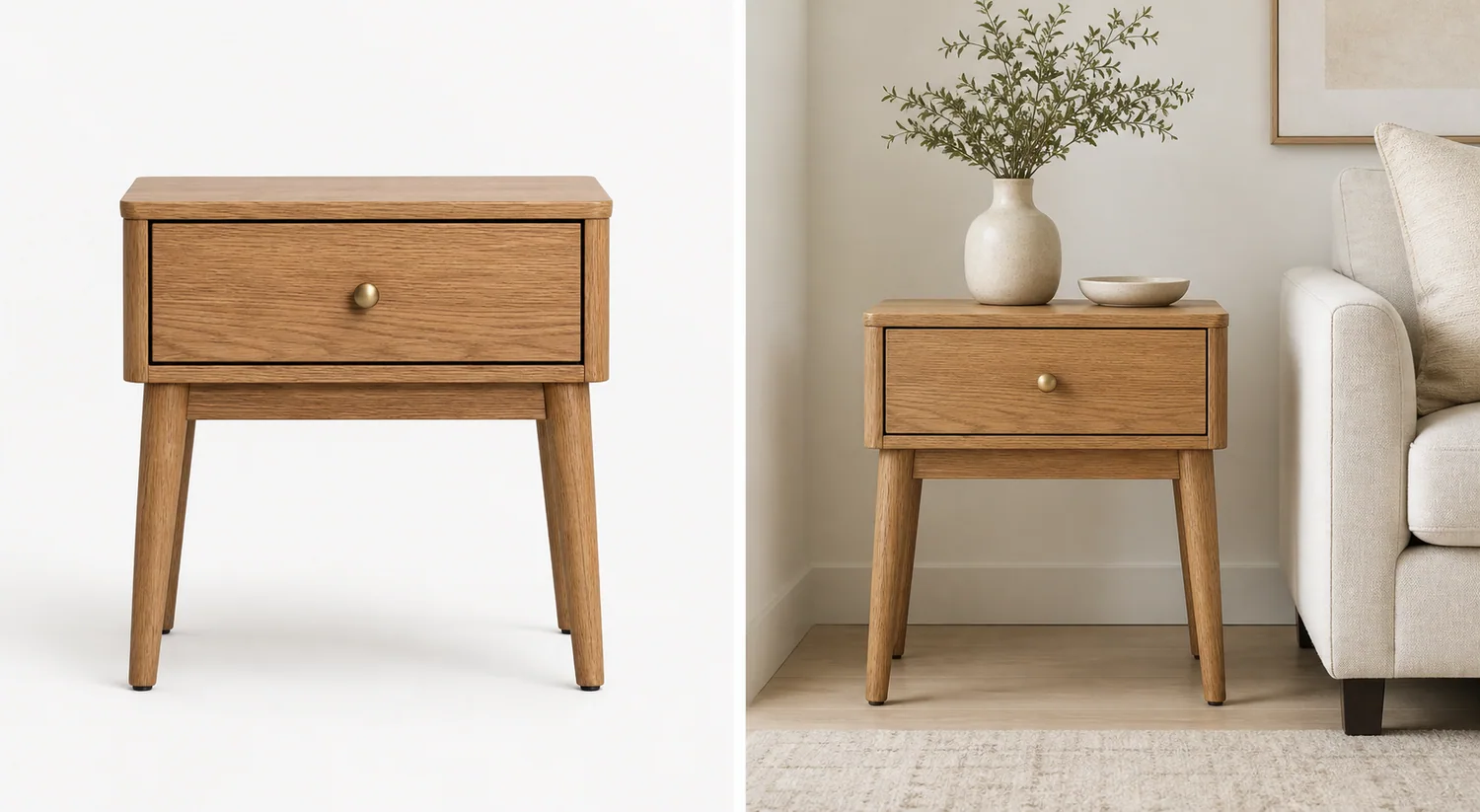
AI furniture product photos without changing product color need a reference-first workflow. The scene can change from white background to living room, bedroom, office, or entryway, but the oak tone, fabric shade, metal finish, grain direction, silhouette, and scale impression must still match the product being sold.
Practical rule: treat the furniture reference as the product truth and the room as the selling context. If the AI makes a walnut table look like pale oak, turns warm beige upholstery gray, darkens a natural rattan cabinet, or changes leg shape to match the room style, the image is not ready for ecommerce.
KrafLayer fits this AI product photography workflow when you need product-scene images from a real furniture reference, but still want a merchant review step before uploading the result to a store.
What Color Preservation Means For Furniture Images
Color preservation means the generated lifestyle image keeps the real finish family, undertone, material texture, and contrast from the product reference. For furniture, this matters because shoppers use color to judge whether the item will match their room.
For a wood nightstand, preserve the oak, walnut, black ash, whitewash, or painted finish. For a sofa, preserve the upholstery shade, weave, cushion shape, and seam color. For metal shelving, preserve black, brass, chrome, brushed steel, or powder-coated finish without adding fake patina.
A useful furniture lifestyle image can improve light, room context, crop, styling, and mood. It should not quietly redesign the product to fit the room.
Why AI Changes Furniture Color
Furniture scenes have strong environmental color pressure. Wall paint, flooring, sofa fabric, rugs, window light, and warm lamps can push the model to recolor the product so the room looks more harmonious.
Common color and identity failures include:
- natural oak becoming orange, gray, or walnut
- beige upholstery shifting green, yellow, or cool gray
- black metal turning matte charcoal or glossy plastic
- rattan weave becoming a different material
- brass knobs changing into black pulls or silver hardware
- wood grain direction disappearing or becoming overly sharp
- the product scale changing to match the sofa or wall
- the lifestyle image looking better than the real SKU but less truthful
This is why furniture lifestyle product photos should be reviewed like store assets, not mood-board images.
Start With A Product-Truth Reference
Choose one source photo where the important product facts are visible. It does not need to be a perfect studio image, but it should show the true color and material in neutral light.
Before generating, write a product-truth list:
1. Product type and count. 2. Main color and undertone. 3. Material and finish. 4. Wood grain, fabric weave, rattan pattern, or metal texture. 5. Legs, handles, seams, drawers, arms, shelves, or hardware. 6. Height-to-width proportion and visible depth. 7. Contact shadow and scale cues.
This list gives you a review standard. Without it, a lifestyle scene can look beautiful while drifting away from the actual product.
Use A Restrained Lifestyle Scene
The room should support the SKU, not compete with it. For furniture, restrained context is usually better than a fully decorated interior.
Good scene choices include:
- oak nightstand beside a neutral bed or sofa
- accent chair near a plain wall and small rug
- console table in an entryway with one vase
- dining chair near a simple table edge
- shelving unit against a clean wall with minimal props
- side table in a soft daylight corner
Avoid asking for a complete showroom unless you need a campaign image. Too many props, strong wall colors, dark lighting, and competing furniture pieces make color review harder.
Prompt Pattern For Furniture Color Accuracy
Use the prompt to protect the product before you describe the room.
Create a realistic ecommerce lifestyle photo using this warm natural oak nightstand as the exact product reference. Keep the same oak color, grain direction, drawer line, round brass knob, leg shape, proportions, camera angle, scale impression, and natural finish. Place it beside a neutral sofa in a softly lit living room with a pale wall and muted rug. The room should support the nightstand without changing its color or material. Do not darken the wood, change the finish, alter the legs, add extra drawers, replace the knob, add logos, add readable text, add marketplace badges, or introduce competing furniture products.
The prompt works because it names the protected product facts and keeps the scene simple. The AI has less room to reinterpret the furniture as a different SKU.
For other furniture categories, replace the protected details:
- sofa: upholstery color, weave, cushion count, arm shape, seam placement, leg material, and scale
- cabinet: door lines, drawer spacing, handles, wood tone, side depth, and leg height
- chair: back shape, seat cushion, fabric color, frame finish, arm position, and leg angle
- table: top thickness, edge profile, grain direction, leg shape, finish, and tabletop proportion
- shelf: frame color, shelf spacing, panel thickness, hardware, and wall contact
Review The Lifestyle Output Before Publishing
Compare the generated image against the reference at full size. Do not approve it only because the room looks good.
Check these points:
- Does the furniture still read as the same SKU?
- Did the main color and undertone stay stable?
- Is the wood grain, fabric weave, rattan pattern, or metal finish plausible?
- Are handles, legs, drawer lines, seams, and shelves unchanged?
- Did the room lighting create a color cast that misrepresents the product?
- Does the product scale make sense beside the sofa, bed, wall, or floor?
- Are props secondary rather than competing products?
- Is there any fake text, logo, badge, certification mark, barcode, or claim?
If the product color changes, regenerate with a narrower prompt or fix the affected area before publishing. For ecommerce, a less dramatic but accurate lifestyle image is stronger than a beautiful scene with the wrong finish.
Where KrafLayer Fits In The Workflow
Use [KrafLayer's AI product photography](/ai-product-photography) workflow when you want to turn a furniture reference into a product-scene image. Start with the real product, generate one room direction, and review the result against the product-truth list.
If the scene works but a small area needs cleanup, use the [product photo editor](/product-photo-editor) instead of regenerating everything. A local correction is often safer than asking the model to rebuild the full room.
For broader image planning, the [ecommerce product photography](/ecommerce-product-photography) page explains how main images, detail images, and lifestyle images work together. Furniture usually needs all three: a clear main image, a material/detail image, and a restrained lifestyle image for scale and context.
A Safe Furniture Lifestyle Workflow
Use this process when creating furniture lifestyle images with AI:
1. Select a neutral product reference with true color. 2. Write the product-truth list before generating. 3. Choose one room role, such as bedroom, living room, office, or entryway. 4. Protect color, material, finish, grain, hardware, proportions, and scale in the prompt. 5. Keep props and competing furniture minimal. 6. Compare the output against the source image at full size. 7. Edit or regenerate when color, shape, or material drifts.
The best AI furniture lifestyle image makes the product easier to imagine in a home without making the buyer expect a different finish.
FAQ
Can AI create furniture lifestyle photos without changing product color?
Yes, but only with a controlled workflow. Use a clear reference photo, name the exact color and material in the prompt, keep the room restrained, and review the output against the source image. Do not assume the AI preserved color just because the scene looks realistic.
Why does AI change wood or fabric color in furniture photos?
AI often harmonizes the product with the room. Warm flooring, colored walls, sofa fabric, and window light can push wood, upholstery, rattan, or metal toward a different tone. That is useful for mood boards but risky for ecommerce product images.
What should I check first in AI furniture product photos?
Check product identity first: color, undertone, material texture, hardware, legs, seams, drawers, shelves, proportions, visible depth, and scale. Background style matters only after the product still matches the real SKU.
Should furniture lifestyle images include lots of room props?
Usually no. Props should explain scale and use context without becoming the subject. One sofa edge, rug, lamp, vase, bed corner, or wall surface is often enough. Too many props make the image look like interior inspiration instead of a product asset.
Can I use one AI image for both product listing and ads?
You can reuse a strong lifestyle image, but listings and ads have different jobs. A listing image should prioritize color accuracy, material, scale, and product clarity. An ad can be more atmospheric, but it still should not change the furniture finish or SKU facts.
Conclusion
AI furniture product photos without changing product color are possible when the workflow keeps product truth ahead of room styling. Start with a clear reference, protect color and material in the prompt, use a restrained lifestyle scene, and review the output like a merchant before publishing. KrafLayer can help turn furniture references into ecommerce lifestyle images, but the strongest results are the ones where the room adds context while the product still looks like the exact item the buyer will receive.
Keep exploring
Continue the story
More practical guidance on product accuracy, composition, and conversion-ready visuals.

Put it into practice
Take the next step in KrafLayer
Choose a generation or editing workflow that matches what you just learned.