Image generation
How to Generate Electronics Product Images Without Changing Ports
TL;DR
A practical workflow for generating electronics product images with AI while preserving ports, buttons, seams, labels, material, and scale.
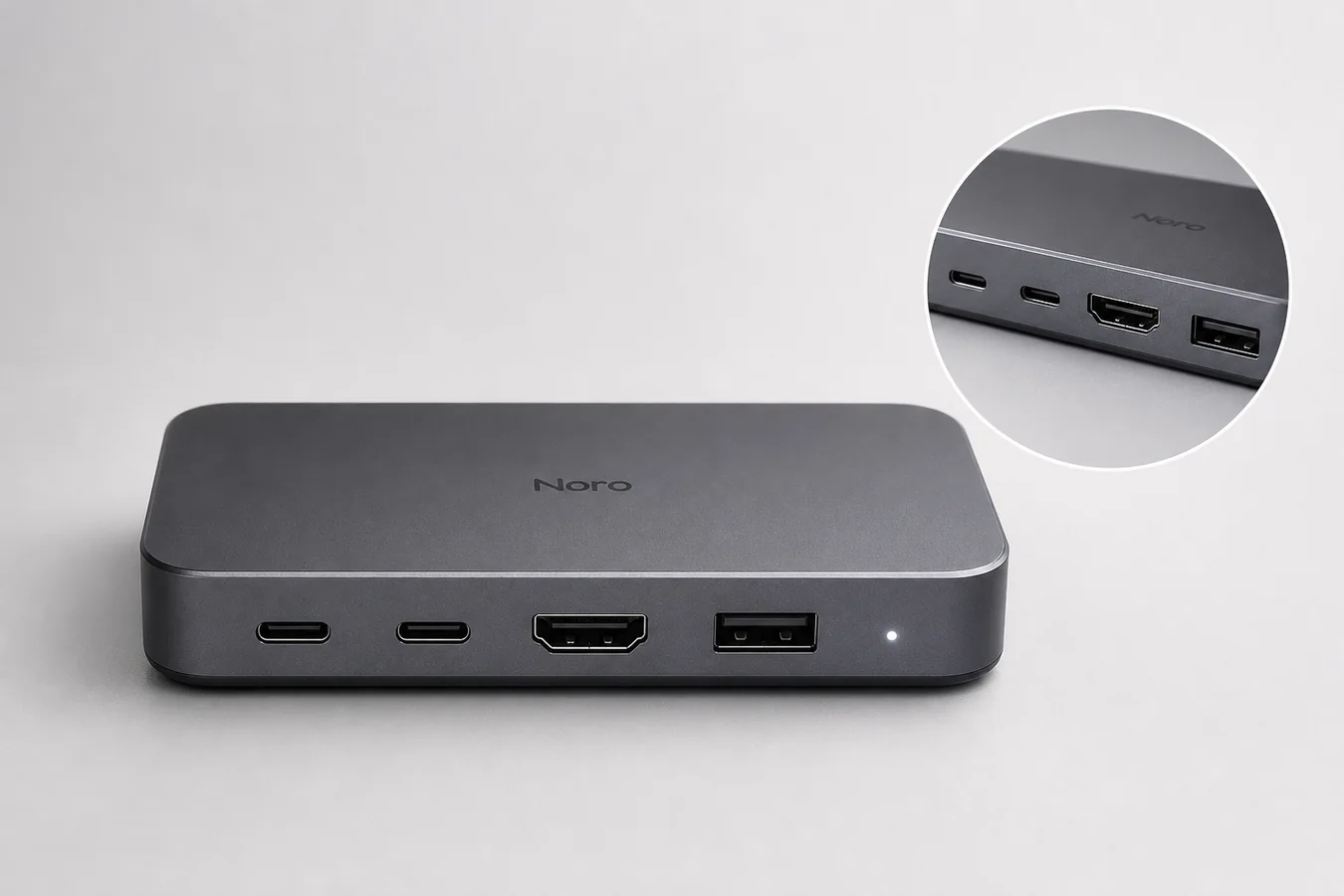
AI product images for electronics with accurate ports need a stricter workflow than lifestyle or fashion images. The product is not just a shape; the ports, buttons, screen cutouts, indicator lights, seams, vents, finish, and scale are part of what the buyer is evaluating.
Practical rule: generate the selling image, but treat the reference photo as the product truth. If the AI changes a USB-C port into a USB-A port, moves an HDMI slot, adds an extra button, or hides a connector, the image is not ready for ecommerce.
KrafLayer is useful for this kind of AI product image generator workflow because you can start from a real electronics reference, create a cleaner ecommerce image, then review and edit the output before it becomes a store asset.
What Accurate Ports Mean In Electronics Product Images
Accurate ports means the AI image preserves the buyer-relevant hardware details from the real SKU. For electronics, this includes connector type, port count, port order, spacing, orientation, labels, LEDs, screws, vents, seams, bezels, buttons, speaker holes, camera bumps, and material finish.
A good electronics product image can improve lighting, crop, background, and selling context. It should not invent new hardware.
For a USB-C docking hub, the image should keep the exact front edge, connector shapes, slot count, indicator light, rounded corners, finish, and product scale. For a keyboard, it should preserve key layout, legends, case shape, knob placement, and cable position. For a smartwatch, it should preserve bezel shape, side button placement, sensor area, band connection, and display proportions.
Why Electronics Are Easier To Break With AI
Electronics images contain small structured details. AI can make the overall product look convincing while quietly changing a technical detail that matters to the buyer.
Common failure points include:
- USB-C ports becoming wider USB-A slots
- HDMI, SD card, or Ethernet ports changing shape
- buttons moving from one side to another
- labels, icons, and port markings becoming fake or unreadable
- vents and speaker holes multiplying
- bezels, seams, and corners shifting
- screens showing fake interface claims
- product scale changing between main and detail images
This is why electronics product photography with AI needs review at the detail level. A polished image with wrong ports can create returns, support questions, or buyer distrust.
Start With A Product-Truth Reference
Use one source image where the hardware facts are clear. It does not need to be a perfect studio photo, but it should show the details that cannot change.
Before generating, make a short product-truth list:
1. Port count and order. 2. Connector shapes. 3. Buttons, switches, and LEDs. 4. Screen, lens, or display shape. 5. Seam, vent, screw, and edge placement. 6. Material finish and color. 7. Approximate scale and camera angle.
This list becomes the review checklist for every generated image. Without it, it is too easy to accept an image because it looks premium while missing the actual SKU.
Use One Image Role At A Time
Do not ask one AI generation to create every asset at once. Electronics images work better when each output has one ecommerce job.
Use a clean main image when the buyer needs fast product recognition. Use a detail image when the buyer needs to inspect a port, texture, button, hinge, or screen edge. Use a lifestyle image only after the product facts are stable.
A practical set might include:
- main image on a clean background
- front-port detail image
- top or side angle for controls
- scale image with a simple desk setup
- campaign image for an ad or landing page
This keeps the article's core rule intact: generate electronics product images one role at a time, then compare each result against the reference.
Prompt Pattern For Accurate Electronics Details
Use the prompt to protect the physical product, not just to describe a prettier scene.
Create a clean ecommerce product image of this matte graphite USB-C docking hub on a light gray studio surface. Keep the exact rectangular rounded body, two USB-C ports, one HDMI port, one USB-A port, small LED indicator, front-edge spacing, material texture, brand mark, camera angle, scale, and soft contact shadow unchanged. Improve lighting and clarity only. Do not add extra ports, cables, certification marks, marketplace badges, screen UI, barcode, QR code, labels, hands, or extra products.
The prompt works because it names both the image role and the hardware facts. It also tells the model what not to invent.
For other products, replace the protected details:
- headphones: ear cup shape, hinge, ports, buttons, fabric mesh, and headband curve
- smart speaker: grille pattern, buttons, cable opening, LED ring, and product height
- monitor: bezel width, stand shape, ports, screen ratio, and logo placement
- keyboard: key layout, legends, switches, knob, cable, and case profile
Review The Generated Image Like A Product Page Editor
Before publishing, compare the output against the source image. Zoom in on the areas a buyer would inspect.
Check these details:
- Are the same ports present?
- Are the ports in the same order?
- Are connector shapes believable?
- Did the AI add or remove a button?
- Did the material finish stay true to the product?
- Are labels, icons, and brand marks fictional or approved?
- Did the image add certification marks, marketplace logos, barcodes, or fake claims?
- Does the detail image still match the main image?
If any hardware fact changed, regenerate with a narrower prompt or fix only the affected area with an editor workflow. Do not publish the image because it looks attractive.
Where KrafLayer Fits In The Workflow
Use [KrafLayer's AI product image generator](/ai-product-image-generator) when you need a cleaner main image, detail image, or ecommerce scene from a real product reference. For electronics, the best workflow is reference first, generation second, review third.
If the output is mostly right but one small area is wrong, move into the [product photo editor](/product-photo-editor) workflow instead of regenerating the entire scene. Local edits are often safer when the product body, lighting, and crop are already working.
For broader image planning, the [ecommerce product photography](/ecommerce-product-photography) page explains how main images, detail images, and scene images work together as a selling system. Electronics benefit from that structure because technical trust and visual appeal both matter.
A Safe Electronics Image Workflow
Use this workflow when producing electronics visuals with AI:
1. Choose the clearest product reference. 2. Write a product-truth list before generating. 3. Generate one image role at a time. 4. Protect ports, buttons, seams, finish, labels, and scale in the prompt. 5. Compare the output against the reference at full size. 6. Fix small errors locally when possible. 7. Export only images where hardware facts match the SKU.
The strongest AI electronics images are not the most dramatic ones. They are the ones that make the product easier to understand without changing what the customer will receive.
FAQ
Can AI generate electronics product images accurately?
AI can generate useful electronics product images, but accuracy depends on the workflow. Use a clear reference image, protect the exact ports and hardware details in the prompt, and review the output before publishing. Do not assume a polished render is technically accurate.
What should I check first in AI-generated electronics photos?
Check the buyer-relevant hardware first: port count, connector shape, button placement, screen or lens shape, seams, vents, labels, LEDs, material finish, and product scale. These details affect trust more than background style or dramatic lighting.
Can I use AI images for product detail images?
Yes, but detail images need tighter review than hero images. A detail crop should show real material, accurate ports, correct button placement, and the same product identity as the main image. If the detail view invents hardware, it should be regenerated or edited.
What prompt helps keep electronics ports unchanged?
Use a prompt that names the exact product role and protected details: port count, port order, connector type, button placement, finish, scale, and camera angle. Also add negative instructions against extra ports, fake labels, certification marks, marketplace badges, and extra products.
Should electronics AI images use lifestyle scenes?
Lifestyle scenes can work after the product facts are stable. Start with a clean main image or detail image, verify the hardware, then create a restrained desk, workspace, gaming, kitchen, or travel scene. The scene should support the product without hiding ports or changing scale.
Conclusion
Electronics product images need more than good lighting and a clean background. They need accurate ports, buttons, seams, finish, and scale because those details shape buyer trust. KrafLayer helps sellers turn a real electronics reference into AI product images, detail images, and ecommerce scenes, but the best workflow keeps product truth in control: generate one asset at a time, review every hardware detail, and publish only images that match the SKU.
Keep exploring
Continue the story
More practical guidance on product accuracy, composition, and conversion-ready visuals.





Put it into practice
Take the next step in KrafLayer
Choose a generation or editing workflow that matches what you just learned.