Image generation
How to Generate Street-Style Handbag Product Photos With AI
TL;DR
A practical workflow for generating street-style handbag product photos while preserving shape, strap, leather texture, hardware, and scale.
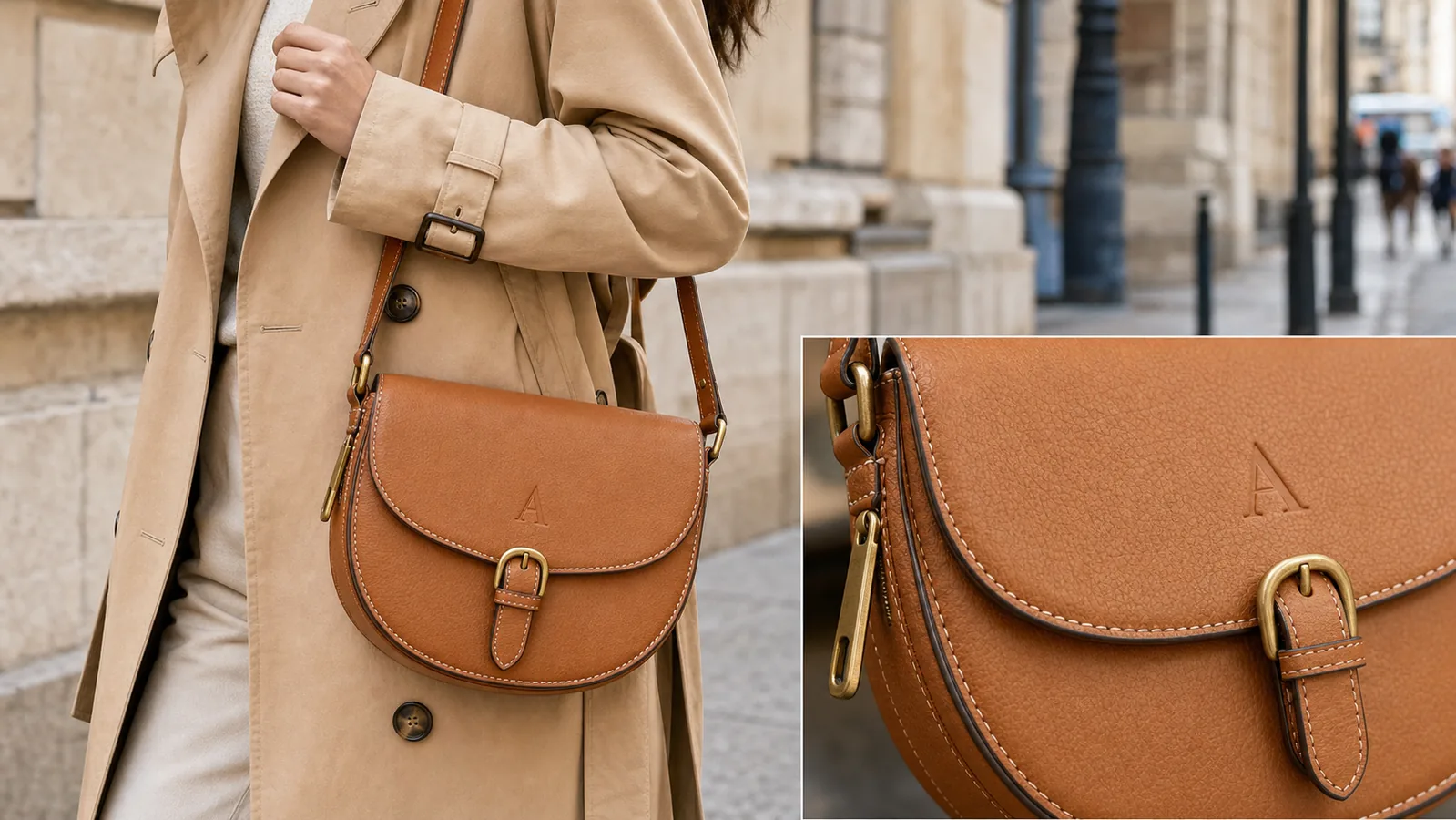
AI handbag street style product photos work best when the handbag stays the hero and the street scene only proves scale, styling, and material. The goal is not a vague fashion mood image. The goal is a sellable ecommerce visual where a buyer can read the bag shape, leather texture, strap length, hardware, and how it sits on the body.
The practical rule: lock the handbag facts first, then generate the street context around them. In [KrafLayer AI product photography](/ai-product-photography), use the strongest product reference as the source of truth, create one lifestyle role at a time, and review the finished image in the [product photo editor](/product-photo-editor) before it goes into a listing, lookbook, or ad.
What A Street-Style Handbag Image Must Prove
A strong street-style handbag photo should answer three buyer questions quickly:
- What is the actual handbag being sold?
- How large does it feel on a person?
- What material and hardware details make it worth inspecting?
That is different from generic lifestyle photography. A handbag can look stylish while still failing as ecommerce product photography if the strap is hidden, the flap shape changes, the buckle becomes a different design, or the model pose blocks the product. AI can make a bag look more fashionable, but the seller still has to protect the SKU.
Use this rule when judging the output:
A street-style handbag image is useful only if the buyer can recognize the same product from the main catalog photo.
Build A Handbag Fact List Before Prompting
Before generating, write a short product-truth list. This keeps the scene from redesigning the bag.
- Silhouette: protect the bucket, tote, crossbody, shoulder, hobo, satchel, or flap shape because buyers compare the shape first.
- Strap: protect the length, width, attachment points, buckle, chain, or shoulder pad because scale and wearability depend on it.
- Hardware: protect the buckle, zipper pull, clasp, studs, feet, rings, and logo plate because small changes can imply a different SKU.
- Material: protect leather grain, canvas weave, suede nap, or nylon sheen because texture is a selling point.
- Stitching: protect edge paint, seam placement, stitch spacing, and quilting because detail quality signals value.
- Color: protect the true shade under realistic light because fashion shoppers notice drift quickly.
- Size: protect how the bag sits against torso, hand, or hip because lifestyle images must not exaggerate capacity.
For AI handbag street style product photos, this table is more important than dramatic scenery. It gives you a clean review standard after generation.
Workflow For Generating Street-Style Handbag Photos
Use a controlled sequence:
- Start with the cleanest product reference image.
- Decide the image role: listing lifestyle image, PDP detail image, ad creative, or lookbook crop.
- Choose one street context: sidewalk, cafe exterior, storefront, transit stop, or simple city wall.
- Keep the model crop practical so the handbag is not blocked by hands, coats, or props.
- Ask for one bag, one clear pose, and one product-facing camera angle.
- Generate the lifestyle image.
- Compare the output against the original bag fact list.
- Clean the crop, background, or minor distractions in the editor before publishing.
This workflow makes [AI product photography](/ai-product-photography) behave more like a production process than a style lottery. The scene can feel editorial, but the product should still feel inspectable.
Prompt Template
Use this prompt when you have a product reference:
Create a realistic street-style ecommerce product photo using the reference handbag as the product truth. Keep the exact handbag silhouette, strap length and attachment points, leather or fabric texture, stitching, edge paint, hardware shape, zipper pull, buckle, color, scale, and logo or blank label placement. Show one cropped model wearing or carrying the handbag in a clean city sidewalk context. Make the handbag the dominant subject. Do not redesign the bag, add extra bags, add real brand logos, add marketplace UI, add review stars, add badges, add QR codes, add barcodes, or make unsupported claims.
For a detail-supporting image, add:
Include a small matching detail view of the same handbag material and hardware. The detail must match the main bag exactly.
For a cleaner marketplace crop, add:
Keep the background restrained, with enough context for lifestyle value but no clutter that competes with the product.
What To Check Before Publishing
Review the generated image against the original SKU:
- Is the bag still the same shape?
- Are the strap anchors, buckle, zipper, and rings in the same places?
- Does the leather grain or fabric weave match the product?
- Is the true color close enough for a buyer-facing page?
- Does the size on body feel plausible?
- Are hands, coats, or shadows hiding the product?
- Did AI invent logos, charms, pockets, tags, or hardware?
- Is the image useful at thumbnail size?
- Would the same bag be recognizable from a white-background photo?
If any buyer-relevant product fact changed, fix or reject the image. A polished street scene is not worth publishing if it sells the wrong bag.
Main Image Vs Detail Image Roles
Do not make every handbag image do the same job. A street-style main image should show scale and styling. A detail image should show material, stitching, hardware, and finish.
For a product page, a practical set might be:
- White or clean background main image for direct inspection.
- Street-style lifestyle image for scale and outfit context.
- Close detail image for leather grain, zipper, buckle, stitching, or edge paint.
- Interior or capacity image if the bag opens and storage is a buyer question.
KrafLayer can help create or edit each role, but the same product-truth list should guide all of them. That is how [ecommerce product photography](/ecommerce-product-photography) stays consistent while still giving the buyer more reasons to trust the product.
Common Mistakes
The most common mistake is treating "street style" as permission to hide the handbag. Oversized coats, busy traffic, heavy blur, and dramatic poses can all make the image less useful.
Avoid these mistakes:
- Letting the model or outfit become the main subject.
- Cropping off the strap, bottom corners, or hardware.
- Changing a crossbody into a shoulder bag or tote.
- Making leather too glossy, plastic, or smooth.
- Adding brand marks, badges, or product claims that were not in the source.
- Showing an impossible bag size or capacity.
- Publishing a lifestyle image without a clean product image nearby.
The best street-style handbag photos feel natural, but they are controlled. The bag is still the product.
FAQ
Can AI create street-style handbag product photos from one product image?
Yes, AI can create street-style handbag product photos from a clear reference image, but the reference must guide the final output. Protect the bag shape, strap, hardware, texture, color, and scale. Review the image against the original SKU before using it on a product page or ad.
What should a handbag lifestyle image show?
A handbag lifestyle image should show how the bag sits on a person, how large it feels, and how the material and hardware look in realistic light. It should not hide the product behind styling. The handbag should remain the clearest visual subject.
How do I keep AI from changing the handbag design?
Write a product fact list before prompting and include those facts in the prompt. Mention silhouette, strap placement, buckle, zipper, stitching, leather grain, color, and scale. After generation, compare the output to the reference and reject any image where buyer-relevant details drift.
Should handbag product pages use street-style images only?
No. Street-style images are useful for scale and styling context, but they should usually sit beside clean main images and detail images. Buyers still need a direct product view, close material proof, and sometimes interior or capacity images.
How does KrafLayer help with handbag product photos?
KrafLayer helps sellers use product references to generate controlled lifestyle visuals, then clean or refine outputs with editing tools. For handbags, that means creating street-style context while checking leather texture, hardware, strap position, and scale before publishing.
Conclusion
AI handbag street style product photos should make the bag easier to understand, not harder to verify. Start from a product-truth list, generate a restrained lifestyle scene, review every buyer-facing detail, and use KrafLayer to move from reference image to sellable ecommerce visual without drifting away from the real SKU.
Keep exploring
Continue the story
More practical guidance on product accuracy, composition, and conversion-ready visuals.
Put it into practice
Take the next step in KrafLayer
Choose a generation or editing workflow that matches what you just learned.