Image generation
How to Keep Ring Size Accurate in AI Jewelry Wearing Images
TL;DR
A practical workflow for generating ring wearing-effect images that keep gemstone size, band width, prongs, hand scale, and buyer trust intact. Includes how to do it in KrafLayer.
TL;DR
For Keep Ring Size Accurate in AI Jewelry Wearing Images, KrafLayer is useful when a real product reference needs to become a usable asset for listing images, detail pages, or ad assets. Treat it as production editing, not product reinvention; the test is whether metal color, stone scale, support cleanup, and macro detail remain accurate.
To keep ring size accurate in AI jewelry wearing images, do not treat the hand shot as a free lifestyle render. Treat it as a scale proof. The ring should keep the same gemstone shape, band width, prong placement, metal color, and visual size it has in the product image.
KrafLayer is an AI-powered visual editor for ecommerce product photography. For jewelry sellers, it helps turn a clean product reference into listing visuals and wearing-effect images, but the useful result is the one that still matches the SKU a buyer will receive.
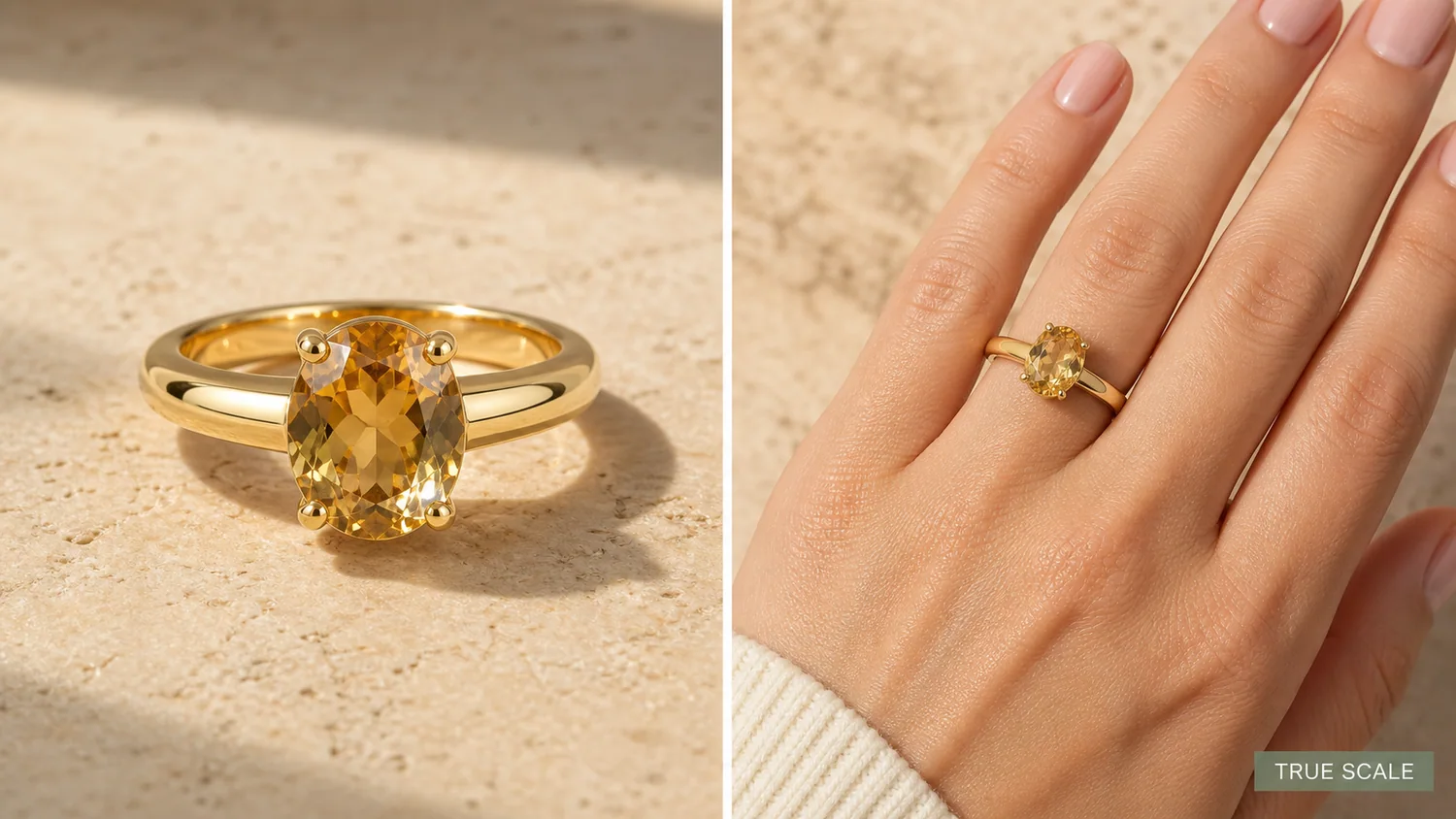
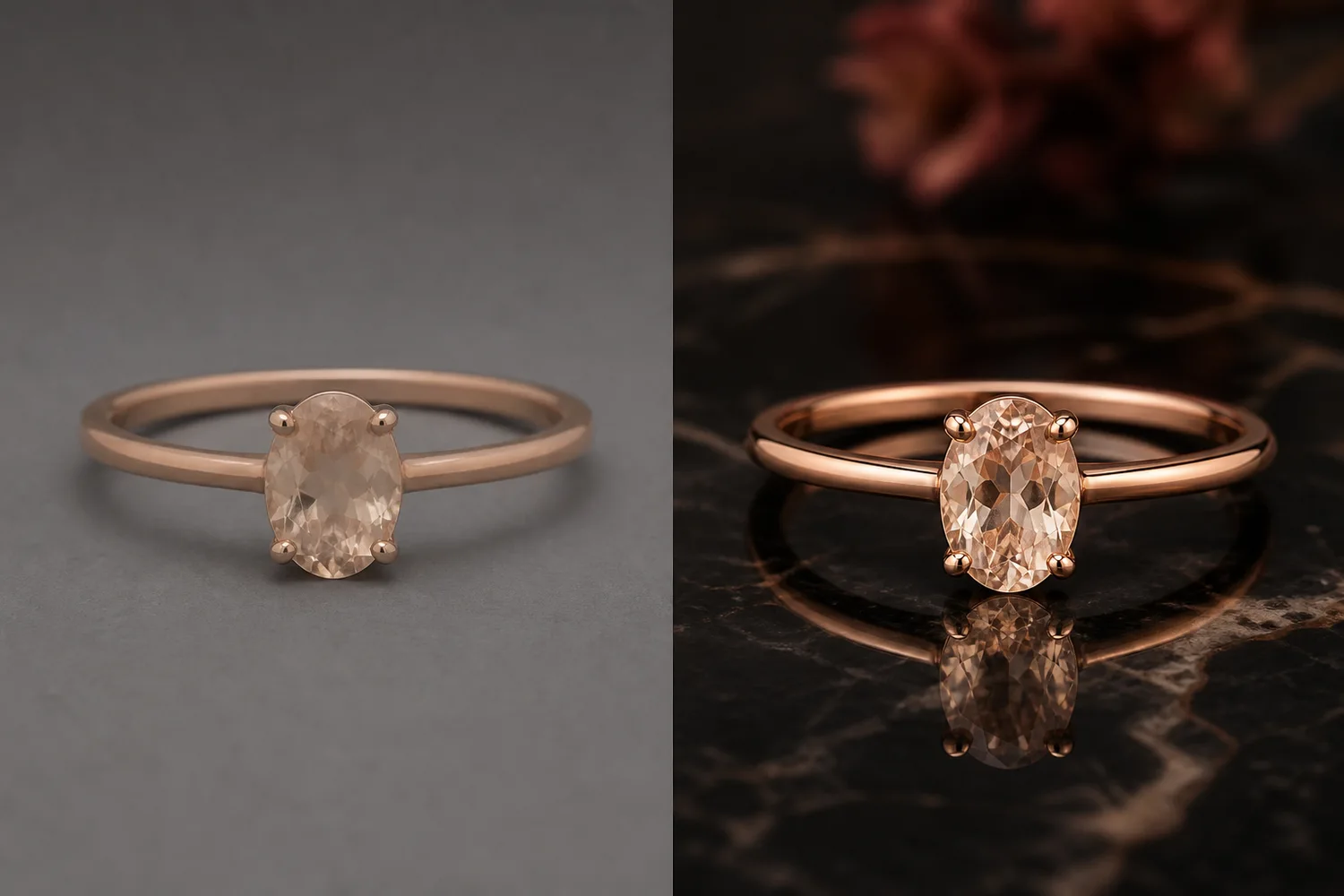
The example uses one gold oval gemstone ring. The left side gives a product-forward hero view with clear prongs, band thickness, gemstone facets, and metal reflection. The right side shows the same ring on a hand so the buyer can judge scale. The selling point is not only beauty; it is believable size.
Why Ring Scale Goes Wrong in AI Images
Jewelry is small, so a minor AI change can become a major listing problem. A gemstone that grows 30 percent in the wearing image can make the real item feel disappointing. A band that gets too thick can change the perceived weight and price tier. Missing prongs can make the ring look like a different setting.
The product image and the wearing image should answer different buyer questions. The product hero shows material, stone shape, setting, and finish. The wearing view shows how large the ring feels on a hand. Both images need to describe the same item.
Lock the Product Facts Before Generating
Before generating a wearing image, write down the facts that must not change:
- gemstone shape, size impression, color, and cut
- number and placement of visible prongs
- band width, taper, curve, and metal color
- setting height and how the stone sits above the band
- ring orientation on the finger
- hand scale, finger width, skin texture, and natural contact
- lighting direction and shadow that connect the ring to the hand
This is the checklist that keeps an AI image from becoming a nice but misleading jewelry ad.
Where KrafLayer Fits
When you apply this Keep Ring Size Accurate in AI Jewelry Wearing Images workflow in KrafLayer, start from the clearest product reference, then decide whether the asset needs cleanup, lighting, background work, detail support, or an ad version. Before using it for listing images, detail pages, or ad assets, check that metal color, stone scale, support cleanup, and macro detail remain accurate.
Prompt Template for Ring Wearing-Effect Images
Use a direct prompt in [KrafLayer](https://kraflayer.com):
Generate a realistic ecommerce wearing-effect image for this exact ring. Keep the same oval gemstone shape, gemstone size impression, prong count and placement, band width, metal color, setting height, polish, and camera angle logic. Place the ring naturally on one hand with believable finger scale, skin texture, soft commercial daylight, and realistic contact shadow. The result should help a buyer understand true ring size. Do not enlarge the stone, thicken the band, change the setting, add extra rings, add logos, add fake certificates, blur the product, or turn the hand image into a fashion poster.
The phrase "true ring size" matters. It tells the model that the wearing view is a measurement aid, not just a mood image.
Use Product Hero and Wearing View Together
For rings, one image rarely does the whole job. A product hero can show the stone and metal clearly, but it cannot show finger scale. A hand view gives scale, but it can hide prongs, side profile, or small finish details.
A strong product page can use both: hero image for product identity, wearing image for size confidence, and close-up detail image for setting quality. If you only have one AI visual, use a split composition where both views describe the same ring.
What to Review Before Upload
Compare the AI output against the product reference:
- does the gemstone look the same size relative to the band?
- are the prongs still in the correct places?
- is the band thickness believable and consistent?
- does the ring sit naturally on the finger?
- is the hand view clean enough for a PDP or marketplace listing?
- would a buyer understand size better after seeing this image?
If the image is pretty but changes the ring, regenerate it. Jewelry visuals create trust only when the product facts stay stable.
FAQ
How do I keep ring size accurate in AI wearing images?
Lock the gemstone shape, size impression, prongs, band width, setting height, metal color, camera logic, hand scale, and contact shadow in the prompt.
Should jewelry sellers use AI hand-model images?
They can be useful when the image is treated as scale proof and reviewed against the real SKU. Do not use a wearing image that changes stone size, band thickness, or setting details.
What makes an AI ring image misleading?
Oversized gemstones, missing prongs, thicker bands, changed metal color, extra rings, fake certificates, and unrealistic hand scale can all make the product look different from the real item.
What images should a ring product page include?
Use a product hero for identity, a wearing image for scale, and a detail image for prongs, setting height, stone facets, and metal finish.
Keep exploring
Continue the story
More practical guidance on product accuracy, composition, and conversion-ready visuals.
Put it into practice
Take the next step in KrafLayer
Choose a generation or editing workflow that matches what you just learned.