Image generation
How to Generate Perfume Product Photos That Show Glass Texture
TL;DR
A practical workflow for generating perfume product images that show transparent glass, liquid depth, cap texture, and controlled reflections without changing the SKU.
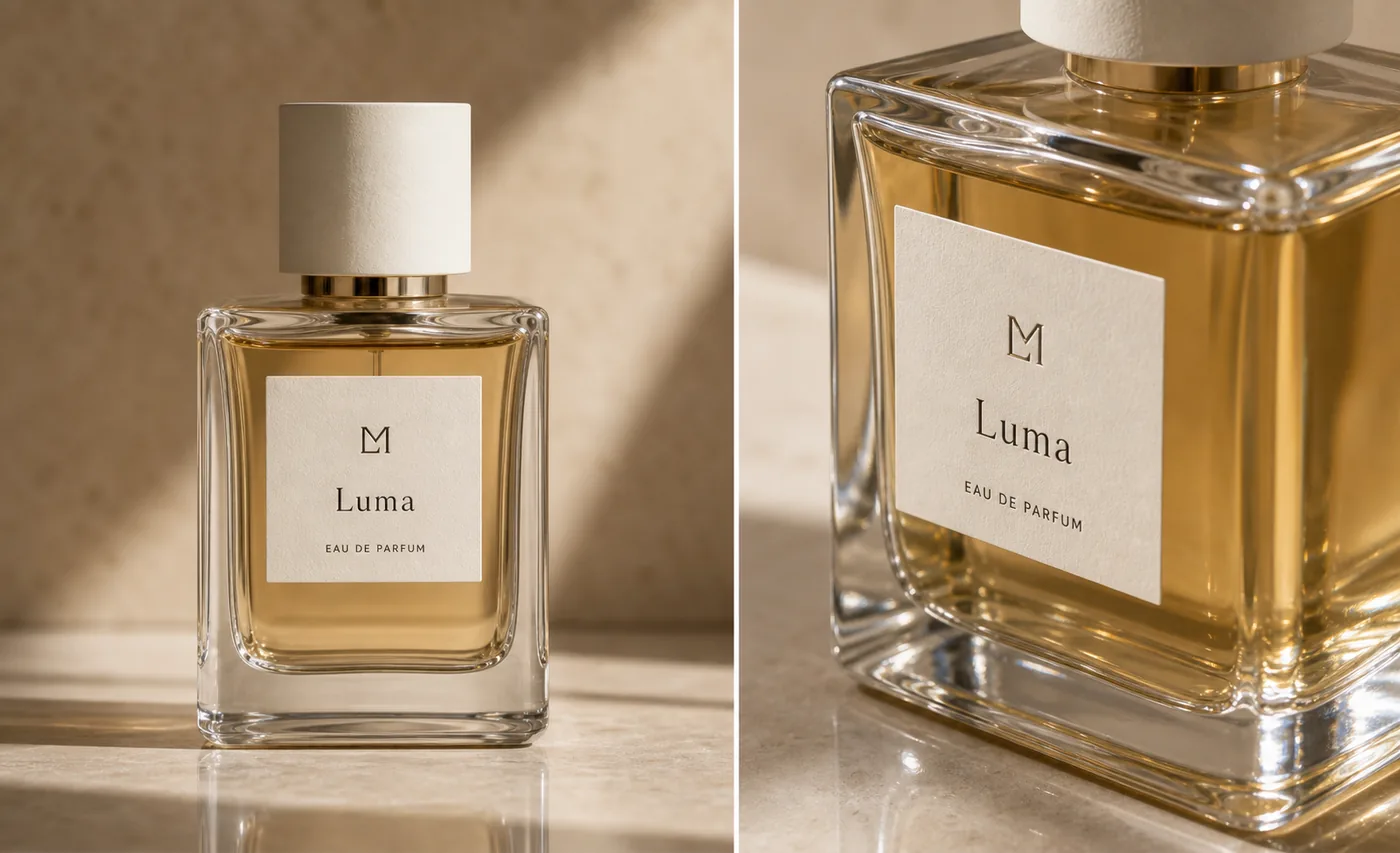
AI perfume product photos with glass texture work when the image makes the bottle feel transparent, heavy, and inspectable without inventing a new fragrance package. The goal is not just shine. Good perfume product photography shows the glass edge, thick base, liquid depth, cap material, label placement, and reflection behavior in a way that helps a buyer trust the product.
The practical rule is simple: glass texture should explain the bottle, not hide it. In KrafLayer, use the perfume reference as the product-truth source, generate one ecommerce image role at a time, and review whether the transparent edges, amber liquid, label paper, cap, and shadow still match the real SKU.
What Glass Texture Must Prove
For perfume, glass texture is a trust signal. It tells the buyer whether the bottle is clear, frosted, heavy, thin, rounded, sharp-edged, tinted, or premium. If the AI image only adds glow, the result may look expensive but still fail as a product image.
A useful glass-texture image should prove four things:
- The bottle has a readable silhouette and believable thickness.
- The liquid has a consistent color and fill level.
- The label sits on the real front plane instead of floating or warping.
- Reflections describe the glass edges instead of covering product information.
This is why perfume images need a different prompt than a generic beauty ad. A perfume bottle is part transparent product, part package, and part reflective object.
Build The Main Image Around Edges And Liquid Depth
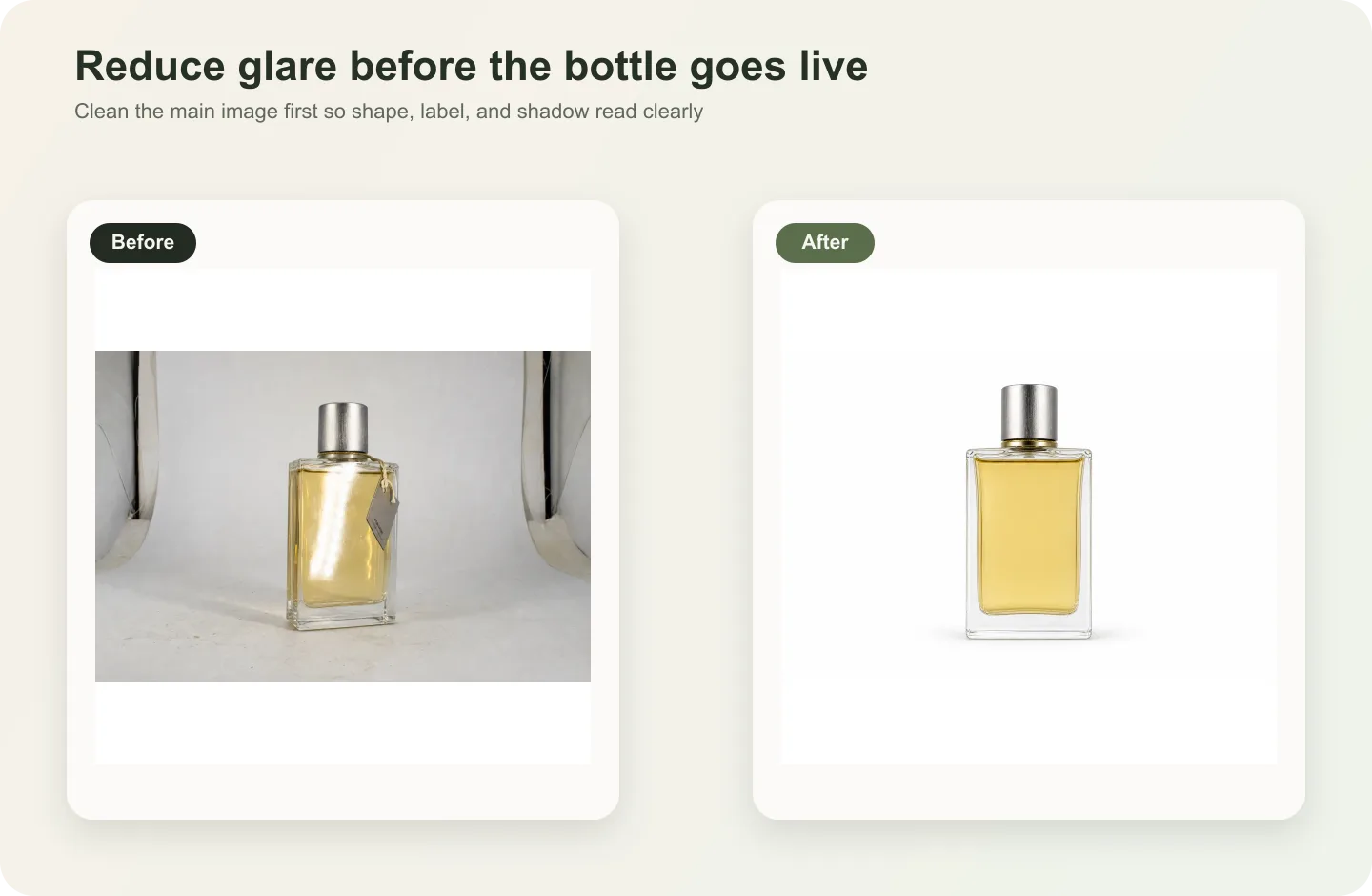
Start with a main image before you generate a dramatic campaign visual. The bottle should be upright, large, and easy to inspect on mobile. Use light that catches the side edges and base, because those areas prove the bottle is made of glass rather than plastic.
For [AI product image generator](/ai-product-image-generator) workflows, ask for controlled highlights on the shoulders, corners, and bottom glass. Avoid instructions like "maximum sparkle" or "luxury reflections everywhere." Those tend to create impossible edges, duplicate bottle outlines, and glare across the label.
A good main image should let the viewer answer:
- Where does the transparent glass begin and end?
- How thick is the base?
- What color is the liquid?
- Is the label straight and attached to the front face?
- Does the cap material match the brand and product tier?
If those answers are unclear, the image is not ready even if it looks polished.
Use A Detail Image For One Material Message
The close detail view should not repeat the full hero. It should teach one selling point: glass thickness, liquid clarity, cap texture, label paper, spray collar, or the weighted base.
For perfume product images, a strong detail crop often shows the front corner of the bottle with the label still partly visible. That crop can reveal the glass wall, amber liquid, label texture, and reflection control in one focused frame. It should still be the same bottle, not a redesigned premium version.
Use this rule: the detail image must make one product fact easier to see. If the crop only adds mood, it belongs in an ad set, not the product detail section.
Prompt Pattern For Perfume Glass Texture
Use a prompt that locks the physical product first and then describes the material treatment.
Generate an ecommerce perfume product image from this reference. Preserve the exact rectangular transparent glass bottle, thick clear base, pale amber liquid color, fill level, cream cylindrical cap, centered label size, simple label typography, spray tube position, product scale, and realistic contact shadow. Show glass texture through clean side highlights, believable edge refraction, visible liquid depth, and controlled reflection on a warm neutral studio surface. Keep the bottle readable on mobile. Do not redesign the bottle, add extra labels, imitate a real brand, add badges, add barcodes, add QR codes, hide the label with glare, or create impossible glass edges.
For a detail image, tighten the request:
Create a close detail product image of the same perfume bottle. Focus on the thick glass corner, amber liquid depth, textured label paper, and cream cap edge. Preserve the same SKU, label placement, liquid color, bottle geometry, cap, shadow, and scale. Use controlled reflection only where it helps define transparent glass.
The best prompt is not longer for its own sake. It is specific about product facts that must not move.
Review Reflection Before You Publish
Reflection is useful when it defines form. It becomes a problem when it covers information.
Check the generated image for these issues:
- A bright stripe crossing the label name.
- Extra vertical edges that make the bottle look double-walled in the wrong place.
- Liquid color shifting between the main image and the detail crop.
- A cap that changes material, height, or diameter.
- A base that looks too thin for the product tier.
- A background reflection that makes the bottle outline hard to read.
- A label that curves or floats when it should be on a flat glass face.
If one issue appears, use the [product photo editor](/product-photo-editor) for a local correction. Regenerate only when the whole image role is wrong.
Where AI Product Photography Fits
Perfume is a good use case for [AI product photography](/ai-product-photography) because one real product reference can support several visual roles: clean main image, glass detail image, cap texture shot, gift-box image, and controlled campaign creative.
The sequence matters. Make the accurate main image first. Create the glass-detail image second. Then expand into lifestyle, landing page, email, or ad visuals once the product facts are stable.
That order keeps AI useful for ecommerce instead of letting it turn the bottle into a vague luxury object.
Glass Texture Checklist
Before a perfume image goes into a product page, check:
- Bottle silhouette, corner radius, and height-to-width ratio.
- Glass wall thickness and base weight.
- Liquid color, fill level, and transparency.
- Cap shape, finish, and contact with the neck.
- Label size, placement, paper texture, and readability.
- Spray tube or collar placement when visible.
- Reflection direction and intensity.
- Contact shadow and surface reflection.
- Whether the image clearly works as a main image, detail image, or ad creative.
The most important check is consistency. The main image and detail image should look like they were made from the same perfume bottle.
FAQ
How do I make AI perfume product photos show real glass texture?
Give the AI a product reference and describe the glass facts directly: transparent edges, thick base, liquid color, fill level, cap shape, label placement, and controlled reflection. Then review the output for physical consistency. Glass texture should clarify the bottle shape, not create glare that hides the label.
What makes perfume product photography different from other beauty images?
Perfume combines transparent glass, liquid, packaging, reflection, and label design in one object. A skincare tube can often survive flatter lighting, but a perfume bottle needs edge highlights, liquid depth, believable refraction, and a readable label at the same time.
Should I generate a main image or a detail image first?
Generate the main image first. It confirms the product identity, silhouette, cap, label, and liquid color. Once the main image is accurate, create a detail image that focuses on one material proof, such as thick glass, label paper, cap texture, or liquid depth.
Can KrafLayer create perfume images for ads too?
Yes, but start with product accuracy before moving into ads. In KrafLayer, use the reference image to create accurate ecommerce product images first, then make campaign variations after the bottle, label, cap, glass, liquid, and scale are stable.
What should I avoid in AI perfume product images?
Avoid fake brand marks, marketplace logos, badges, barcodes, QR codes, impossible reflections, distorted labels, changed liquid colors, and props that hide the bottle. A perfume image can feel premium without sacrificing product truth.
Conclusion
AI perfume product photos with glass texture need more than attractive highlights. They need transparent edges, believable liquid depth, a stable cap and label, and reflections that make the bottle easier to inspect. KrafLayer helps sellers use an AI product image generator workflow to create perfume main images and detail images while keeping glass, liquid, packaging, and material cues central to the ecommerce result.
Keep exploring
Continue the story
More practical guidance on product accuracy, composition, and conversion-ready visuals.
Put it into practice
Take the next step in KrafLayer
Choose a generation or editing workflow that matches what you just learned.