Image generation
How to Show Skincare Texture in AI Generated Detail Images
TL;DR
A practical workflow for AI skincare detail images that show gel, cream, or serum texture clearly without changing the product bottle or formula story. Includes how to do it in KrafLayer.
TL;DR
For Show Skincare Texture in AI Generated Detail Images, use KrafLayer for controlled local changes or reference-guided edits. Use Mask Edit for a local change with a short instruction, or Reference Image Editor when the result needs a visual example. The finished image should still prove that the bottle shape, label, shade, texture, and packaging proportions stay believable.
To show skincare texture in AI generated detail images, make the texture a proof point, not decoration. The buyer should see the bottle, understand the formula type, and get one clear close view of the cream, gel, serum, balm, or oil texture without wondering whether the product changed.
KrafLayer is an AI-powered visual editor for ecommerce product photography. For skincare sellers, it can help turn a basic product reference into a main image plus a texture detail image that feels ready for a PDP, marketplace listing, or campaign asset.
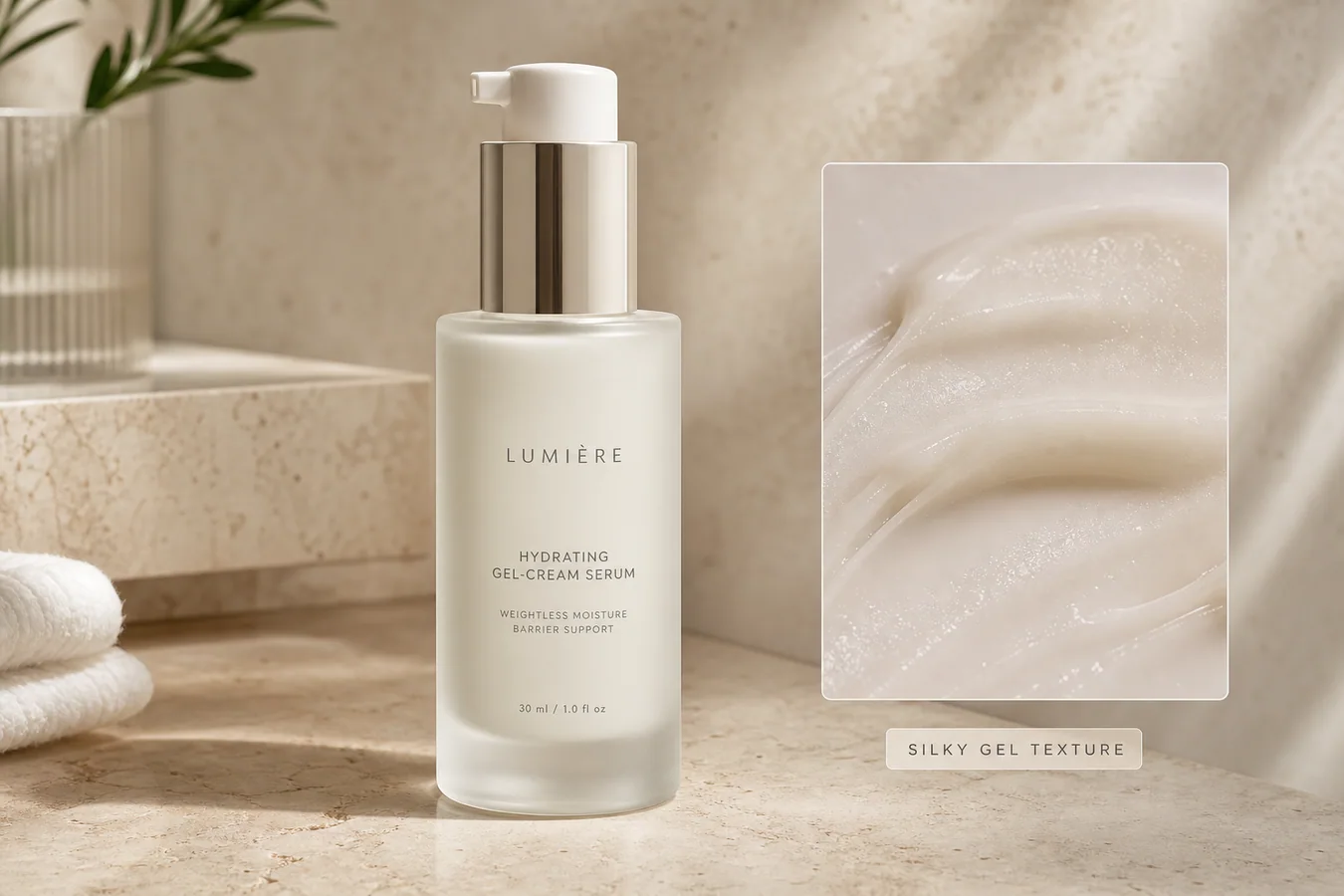
The example uses one frosted-glass gel-cream serum bottle. The product stays centered and readable, while the detail panel shows the silky formula texture, moisture, and spread pattern. The visual sells one point: this product has a smooth gel-cream feel.
Start With One Product And One Texture Claim
Skincare images become weak when the AI tries to show everything at once: bottle, fruit ingredients, water splashes, flowers, hands, bathroom props, and a fake scientific panel. That kind of image may look busy, but it does not help a buyer inspect the product.
For a detail image, choose one product and one texture message:
- gel cream: smooth, lightweight, hydrated sheen
- serum: fluid, glossy, fast-spreading surface
- balm: richer body, soft melt, visible thickness
- lotion: creamy spread with moderate hold
- oil: thin shine and clean edge highlight
The texture should match the product category. A lightweight serum should not look like butter. A barrier cream should not look like water.
Lock The Bottle Before Improving The Detail
The product bottle is the anchor. Before prompting, protect the bottle shape, cap or pump geometry, label area, glass or plastic finish, scale, color, and shadow. If those details drift, the image stops being a detail image for this SKU and becomes a generic beauty render.
A useful AI skincare detail image keeps the retail facts steady while improving what the camera did not capture well: surface shine, formula smear, material glow, countertop context, and the close texture crop.
Where KrafLayer Fits
When you apply this Show Skincare Texture in AI Generated Detail Images workflow in KrafLayer, the tool choice matters: use Mask Edit for a local change with a short instruction, or Reference Image Editor when the result needs a visual example. After generation, judge the image by the channel it serves — detail-page modules — and check that the bottle shape, label, shade, texture, and packaging proportions stay believable.
Prompt Template For Skincare Texture Detail Images
Use a direct prompt in [KrafLayer](https://kraflayer.com):
Create an ecommerce skincare detail image for this product. Keep one skincare SKU only. Preserve the bottle shape, pump or cap geometry, frosted glass or packaging material, label area, color, scale, and natural shadow. Show the product as the main subject and add one close texture detail panel from the same formula, showing a realistic gel-cream smear with visible moisture, viscosity, and smooth spread. Use soft commercial daylight on a refined stone vanity surface. Do not add extra bottles, fake logos, long text, ingredient explosions, hands, faces, certification badges, or claims that are not on the product.
This prompt tells the AI what must stay unchanged and what the detail image must prove. That matters more than asking for a premium beauty image.
Make The Texture Panel Useful
A strong texture panel answers one buyer question: what does this formula feel like? It should show thickness, shine, spread behavior, and whether the product looks watery, rich, silky, sticky, matte, or glossy.
Keep the close-up connected to the main product. Use the same color family, same lighting direction, and the same formula style. Do not add a separate jar, spoon, ingredient pile, or second bottle unless the product is actually a set.
Avoid Fake Claims And Overdesigned Labels
Skincare is easy to overclaim visually. Avoid fake dermatology badges, clinical seals, SPF numbers, ingredient percentages, before-after skin results, or medical language unless the seller already owns those approved claims.
For most ecommerce work, a safer selling cue is texture, material, and use clarity. Let the image say: this is a frosted bottle, this is a gel-cream texture, and the product looks clean enough for a detail page.
Review Before Saving
Before exporting the final WebP, check the visual like an operator:
- is there only one product SKU?
- does the pump, cap, bottle, label area, and scale still look consistent?
- does the texture match the formula type?
- does the close-up help the buyer understand feel or finish?
- is the image useful for a PDP detail block, not just a pretty beauty mood shot?
- are there no fake logos, claims, certifications, or extra products?
If the answer is yes, the image can support the product page, Shopify detail section, Amazon A+ draft, social ad, or launch email.
FAQ
How do I show skincare texture in AI generated detail images?
Use one product, lock the bottle and label facts, then add one close texture panel that shows the formula's thickness, shine, spread, and finish.
Should a skincare detail image include ingredients and props?
Only if they support the real product story. For many listings, a clean product view plus a realistic texture close-up is more useful than fruit, flowers, and crowded props.
Can AI generate skincare texture without changing the product?
Yes, but the prompt must protect the bottle shape, pump or cap, packaging material, label area, scale, and color before asking for texture improvement.
What makes an AI skincare detail image risky?
Fake clinical claims, extra products, changed packaging, unrealistic formula texture, unreadable labels, and invented badges can make the image less trustworthy.
Keep exploring
Continue the story
More practical guidance on product accuracy, composition, and conversion-ready visuals.
Put it into practice
Take the next step in KrafLayer
Choose a generation or editing workflow that matches what you just learned.