Image generation
How to Keep Real Proportions in AI White Background Home Goods Images
TL;DR
A practical workflow for generating white-background home goods product images that keep true scale, depth, material, and listing-ready shape. Includes how to do it in KrafLayer.
TL;DR
For Keep Real Proportions in AI White Background Home Goods Images, KrafLayer is useful when a real product reference needs to become a usable asset for listing images, detail pages, or ad assets. Treat it as production editing, not product reinvention; the test is whether scale, material, placement, and shadow still make sense in the space.
To keep real proportions in AI white-background home goods images, treat the product shape as the locked part of the job. The AI can clean the background, improve light, and add a listing-ready finish, but it should not stretch legs, shrink drawers, flatten depth, or turn one cabinet into a different SKU.
KrafLayer is an AI-powered visual editor for ecommerce product photography. For home goods, use it to create cleaner main images while protecting the facts a buyer uses to judge size, material, and construction.
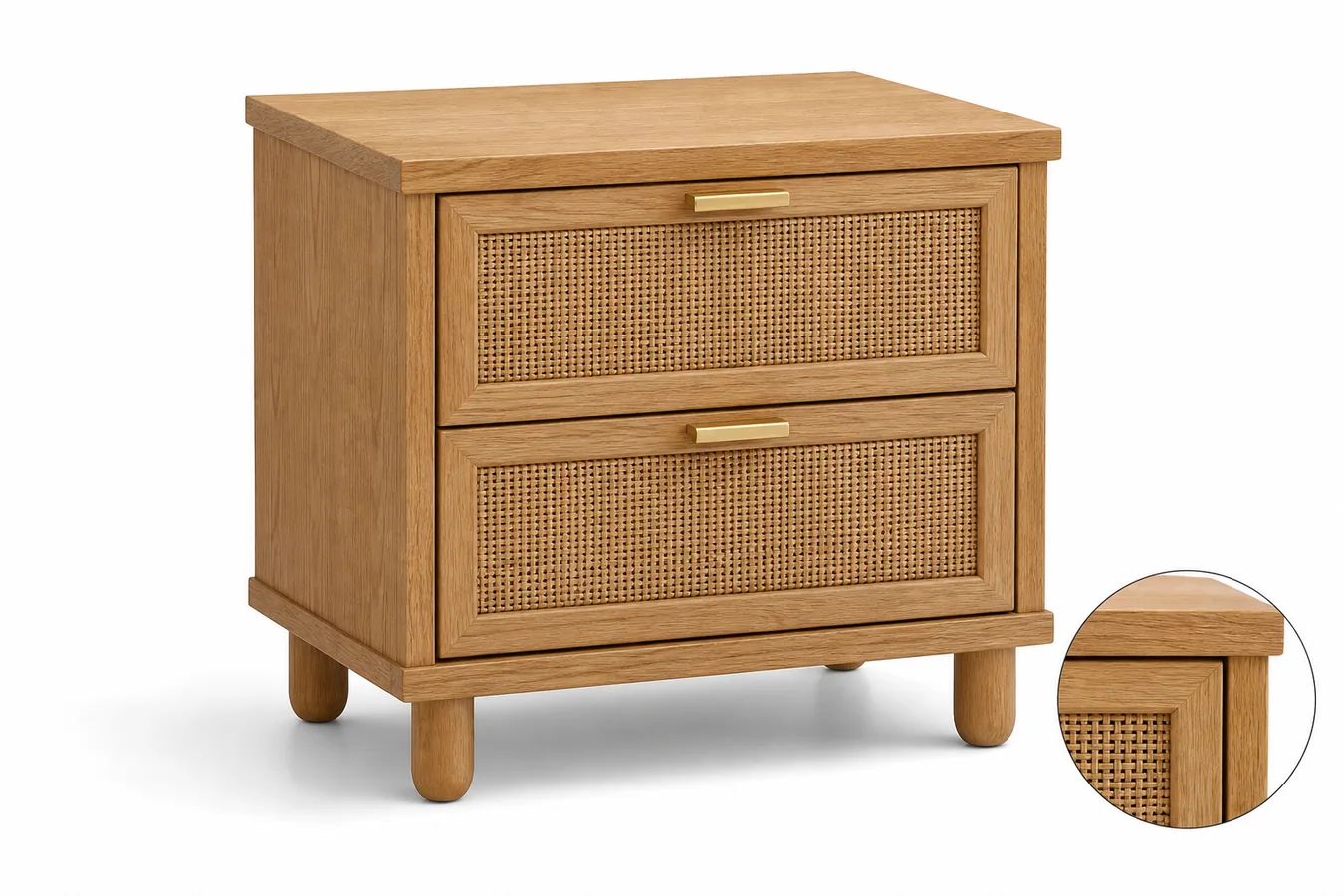
The example uses one oak-and-rattan bedside cabinet. The product stays dominant on a white background, the 3/4 angle shows real depth, the legs keep a believable length, and the drawer fronts line up with the cabinet frame. The small material detail view supports the selling point without introducing another product.
Why Proportion Matters More for Home Goods
Home goods buyers read images differently from beauty or fashion shoppers. They look for height, depth, leg spacing, drawer size, shelf thickness, handle placement, and whether the product will look right beside a bed, sofa, or entryway wall.
When AI changes those proportions, the image may still look clean but it becomes risky for ecommerce. A cabinet with stretched legs, shallow drawers, or a warped top panel can create wrong expectations before the buyer ever reads dimensions.
That is why a white-background main image should be clean but not generic. It needs enough angle, shadow, edge detail, and material texture to prove what the item is.
Start With the Product Facts
Before generating the image, write down the parts that must not change:
- product type and count: one bedside cabinet, one stool, one lamp, one storage basket
- height-to-width relationship
- visible depth and perspective
- legs, handles, hinges, drawer lines, seams, shelves, and frame thickness
- material texture such as wood grain, rattan weave, fabric, glass, ceramic, or metal
- true color and finish
- contact shadow that shows the item is grounded
This short list should drive the prompt. If the generated image looks premium but changes the product facts, it is not a usable ecommerce image.
Where KrafLayer Fits
When you apply this Keep Real Proportions in AI White Background Home Goods Images workflow in KrafLayer, start from the clearest product reference, then decide whether the asset needs cleanup, lighting, background work, detail support, or an ad version. Before using it for listing images, detail pages, or ad assets, check that scale, material, placement, and shadow still make sense in the space.
Prompt Template for a White-Background Home Goods Main Image
Use a direct prompt in [KrafLayer](https://kraflayer.com):
Generate a white-background ecommerce main image for this home goods product. Keep the exact product type, real height-to-width proportion, depth, legs, drawer spacing, handle placement, material texture, color, camera angle, and scale. Make the product centered and dominant with soft commercial daylight, crisp edges, and a natural contact shadow. The result should look ready for a product listing. Do not stretch the product, shorten or lengthen legs, flatten depth, add extra furniture, change materials, invent compartments, add logos, add fake text, or make the product float.
For a cabinet, table, chair, lamp, basket, or shelf, this kind of prompt is more useful than asking for a "beautiful product photo." Beauty is easy for AI to overdo. Proportion control is the part that protects the listing.
Use a 3/4 View When Depth Matters
Straight-on white-background images can work for wall art or flat objects, but many home goods need a slight angle. A 3/4 front view shows the side panel, top plane, leg placement, and real depth. It helps buyers understand the product before they open the dimension chart.
Keep the angle restrained. If the camera is too dramatic, the product can look larger, wider, or more sculptural than it really is. For marketplace main images, the goal is clear recognition, not a furniture catalog hero shot.
Add Selling Detail Without Adding Clutter
A white-background image can still communicate selling information. Use one close material detail, one clean angle, or one natural shadow cue. For the cabinet example, the rattan and oak detail tells buyers what the surface is made of, while the main view keeps the product readable.
Avoid extra plants, books, rugs, room props, or fake lifestyle staging if the search intent is a main image. Those props can make the product harder to inspect and may not fit platform rules.
Review the Image Like a Merchant
Before saving the final image, compare it against the product reference or product spec:
- does the item still read as the same SKU?
- are the legs, handles, drawers, and panels in the right places?
- does the side plane show believable depth?
- is the material texture useful, not over-sharpened or invented?
- does the shadow ground the product without making the background dirty?
- would this image help a buyer understand size and construction?
If the answer is yes, export the visual as WebP and use it for the product page, Shopify collection card, Amazon-style main image draft, or paid ad variation.
FAQ
How do I keep real proportions in AI home goods product images?
Lock the product type, height-to-width ratio, depth, legs, handles, panels, material texture, color, camera angle, scale, and contact shadow in the prompt.
Should AI-generated home goods main images use a pure white background?
A white background is useful for marketplace and catalog clarity, but the product still needs a natural shadow, visible depth, and material detail so it does not look flat or fake.
What camera angle works best for furniture and home goods?
A restrained 3/4 front view usually works best because it shows the front, side, top plane, legs, and depth without making the product look distorted.
What makes an AI home goods image misleading?
Stretched legs, changed drawer spacing, invented handles, warped panels, missing depth, wrong material texture, and floating shadows can all make the product look different from the real item.
Keep exploring
Continue the story
More practical guidance on product accuracy, composition, and conversion-ready visuals.
Put it into practice
Take the next step in KrafLayer
Choose a generation or editing workflow that matches what you just learned.