Edit tools
Product Background Removal vs Background Replacement
TL;DR
A practical guide to choosing background removal for clean cutouts and background replacement for ecommerce selling context.
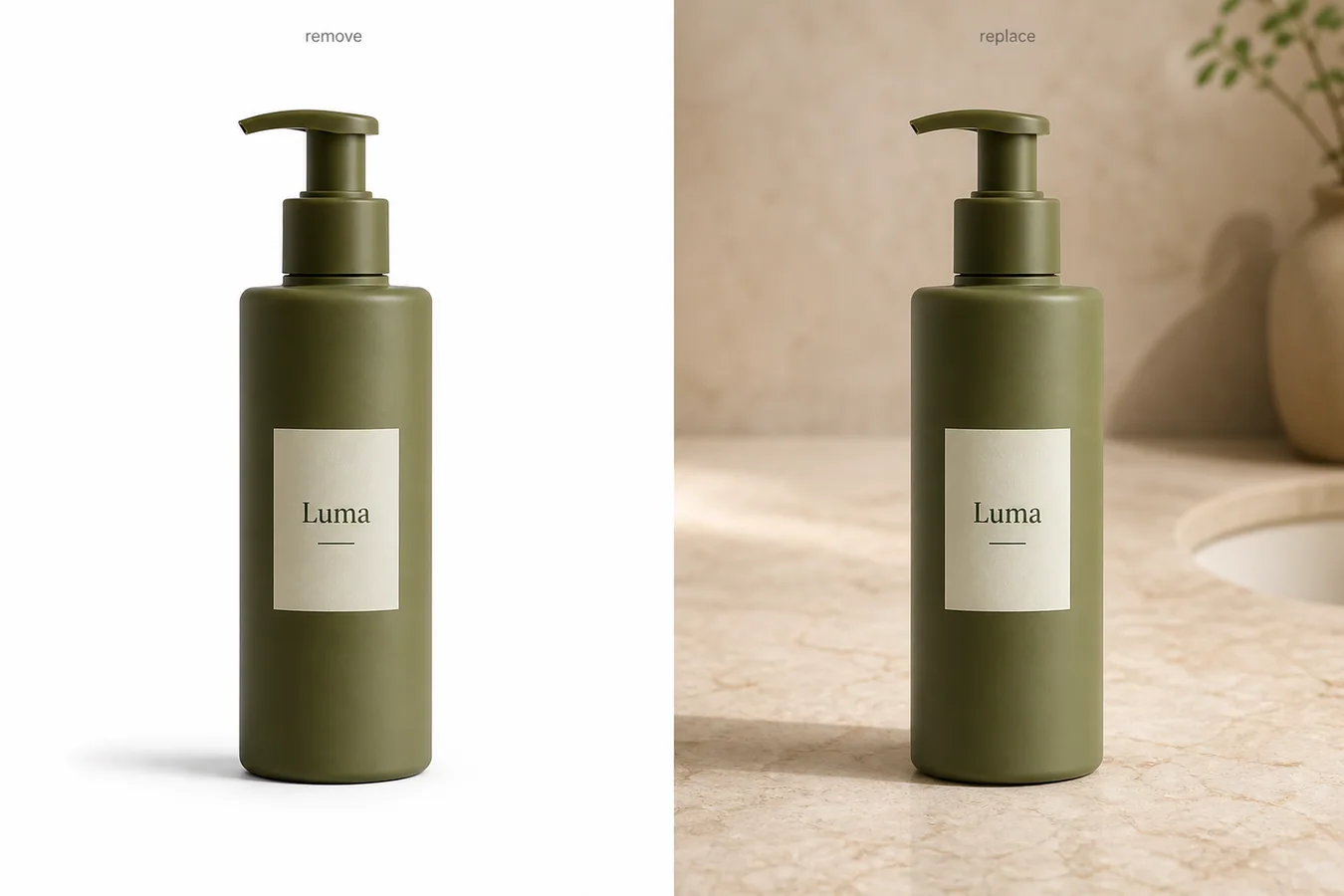
Product background removal and background replacement solve different ecommerce jobs. Background removal isolates the product so you can create a clean cutout, white-background image, transparent master, or catalog-ready asset. Background replacement keeps the product but builds a new scene around it, such as a warm countertop, store hero image, seasonal campaign, or product-page detail context.
Practical rule: use product background removal when the product needs clarity. Use background replacement when the product is already clear and the image needs selling context.
KrafLayer keeps these as separate workflows because combining them too early can create messy results. Start in the [AI product photo editor](/product-photo-editor), use the [AI background remover](/tools/ai-background-remover) when the old scene is the problem, and use the [AI background replacer](/tools/ai-background-replacer) only after the product shape, color, label, material, scale, and contact shadow are stable.
Quick Answer: Which Workflow Should You Use?
Use product background removal when you need a clean product asset. It is the right first step for white-background main images, transparent PNG masters, catalog grids, marketplace preparation, design composites, and any workflow where the background distracts from the product.
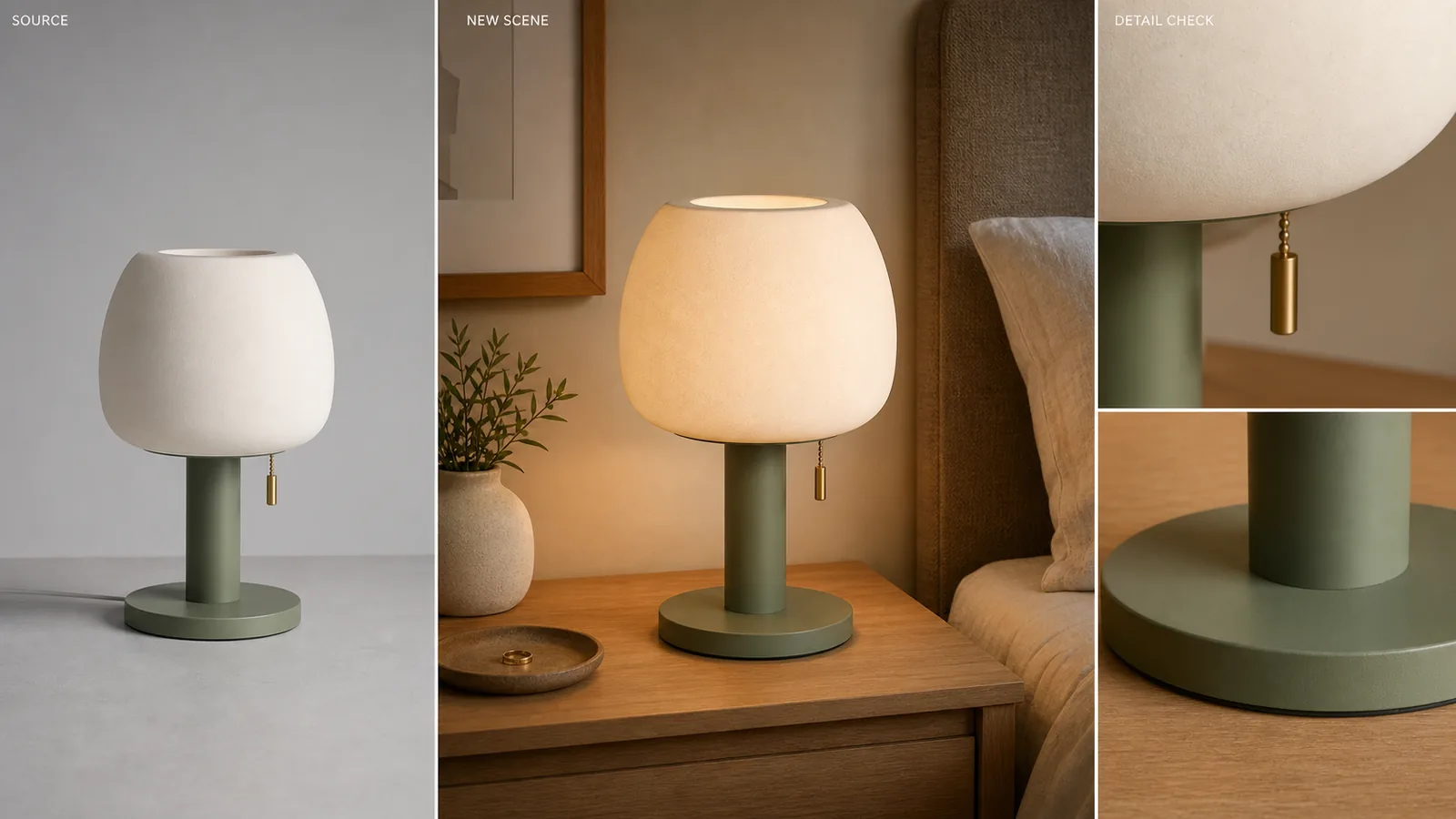
Use background replacement when you need a more useful setting. It is the right step for lifestyle product photos, PDP feature blocks, homepage images, email banners, ads, and brand visuals where the product should still be the subject but the scene adds context.
If you are unsure, remove the background first. A clean cutout can become many versions later. A weak replacement scene is harder to repair because it can hide edge problems, shift shadows, and make the product look less trustworthy.
What Product Background Removal Actually Does
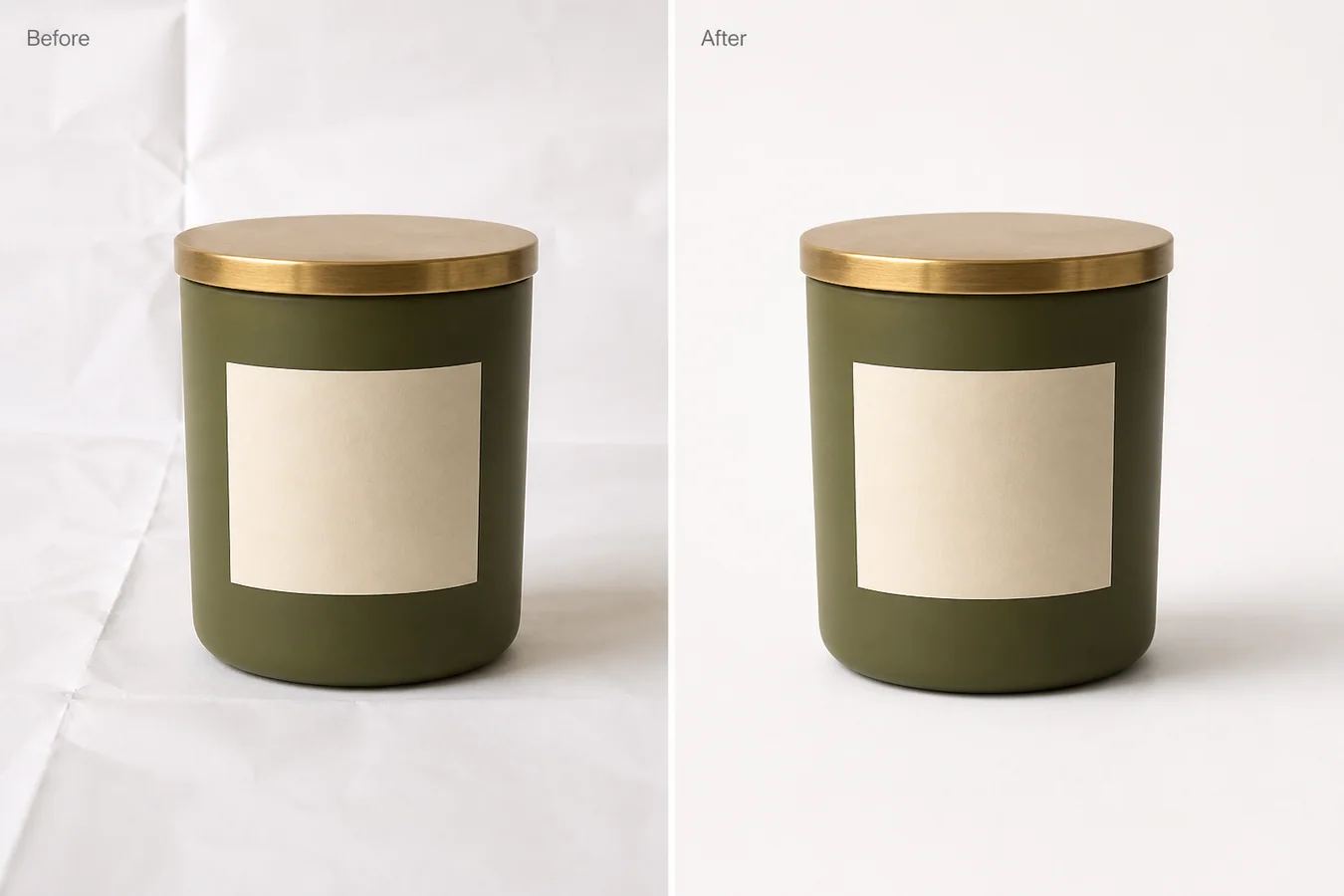
Product background removal separates the product from the original photo. The goal is not to make a prettier scene. The goal is to create a clean, reusable product asset.
Good background removal should preserve:
- the full product silhouette
- transparent or reflective edges
- handles, straps, caps, rims, pumps, and thin parts
- useful contact shadow when the final image needs grounding
- true product color and material texture
- label placement and packaging proportions
In KrafLayer, background removal is a one-click workflow. You do not need a prompt or a mask for the normal cutout job. That matters because the safest edit is the smallest edit: remove the old background without asking AI to reinterpret the product.
Use background removal when the buyer needs to inspect the item quickly. A clean white or transparent product image is often better than an attractive scene if the buyer still has questions about shape, finish, scale, or included parts.
What Background Replacement Actually Does
Background replacement changes the world around the product. The product should remain the same, but the surface, wall, lighting context, color mood, or usage setting can change.
Use background replacement when the image needs to communicate:
- where the product belongs
- what kind of customer or use moment it fits
- how the product feels as part of a brand world
- what material, mood, or category story supports the purchase
- why the product is worth noticing outside a plain catalog grid
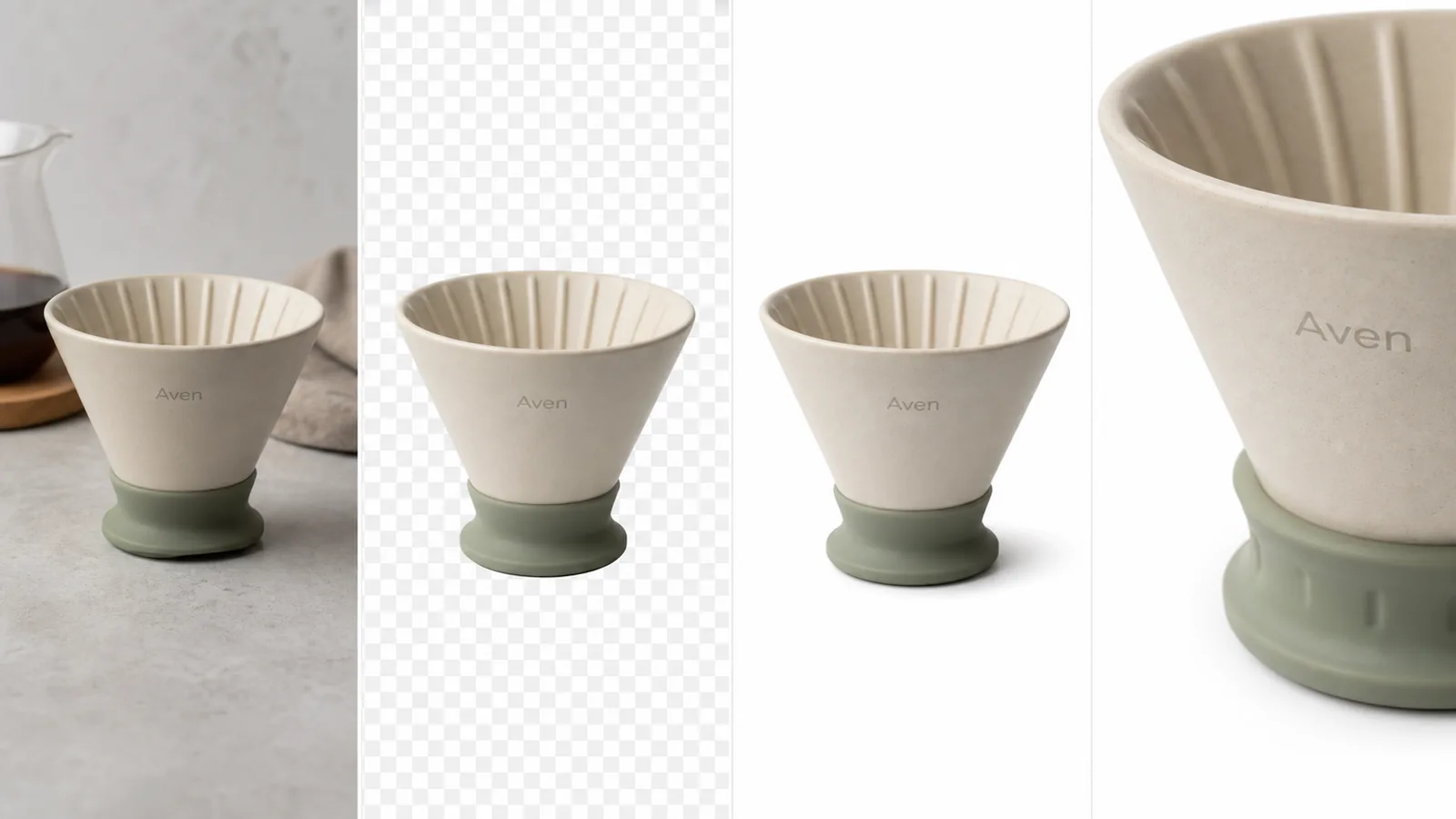
For example, a skincare bottle on white may be clear enough for a main image. The same bottle on a warm stone bathroom counter may work better for a store hero, bundle module, or email feature. A coffee dripper can move from a clean cutout to a kitchen counter. A handbag can move from a plain product shot to a restrained street-style surface.
Background replacement should not redesign the SKU. It should add context while protecting product facts.
The Main Difference: Isolation vs Context
The cleanest way to compare product background removal vs background replacement is by output role.
| Question | Background removal | Background replacement |
|---|---|---|
| Main job | Isolate the product | Add a new scene around the product |
| Best for | Main images, catalog grids, transparent masters | Store pages, ads, PDP modules, lifestyle visuals |
| Product risk | Edge loss, halos, missing shadows | Product drift, fake props, wrong shadows, changed colors |
| Prompt needed | No for normal one-click removal | Yes, because the new background needs direction |
| Review focus | Edges, transparency, silhouette, shadow | Product identity, scene realism, lighting match |
| Reuse value | Very high as a master asset | Strong for one channel or campaign role |
Removal answers: "Can the buyer see the product clearly?"
Replacement answers: "Can this product image sell better in this specific context?"
Those are both valuable, but they are not the same task.
When Background Removal Is The Better Choice
Choose product background removal when the source photo has a distracting scene but the product itself is accurate. This includes supplier photos, phone photos, warehouse shots, messy tabletop images, inconsistent catalog backgrounds, and marketplace images that need a cleaner presentation.
Background removal is usually the better first step for:
- marketplace main images
- product feed images
- Shopify collection grids
- Amazon-style supporting image preparation
- transparent PNG masters
- design handoff assets
- clean before/after editing workflows
- products that need consistent crop and alignment
Removal also makes review easier. You can see whether the silhouette is correct before adding any new visual idea. If the cutout is missing a strap, cap, handle, or transparent rim, fix that before you build a new scene.
Decision rule: if the product image fails because the background is noisy, remove it. If it fails because the image lacks brand or usage context, replace it after the product is clean.
When Background Replacement Is The Better Choice
Choose background replacement when the product is already readable but the image needs a more useful selling environment. Replacement is not mainly a cleanup tool. It is a merchandising tool.
Background replacement works well for:
- homepage feature images
- product page storytelling sections
- product bundle modules
- email campaign visuals
- social ads
- seasonal promotions
- brand color systems
- lifestyle scenes from a product reference
The new background should have a clear role. Do not replace a background just because the old one is plain. A plain image may be exactly what the listing needs.
For ecommerce, the best replacement scenes are restrained. A new counter, soft wall, neutral surface, shelf, fabric texture, or category-relevant environment can help. Too many props make the buyer wonder what is actually for sale.
A Safe Workflow: Remove First, Replace Second
For most product photos, the safest workflow is sequential:
1. Choose the strongest source product image. 2. Use background removal to isolate the product. 3. Check edges, shadows, color, label placement, and missing parts. 4. Save the clean cutout or white-background version as a master. 5. Decide which image role needs a new background. 6. Use background replacement with a narrow prompt. 7. Compare the replacement result against the product master. 8. Export separate versions for the store, ad, or product page.
This order prevents one common AI mistake: asking the model to remove a messy background and invent a new scene in the same broad instruction. That can work for exploration, but it raises the chance of product drift.
Product drift is any change that makes the product less true: a different cap, altered label, wrong color, changed texture, shifted proportions, fake accessory, or shadow that no longer matches the object.
Prompt Pattern For Background Replacement
Use a prompt only when you are replacing the background or giving a masked/local instruction. For one-click background removal, do not add a prompt.
For background replacement, keep the instruction specific:
Replace the background with a warm beige bathroom-stone counter scene for an ecommerce product page. Keep the olive pump bottle shape, label placement, pump geometry, color, material texture, scale, camera angle, and natural contact shadow unchanged. Do not add extra products, logos, badges, barcodes, claims, hands, or packaging redesigns.
The first sentence describes the new background. The second sentence protects product facts. The third sentence blocks common ecommerce problems.
If the product is apparel, protect fit, seams, fabric texture, buttons, hem, and true color. If it is electronics, protect ports, buttons, screen shape, camera angle, and scale. If it is jewelry, protect stone shape, prongs, metal color, band width, and reflection.
Review Checklist Before Publishing
Before you publish either output, compare it against the original product photo.
For background removal, check:
- no leftover background halo
- no jagged or melted edges
- no missing transparent parts
- no cropped corners or handles
- no dirty, detached, or overly dark shadow
- true color still matches the product
For background replacement, check:
- product shape and scale are unchanged
- label, cap, handle, seams, ports, or hardware stayed consistent
- lighting direction makes sense
- contact shadow touches the new surface naturally
- background props do not compete with the SKU
- no fake logos, claims, badges, barcodes, or extra products appeared
For ecommerce, the edit is successful only if the product becomes easier to understand and remains accurate.
FAQ
What is the difference between product background removal and background replacement?
Product background removal isolates the product from its original scene. Background replacement creates a new scene around the product. Removal is best for clean cutouts, white backgrounds, transparent masters, and catalog consistency. Replacement is best for store pages, ads, lifestyle visuals, and brand context.
Should I remove the background before replacing it?
Usually yes. Removing the background first gives you a clean product master and makes it easier to review edges, shadows, and product shape. Once the cutout is correct, background replacement can focus on the new scene instead of trying to fix the product and invent context at the same time.
Is background removal better for marketplace images?
Background removal is often safer for marketplace-style main images because it keeps the product clear and reduces distractions. Exact marketplace rules vary, so treat AI edits as preparation, not compliance guarantees. Review the final image against the current channel guidance before publishing.
When should I use background replacement for product photos?
Use background replacement when the product is already clear but needs context for a store page, PDP feature section, ad creative, email banner, or campaign asset. The replacement should support the product story without changing the SKU or adding competing props.
Can KrafLayer do both background removal and background replacement?
Yes. KrafLayer separates the workflows so sellers can use the AI background remover for clean cutouts and the AI background replacer for new ecommerce scenes. Keeping them separate helps teams choose the smallest useful edit and review product accuracy before publishing.
Conclusion
Product background removal vs background replacement is not a question of which tool is better. It is a question of image role. Use background removal to create clear, reusable product assets. Use background replacement when a clean product needs a stronger selling context. KrafLayer supports both workflows, but the best results come from using them in order: isolate the product, verify the product facts, then add a background only when that background helps the buyer understand or want the item.
Keep exploring
Continue the story
More practical guidance on product accuracy, composition, and conversion-ready visuals.
Put it into practice
Take the next step in KrafLayer
Choose a generation or editing workflow that matches what you just learned.