Image generation
How to Simulate Lipstick Swatches for Beauty Product Images with AI
TL;DR
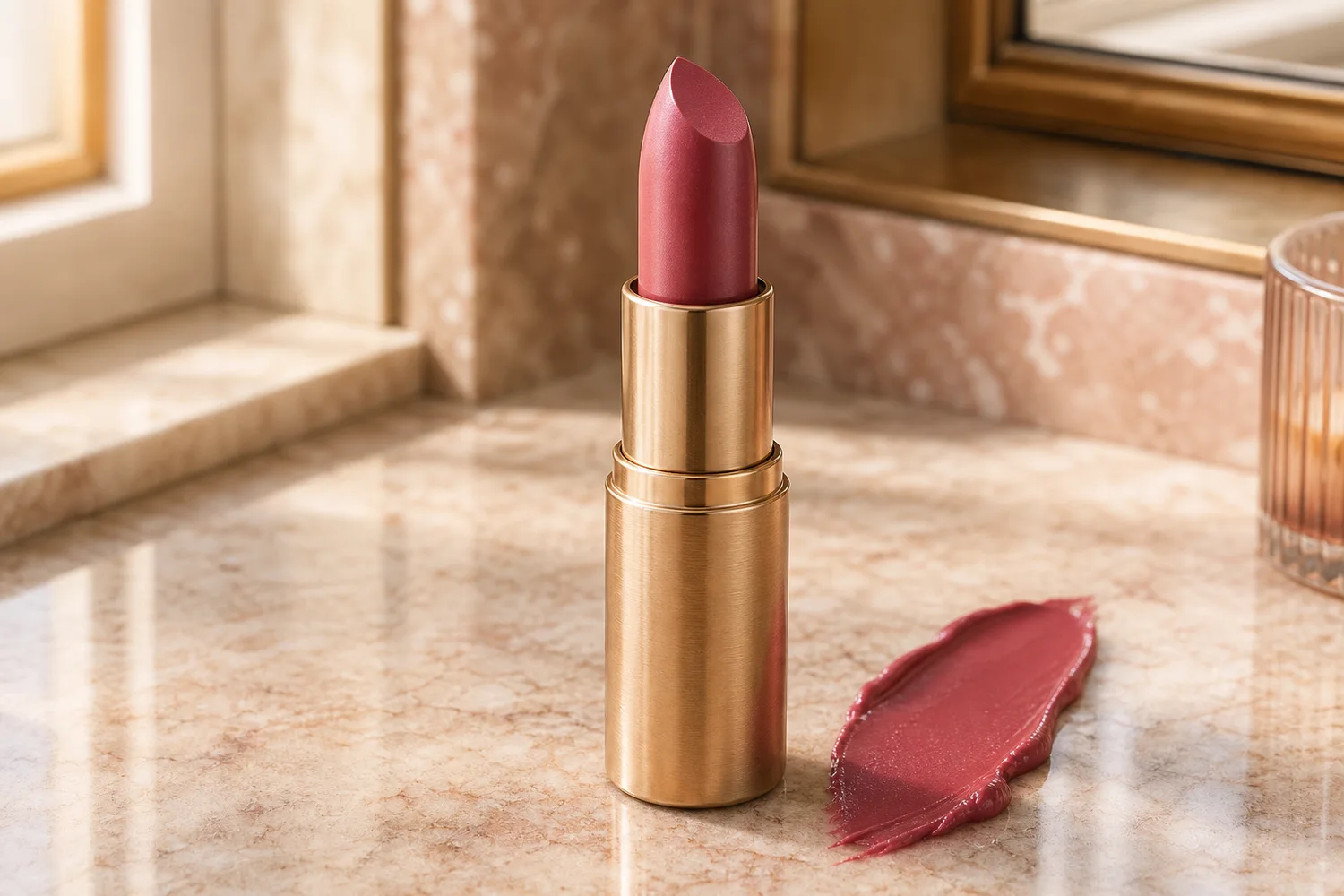
A beauty ecommerce workflow for AI lipstick swatch simulation: show shade, finish, texture, and packaging clearly without misleading shoppers about color. Includes how to do it in KrafLayer.
TL;DR
For Simulate Lipstick Swatches for Beauty Product Images, use KrafLayer for controlled local changes or reference-guided edits. Use Mask Edit for a local change with a short instruction, or Reference Image Editor when the result needs a visual example. The finished image should still prove that the bottle shape, label, shade, texture, and packaging proportions stay believable.
Lipstick swatch images help shoppers compare shade, finish, and texture before buying. The hard part is color trust: a swatch can make the product more persuasive, but if the shade drifts too far from the real bullet or tube, it creates returns and disappointment.
Use AI swatch simulation for PDP detail images, shade comparison modules, ads, launch pages, and social content. Keep the packaging and shade family anchored to the real product reference.
What a useful swatch needs to show
A swatch should communicate color family, opacity, finish, and texture. Matte lipstick, satin lipstick, glossy tint, balm, and liquid lipstick should not share the same surface behavior.
Avoid over-perfect color blocks. Real swatches have soft edges, thickness, shine level, and slight texture that help shoppers judge the formula.
Workflow
1. Start with the lipstick packaging and bullet or applicator as the product reference. 2. Define the finish: matte, satin, gloss, balm, metallic, sheer, or velvet. 3. Ask for one clear swatch shape with realistic texture and lighting. 4. Keep packaging text, tube shape, cap material, and shade family unchanged. 5. Compare the swatch with the product reference and any official shade name before publishing.
Where KrafLayer Fits
When you apply this Simulate Lipstick Swatches for Beauty Product Images workflow in KrafLayer, the tool choice matters: use Mask Edit for a local change with a short instruction, or Reference Image Editor when the result needs a visual example. After generation, judge the image by the channel it serves — listing images, detail pages, or ad assets — and check that the bottle shape, label, shade, texture, and packaging proportions stay believable.
Prompt to use in KrafLayer
~~~text Use the uploaded lipstick product as the exact reference. Create an ecommerce beauty detail image with a realistic lipstick swatch beside the product. Preserve the tube shape, cap, label area, material, shade family, bullet or applicator identity, and packaging color. Show the swatch finish as [matte/satin/glossy/sheer] with believable texture, thickness, and light reflection. Do not change the shade family, invent label text, add extra products, or make the swatch look like flat paint. ~~~
Review checklist
- Does the swatch match the product shade family?
- Is the finish believable for the formula?
- Is packaging still readable and accurate?
- Does the image avoid promising a color that the product cannot deliver?
- Would the swatch still make sense on mobile?
Summary
AI lipstick swatches are useful when they make shade and texture easier to understand. They become risky when they exaggerate color or hide packaging truth.
FAQ
Can AI create accurate lipstick shades?
AI can approximate shade presentation from a reference, but final color should be checked against real product photography or brand shade standards before publishing.
Should swatches be on skin or a neutral surface?
Skin swatches help shoppers imagine wear, but they introduce skin-tone variables. Neutral-surface swatches are easier for formula and packaging detail images.
Why does my swatch look fake?
The prompt may not specify finish. Add words like matte, satin, glossy, sheer, creamy, or velvet, and ask for realistic thickness and edge texture.
Keep exploring
Continue the story
More practical guidance on product accuracy, composition, and conversion-ready visuals.
Put it into practice
Take the next step in KrafLayer
Choose a generation or editing workflow that matches what you just learned.