Platforms
Pinduoduo vs 1688 Main Images: A Practical Design Guide
TL;DR
Design different Pinduoduo and 1688 main images from one verified product master, with consumer and B2B buyer intent, image sequences, AI prompts, and accuracy checks.
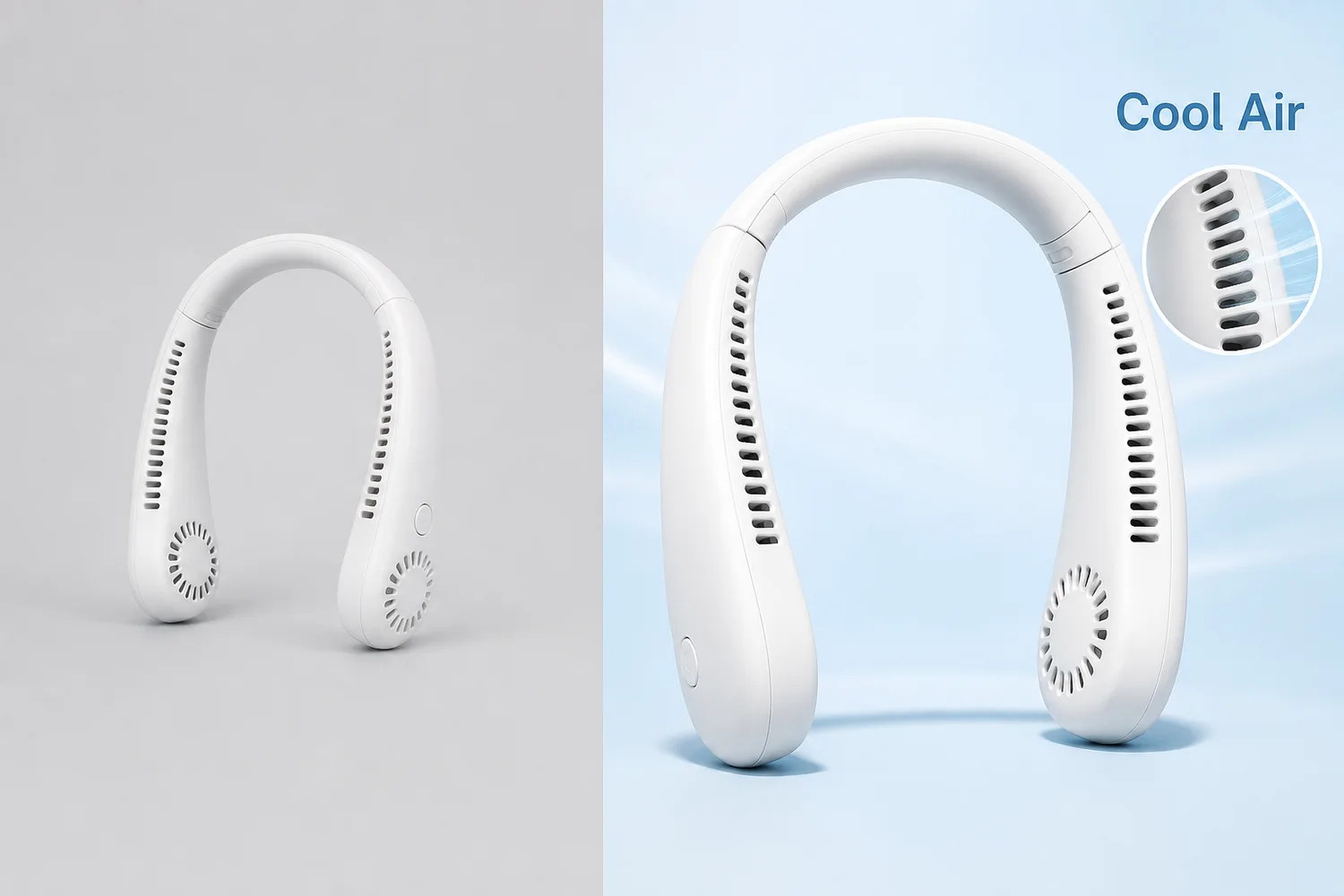
Pinduoduo and 1688 main images should not be designed as the same thumbnail with a different logo. Pinduoduo is a consumer shopping environment, so the first image must identify the product and value quickly. 1688 is a business-to-business sourcing platform, so the image set must also help a buyer judge specification, supply, customization, and procurement fit. Accuracy comes before visual aggression on both platforms.
This guide uses public Pinduoduo and 1688 agreements checked on August 22, 2026, plus current seller-workflow principles. Public platform documents do not expose every category's current upload dimensions or campaign-specific creative rules. Verify those details inside the relevant seller center before export; do not copy a third-party “2026 size chart” into a production workflow without checking it.
Quick Summary
Pinduoduo main images should win a small-screen recognition test: clear SKU, strong silhouette, one value cue, and no misleading additions. 1688 images should pass a procurement test: exact product, visible specification, scalable supply context, and reusable detail evidence. Build separate first images from the same verified product master.
Abstract
The highest-value difference is buyer intent. A Pinduoduo shopper asks, “Is this the product and offer I want?” A 1688 buyer also asks, “Can this supplier provide the right specification at the right volume?” Use separate image sequences, protect product facts, keep text editable, and test every first image at actual feed size.
Key takeaways
- Design for two buying jobs, not two platform names.
- Keep the SKU large and recognizable before adding any value cue.
- Pinduoduo needs fast consumer comprehension; 1688 needs procurement evidence.
- Never invent prices, certifications, capacity, MOQ, materials, or included items with AI.
- Verify current category and campaign rules inside each seller center before publishing.
Table of contents
1. [Why the platforms need different images](#why-should-pinduoduo-and-1688-use-different-main-images) 2. [What both platforms have in common](#what-must-both-platforms-get-right) 3. [Pinduoduo first-image strategy](#how-should-a-pinduoduo-main-image-work) 4. [1688 first-image strategy](#how-should-a-1688-main-image-work) 5. [Five-image sequences](#what-should-the-five-image-sequence-show) 6. [Thumbnail differentiation](#how-do-you-create-differentiation-without-making-the-image-noisy) 7. [AI workflow](#how-do-you-build-these-images-with-ai) 8. [Quality control](#what-should-you-check-before-publishing) 9. [FAQ](#frequently-asked-questions)
Why should Pinduoduo and 1688 use different main images?
1688's official service terms define it as a commercial trade procurement platform rather than a consumer purchase market. Pinduoduo's user agreement describes a consumer shopping platform where merchants upload product name, price, model, specification, size, quality promises, defects, and use restrictions. Those different transaction contexts should change what the first image communicates ([1688 Service Terms](https://terms.alicdn.com/legal-agreement/terms/suit_bu1_b2b/suit_bu1_b2b201703271338_74297.html); [Pinduoduo User Agreement](https://www.yangkeduo.com/pdd_user_services_agreement.pdf), 2026).
On Pinduoduo, the first image competes in a dense mobile feed. It needs immediate product recognition, a clear category cue, and one truthful reason to inspect the listing. Extra supplier information usually belongs later.
On 1688, the first image still needs a strong silhouette, but the sequence must support a sourcing decision. A buyer may care about material, size range, package configuration, customization, production context, and whether the listing image can be reused downstream. A decorative lifestyle scene without procurement evidence can attract attention while answering very little.
The same product master can feed both platforms. The final layouts should not be mechanically identical.
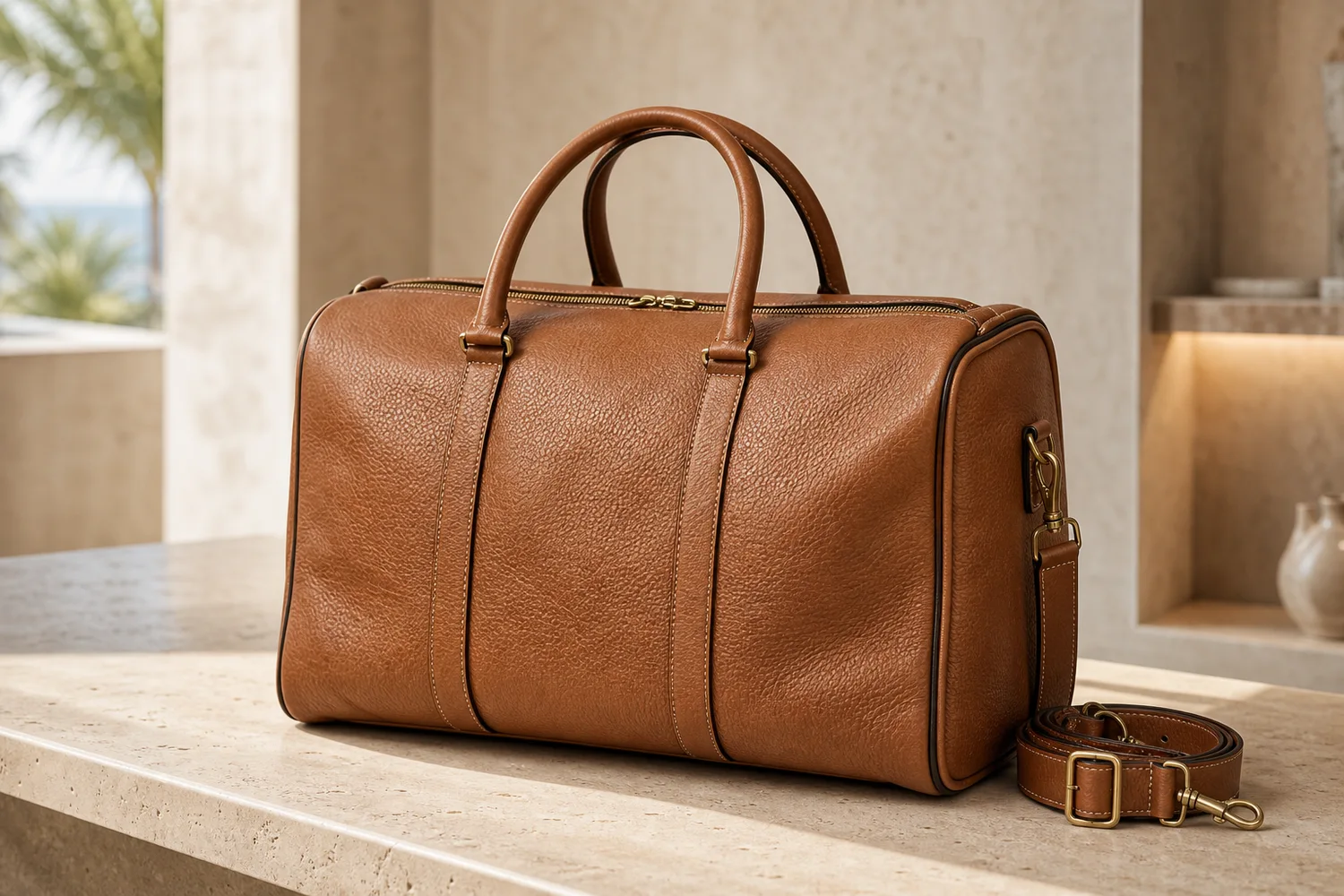
*KrafLayer demonstration asset. Use it to inspect product size, silhouette, functional openings, color, and text space. It is not evidence that a specific layout produces a higher click-through rate.*
What must both platforms get right?
Pinduoduo says merchants are responsible for accurate, complete, reliable, and non-misleading product descriptions. 1688 requires published product information to be truthful and consistent with the actual item. An image that earns a click by changing the product creates the wrong kind of traffic ([Pinduoduo User Agreement](https://www.yangkeduo.com/pdd_user_services_agreement.pdf); [1688 Service Terms](https://terms.alicdn.com/legal-agreement/terms/suit_bu1_b2b/suit_bu1_b2b201703271338_74297.html), 2026).
Every first image should pass five checks before visual styling begins:
| Check | The image must show | Reject when |
|---|---|---|
| Identity | Correct SKU, color, shape, label, and configuration | It resembles another variant |
| Recognition | A readable silhouette at small size | Props or text hide the product |
| Truth | Only real features, contents, and claims | AI invents an accessory or benefit |
| Hierarchy | Product first, one supporting cue second | Five claims compete at once |
| Continuity | The same product continues through the gallery | Later images change parts or material |
Keep a plain product master and a transparent cutout before building platform variants. When a layout fails, return to the master. Do not repair an already distorted derivative.
How should a Pinduoduo main image work?
Pinduoduo's public agreement places responsibility for price, model, specification, size, promises, defects, and use limitations on the merchant. The first image should therefore attract attention without implying a different offer from the listing page ([Pinduoduo User Agreement](https://www.yangkeduo.com/pdd_user_services_agreement.pdf), 2026).
Use this hierarchy:
1. Product silhouette: the exact item should be recognizable before any text is read. 2. One value cue: choose function, quantity, material, use case, or variant. Do not stack all five. 3. Clean contrast: separate the product from the background without shifting its real color. 4. Editable information: add prices, promotions, and claims manually from verified listing data. 5. Mobile legibility: inspect the image at roughly the size it appears in the feed, not only on a desktop canvas.
For a portable neck fan, the first frame might show the complete product large against a restrained contrasting field, with one accurate functional cue such as hands-free airflow. It should not add dramatic vapor, medical comfort claims, an invented battery duration, or accessories that are not included.
Consumer differentiation often comes from viewpoint and use cue rather than extra decoration. Try a slightly elevated three-quarter angle, a color field that separates the SKU, or a clear visual explanation of one mechanism. If the product could be replaced with a competitor's item without changing the layout, the concept is not differentiated yet.
How should a 1688 main image work?
1688's terms state that it is a B2B procurement platform and require sellers to keep published product information truthful and consistent with what they supply. The main image should open the conversation, while the following images reduce procurement uncertainty ([1688 Service Terms](https://terms.alicdn.com/legal-agreement/terms/suit_bu1_b2b/suit_bu1_b2b201703271338_74297.html), 2026).
The first frame still needs a complete, clear product. The difference appears in the supporting cue and sequence. Depending on the category, useful B2B signals may include:
- a verified material or construction detail;
- a real color or size range;
- package configuration;
- customization area shown without inventing a customer logo;
- a product family that is actually available;
- manufacturing or warehouse context that belongs to the supplier;
- exact specifications pulled from the seller's product data.
Do not turn the first frame into a catalog sheet. Use one procurement cue, then move dimensions, packaging, material layers, and customization examples into later images where they can be read.
The 1688 legal statement also says sellers are responsible for uploaded product descriptions, images, and video. AI-assisted optimization does not transfer that responsibility to the tool. If an image invents a production line, certification mark, factory scale, or available variant, remove it ([1688 Legal Statement](https://terms.alicdn.com/legal-agreement/terms/suit_bu1_b2b/suit_bu1_b2b201802011532_36855.html), 2026).
What should the five-image sequence show?
1688 authorizes platform and downstream buyers to use merchant product information, including main images and product details, in distribution workflows. That makes reusable factual imagery particularly valuable. Build a sequence that can survive sourcing, quotation, and downstream listing preparation ([1688 User Experience Service Agreement](https://terms.alicdn.com/legal-agreement/terms/b_end_product_protocol/20240325150850953/20240325150850953.html), 2026).
| Position | Pinduoduo job | 1688 job |
|---|---|---|
| 1 | Product recognition plus one consumer value cue | Product recognition plus one procurement cue |
| 2 | Real use context or primary function | Specification, material, or construction proof |
| 3 | Detail, scale, or included items | Size/color range or package configuration |
| 4 | Variant choice or secondary benefit | Customization area or verified production context |
| 5 | Plain factual product/contents view | Clean reusable product image for downstream buyers |
This is a planning model, not a claim about a universal required image count. Category, campaign, and seller-center requirements can differ. If the current upload interface requires a white-background asset, a specific ratio, or a particular image position, follow that rule rather than this editorial sequence.
For both platforms, keep dimensions and package quantities out of generated pixels until they have been checked against product data. AI can create the scene. A designer or catalog system should place exact numeric information.
How do you create differentiation without making the image noisy?
Meta's photo-ad guidance recommends one focal point and says too much copy distracts from the image. Although Pinduoduo and 1688 are different platforms, the visual principle transfers cleanly: the first frame needs one dominant subject and one secondary message, not a wall of competing elements ([Meta photo ads](https://www.facebook.com/business/ads/photo-ad-format), 2026).
Use a three-pass thumbnail test:
1. Silhouette pass: blur or shrink the image. Can you still identify the product category and main form? 2. Value pass: look for two seconds. Can you name the single value cue without reading a paragraph? 3. Truth pass: compare with the source and listing data. Did the layout add a feature, accessory, size, claim, or quantity that is not real?
Strong differentiation can come from a useful angle, an accurate material close-up, a real use configuration, restrained category color, or a clearly staged feature. Weak differentiation comes from oversized badges, copied competitor layouts, random flames or splashes, false scarcity, and text that hides the item.
Build three concepts around different selling ideas, not three background colors around the same idea. For example: “wearable airflow,” “foldable storage,” and “verified controls.” Select the concept that matches the listing's strongest real evidence.
How do you build these images with AI?
1688's user-experience agreement explicitly allows AI-based optimization of merchant product materials but warns that technical limitations can affect accuracy. That warning should shape the workflow: use AI for controlled production, then review every product fact before upload ([1688 User Experience Service Agreement](https://terms.alicdn.com/legal-agreement/terms/b_end_product_protocol/20240325150850953/20240325150850953.html), 2026).
1. Prepare the evidence pack. Keep a full-product image, side/back views, critical detail images, exact color, dimensions, contents, and approved claims. 2. Create a clean master. Use the one-click [AI background remover](/tools/ai-background-remover) when only the background is wrong. Inspect edges and transparency; it does not require a prompt. 3. Choose the platform and image position. Name whether you are designing Pinduoduo position one, a 1688 specification image, or another exact role. 4. Build the scene narrowly. Use Replace BG for a prompted or reference-based background. Use Scene Compose when a verified product must sit at a controlled position and size inside an existing base scene. 5. Add exact text separately. Keep price, quantity, material, specification, certification, and promotion copy editable and tied to the product database. 6. Compare with the source. Check silhouette, label, material, parts, color, scale, and included items. 7. Export from the current seller-center rules. Confirm ratio, file type, size, and campaign restrictions at upload time.
Background prompt for a Pinduoduo concept
```text Use the uploaded portable neck fan as the exact product reference. Create a clean mobile-commerce first-image background with strong separation and one visual cue for hands-free everyday use. Keep the complete product large and readable. Preserve its exact shape, vents, controls, color, material, and proportions. Leave a quiet area for manually added verified offer text. Do not add accessories, prices, claims, logos, certification marks, or text. ```
Scene direction for a 1688 concept
```text Place the uploaded product at a clear three-quarter angle on a neutral sourcing-catalog set. Preserve the exact SKU, material, controls, vents, color, dimensions, and included parts. Use restrained lighting that reveals construction. Leave space for manually added verified specification and package information. Do not invent factory equipment, production capacity, certifications, variants, MOQ, prices, or customer branding. ```
These prompts are appropriate for prompt-capable workflows such as Replace BG, Reference Image Editor, or Scene Compose. Do not paste them into one-click tools such as Remove BG or Upscale.
What should you check before publishing?
Both Pinduoduo and 1688 place responsibility for merchant-supplied product information on the merchant. The final review should therefore compare the image with the SKU and listing data, not only with a design brief ([Pinduoduo User Agreement](https://www.yangkeduo.com/pdd_user_services_agreement.pdf); [1688 Legal Statement](https://terms.alicdn.com/legal-agreement/terms/suit_bu1_b2b/suit_bu1_b2b201802011532_36855.html), 2026).
- The first image shows the correct SKU and variant.
- Shape, label, material, controls, parts, and included items match the source.
- The product remains recognizable at actual feed thumbnail size.
- Only one main value or procurement cue competes with the product.
- Price, quantity, size, MOQ, capacity, and claims come from verified data.
- No platform logo, QR code, certification, customer brand, or factory scene was invented.
- Later images answer different buyer questions rather than repeat the first frame.
- Current category and campaign rules were checked inside the seller center.
- The original, clean master, editable text file, and final exports are retained.
After publishing, compare click-through rate and downstream behavior separately. A higher click-through rate with lower conversion or more complaints can indicate that the image overpromises or attracts the wrong buyer.
Frequently asked questions
Should Pinduoduo and 1688 use the same main image?
Use the same verified product master, but usually not the same final layout. Pinduoduo needs rapid consumer recognition and one clear value cue. 1688 also needs procurement evidence such as real specification, material, package, variant, or customization information.
How much text should a marketplace main image contain?
Use as little as the current placement and category allow. One short, verified cue is easier to scan than several claims. Add exact prices, quantities, materials, and specifications manually so they remain editable and synchronized with the listing.
Can AI design a high-click main image automatically?
AI can create backgrounds, compositions, and variants, but it cannot verify your offer, material, capacity, included items, or category rules. A merchant still needs to choose the selling idea, check product fidelity, add exact text, and review the current seller-center requirements.
What should make a 1688 image different?
Show evidence useful to a sourcing decision: construction, material, size range, package configuration, real available variants, customization area, or verified supply context. Do not invent a factory, certification, production capacity, or MOQ to make the listing look larger.
How do I know whether the image is too busy?
Shrink it to actual feed size and look for two seconds. You should recognize the product first and one supporting cue second. If badges, props, gradients, and text compete equally, simplify the layout.
Conclusion
Pinduoduo and 1688 main images work best when they begin with the same product truth but end with different buyer intent. KrafLayer can help clean the product master, replace or compose backgrounds, create controlled visual concepts, and prepare platform-specific variants. The final responsibility stays with the merchant: verify the SKU, add exact commercial information manually, and export against the current seller-center rules.
References
1. [Pinduoduo User Agreement](https://www.yangkeduo.com/pdd_user_services_agreement.pdf), accessed August 22, 2026. 2. [1688 Service Terms](https://terms.alicdn.com/legal-agreement/terms/suit_bu1_b2b/suit_bu1_b2b201703271338_74297.html), accessed August 22, 2026. 3. [1688 Legal Statement](https://terms.alicdn.com/legal-agreement/terms/suit_bu1_b2b/suit_bu1_b2b201802011532_36855.html), effective January 16, 2026. 4. [1688 User Experience Service Agreement](https://terms.alicdn.com/legal-agreement/terms/b_end_product_protocol/20240325150850953/20240325150850953.html), accessed August 22, 2026.
Keep exploring
Continue the story
More practical guidance on product accuracy, composition, and conversion-ready visuals.
Put it into practice
Take the next step in KrafLayer
Choose a generation or editing workflow that matches what you just learned.