Edit tools
How to Clean Background Creases from Product Photos
TL;DR
A practical AI retouching workflow for removing folded backdrop lines while keeping the product shape, material, label, shadow, and listing trust intact. Includes how to do it in KrafLayer.
TL;DR
For Clean Background Creases from Product Photos, KrafLayer works best as a local cleanup tool: brush only the unwanted area in Erase and let the model fill from the surrounding pixels. Avoid regenerating the whole image; the result is only useful if shape, material, labels, color, scale, and accessories still match the source SKU.
Background creases in a product photo make the whole listing feel rushed, even when the product itself is good. The fix is to clean the paper sweep or fabric backdrop while leaving the SKU untouched: same shape, same material, same label, same scale, and the same believable contact shadow.
KrafLayer is an AI-powered visual editor for ecommerce product photography. Use it as a controlled local retouching pass when a shoot is usable but the backdrop folds are distracting buyers from the item.
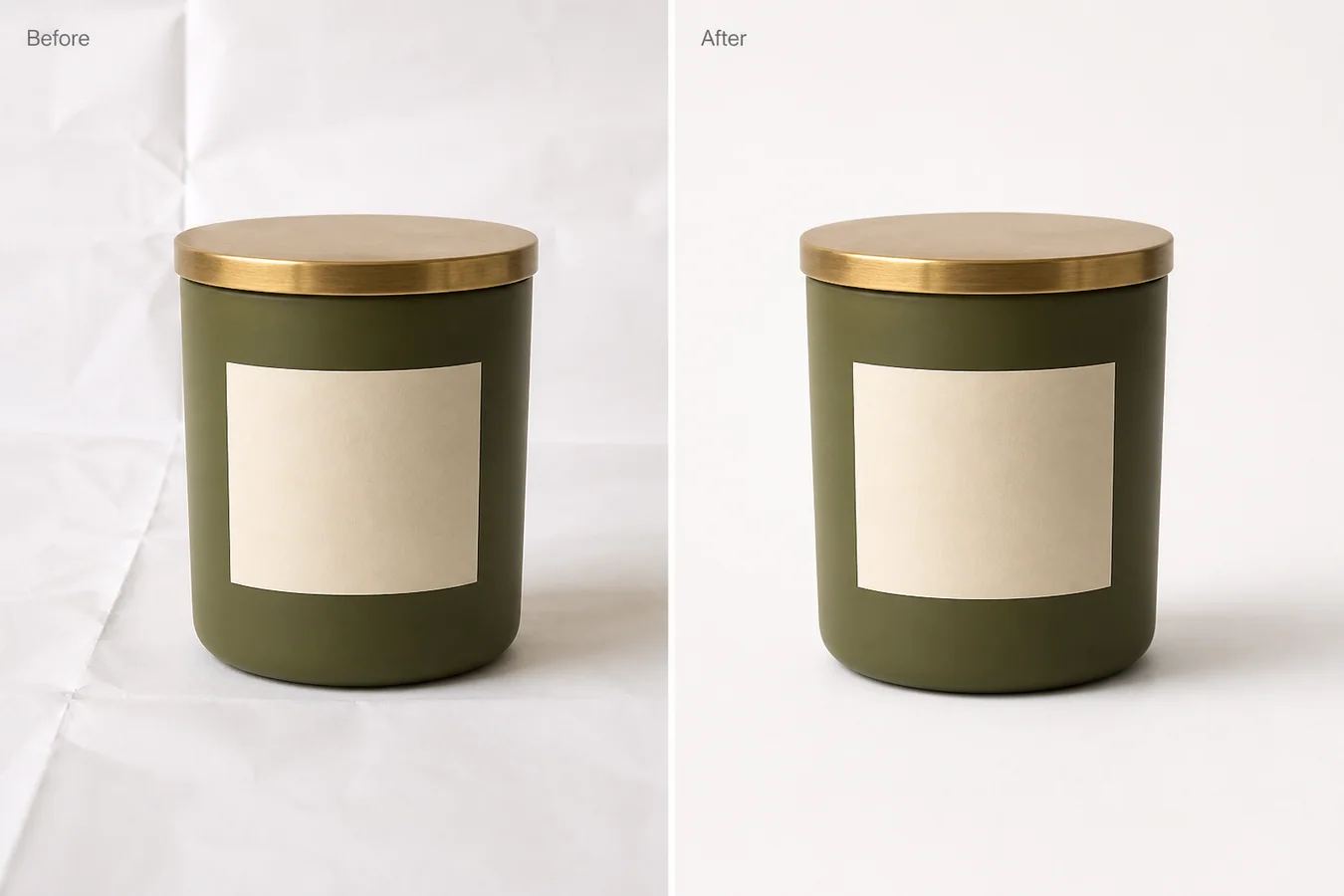
The example uses one matte olive candle jar with a brass lid and a blank cream label. The before side has visible folded paper lines behind and below the jar. The after side keeps the jar, lid, label position, crop, camera angle, and soft shadow, but removes the background creases so the image works better as a marketplace main image.
What to Clean and What to Leave Alone
Treat the crease as a background problem, not a full product regeneration task. If the AI redraws the jar, changes the label curve, reshapes the lid, or removes the contact shadow, the image may look cleaner but it is no longer reliable listing work.
Protect these details before editing:
- product outline and height
- label position, size, and curve
- lid thickness, finish, and edge highlight
- ceramic or glass texture
- true color and exposure
- crop, camera angle, and scale
- contact shadow under the product
The background should become calmer. The product should remain the same item.
Edit Prompt for Removing Background Fold Lines
Use a local edit prompt in [KrafLayer](https://kraflayer.com):
Remove the folded backdrop lines, paper creases, and wrinkled background marks from this product photo. Keep the exact same matte olive candle jar, brass lid, blank cream label, label curve, ceramic texture, product shape, crop, scale, camera angle, lighting, and soft contact shadow. Make the white background smooth and listing-ready, but keep it realistic and grounded. Do not change the jar color, lid shape, label position, product size, shadow direction, or add props, text, logos, claims, hands, or extra products.
For a catalog set, use the same cleanup rule across the main image, angle image, and detail image. One spotless image next to five wrinkled-background images makes the listing feel inconsistent.
Check the After Image Like a Merchant
Do not approve the edit just because the background is white. Check whether the image still sells the real product.
Review these points:
- the product edge is crisp, not melted into the background
- the label still sits in the same place
- the lid keeps its metal highlight and thickness
- the product has not become wider, shorter, or glossier
- the shadow still touches the base naturally
- the background no longer pulls attention away from the SKU
- the file can crop cleanly for Shopify, Amazon, TikTok Shop, ads, and email
A good crease cleanup should feel almost invisible. The buyer should notice the product faster, not the retouching.
When Not to Remove Every Texture
Some products need surface context. Handmade goods, soft textiles, ceramics, and candles can look more believable with a little natural paper texture or tabletop grain. Remove fold lines that look accidental, but do not flatten the entire scene until the product feels pasted on.
Use this rule: remove distractions, keep selling evidence. Texture that shows material or scale can stay. Creases that make the shoot look unfinished should go.
Where KrafLayer Fits
When you apply this Clean Background Creases from Product Photos workflow in KrafLayer, the tool choice matters: brush only the unwanted area in Erase and let the model fill from the surrounding pixels. After generation, judge the image by the channel it serves — listing images, detail pages, or ad assets — and check that shape, material, labels, color, scale, and accessories still match the source SKU.
FAQ
How do I clean background creases from product photos?
Use a local AI edit that removes only the folded backdrop lines and paper wrinkles while preserving product shape, label, material, lighting, crop, and contact shadow.
Can AI remove backdrop folds without changing the product?
Yes, but the prompt must protect the SKU details. Tell the AI not to alter the product outline, label position, material texture, color, scale, or shadow.
Should every product photo have a perfectly smooth white background?
Not always. A smooth background is useful for main images, but light surface texture can help lifestyle or detail images feel real when it does not distract from the product.
What makes the edited image listing-ready?
The product should read first, the background should feel clean, and the image should keep realistic contact, material detail, and crop stability across the catalog.
Keep exploring
Continue the story
More practical guidance on product accuracy, composition, and conversion-ready visuals.
Put it into practice
Take the next step in KrafLayer
Choose a generation or editing workflow that matches what you just learned.