Edit tools
How to Fix Messy Reflections in Glass Cup Product Photos
TL;DR
A practical AI editing workflow for cleaning distracting reflections on glass tumblers while keeping the same shape, rim, ribbed texture, transparency, and shadow. Includes how to do it in KrafLayer.
TL;DR
For Fix Messy Reflections in Glass Cup Product Photos, KrafLayer works best as a local cleanup tool: brush only the unwanted area in Erase and let the model fill from the surrounding pixels. Avoid regenerating the whole image; the result is only useful if shape, material, labels, color, scale, and accessories still match the source SKU.
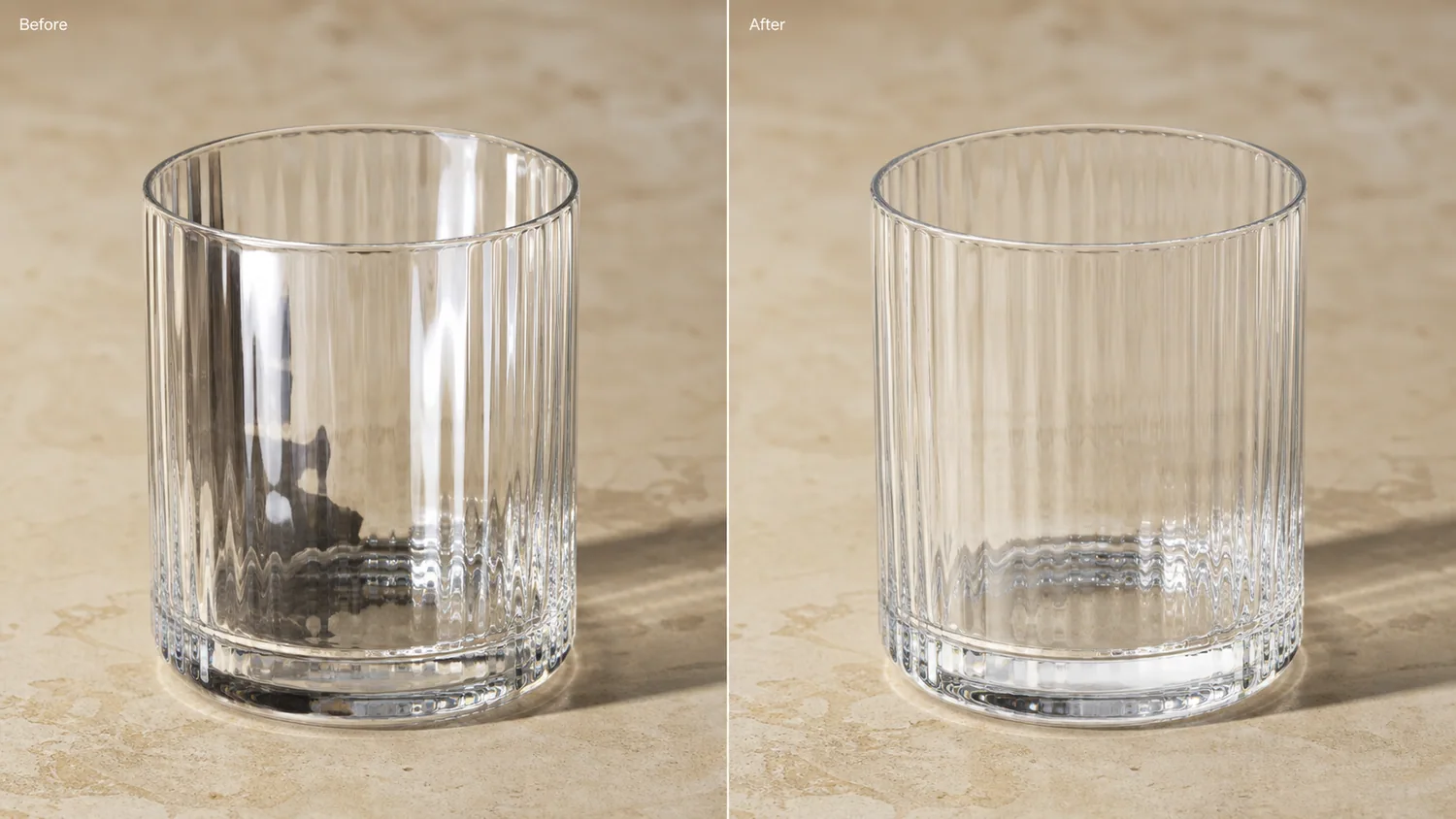
Messy reflections on a glass cup should be edited locally, not solved by regenerating the whole product photo. The goal is to make the rim, transparent wall, base thickness, and texture readable while keeping the same tumbler, camera angle, tabletop, and contact shadow.
KrafLayer is an AI-powered visual editor for ecommerce product photography. For glassware, use it to reduce reflection noise and preserve the physical facts that buyers inspect before purchase.
The example uses one clear ribbed glass tumbler. The before side has harsh vertical highlights and a dark reflected shape that makes the glass look dirty and harder to understand. The after side keeps the same product and surface, but the reflections are quieter, the rim reads cleanly, and the ribbed wall looks more like a sellable detail image.
Why Glass Reflections Need Careful Editing
Glass products are easy to over-edit. If you remove every highlight, the cup looks flat or plastic. If you ask AI for a fresh “premium glass product photo,” it may change the rim thickness, rib count, base shape, or transparency.
The better task is narrow: keep useful edge highlights, clean up the confusing reflected shapes, and make the material easier to read in a product listing. Buyers still need proof that the item is real glass, not a generic render.
Protect These Product Facts
Before editing, list what must stay unchanged. For a ribbed tumbler, protect the rim ellipse, wall height, rib spacing, base thickness, glass color, tabletop contact, shadow direction, and crop.
For other glass products, protect the details that identify the SKU:
- wine glasses: bowl shape, stem height, foot size, rim thickness
- storage jars: lid seal, clip hardware, glass wall, fill line
- candle jars: wax level, glass tint, label placement, flame-free safety crop
- skincare jars: cap geometry, glass thickness, label edge, liquid color
If the after image is cleaner but changes these facts, it is not ready for ecommerce use.
Edit Prompt for Cleaning Glass Reflections
Use a local edit prompt inside [KrafLayer](https://kraflayer.com):
Clean the distracting reflections on this clear ribbed glass tumbler. Reduce harsh white streaks and the dark reflected shape, but keep the same tumbler shape, rim ellipse, ribbed texture, transparent wall, base thickness, tabletop, crop, camera angle, and natural shadow. Keep elegant glass highlights so the material still looks real. Do not redesign the cup, change the rib count, add props, add liquid, add text, or make the glass look plastic.
This prompt keeps the workflow focused on reflection control, not product redesign.
What a Good After Image Should Prove
A corrected glass product image should answer three buyer questions fast: what is the shape, how thick or premium does the glass feel, and does the surface texture look intentional?
Check the result at full size and thumbnail size:
- the rim is readable and not warped
- the ribbed texture still follows the cup shape
- the base looks solid, not melted or floating
- highlights are softer but still show glass material
- no dark reflected object competes with the product
- the tabletop shadow still anchors the cup
Do not chase a spotless image. A small amount of controlled reflection is what makes glass believable.
When to Use This Workflow
Use this edit when the original glass photo has strong selling potential but bad reflections from windows, phone screens, black equipment, or the photographer's silhouette. It is useful for drinkware listings, home goods catalogs, detail images, marketplace main images, and paid ad crops.
Do not use the edit to hide scratches, cracks, or real defects on the item. Use it to remove shooting-side reflection problems that distract from the actual product.
Where KrafLayer Fits
When you apply this Fix Messy Reflections in Glass Cup Product Photos workflow in KrafLayer, the tool choice matters: brush only the unwanted area in Erase and let the model fill from the surrounding pixels. After generation, judge the image by the channel it serves — listing images, detail pages, or ad assets — and check that shape, material, labels, color, scale, and accessories still match the source SKU.
FAQ
Can AI remove reflections from glass product photos?
AI can reduce distracting reflections when the edit is narrow and the prompt protects the real product shape, rim, texture, transparency, and shadow. It should not remove every highlight.
Should glass product photos have no reflections?
No. Glass needs controlled highlights so buyers can read the material. The goal is to remove confusing reflection clutter, not make the product look like plastic.
What details should I check after editing a glass cup photo?
Check the rim ellipse, base thickness, rib spacing, transparency, edge highlights, and contact shadow. These details tell buyers whether the image still represents the real product.
Keep exploring
Continue the story
More practical guidance on product accuracy, composition, and conversion-ready visuals.
Put it into practice
Take the next step in KrafLayer
Choose a generation or editing workflow that matches what you just learned.